A member cancels their premium subscription, but they can still access your exclusive coaching videos, private forum discussions, and downloadable templates. Your paying members notice. Trust erodes. Revenue leaks.
This scenario plays out more often than you’d think. Membership content restriction isn’t just a technical checkbox; it’s the foundation of sustainable membership sites.
Without proper access controls, you can’t deliver on your value proposition or protect the exclusive resources that justify membership fees.
This guide walks you through setting up effective content restriction using BuddyBoss, a platform designed specifically for community and membership management.
We’ve helped hundreds of membership site owners create structured access systems that improve retention and engagement, and we’ll share exactly what works.
Why Content Restriction is Important in Membership Sites
Your premium content represents investment: time creating courses, curating resources, building communities.
When anyone can access it regardless of membership status, that investment loses value immediately.
Proper membership content restriction delivers three critical benefits:
It protects your exclusive resources. Members pay for access to something they can’t get elsewhere. The moment that exclusivity disappears, so does your competitive advantage.
It encourages upgrades to higher membership tiers. When free members see locked premium content, they understand the additional value available. Sites with clear tiered access see up to 40% higher retention rates because the upgrade path is visible and compelling.
It improves member experience and engagement. Restricted content creates intentional pathways through your community. Members know exactly what they get at each level, reducing confusion and support requests.
Top membership platforms structure access around value, not arbitrary restrictions. They show just enough to demonstrate what’s behind the paywall without giving everything away.
How Membership Content Restriction Works in WordPress
Membership content restriction controls who can view, download, or interact with specific parts of your site based on their membership status or tier.
Think of it like building security. Some areas are open to the public (your lobby), some require basic credentials (the office floor), and others need special clearance (the executive suite). Your membership site works the same way.
Access Levels Explained
Most membership sites use tiered access:
- Free tier: Access to introductory content, basic community features, limited resources
- Basic paid tier: Core courses, active community participation, standard support
- Premium tier: Advanced content, exclusive events, priority support, downloadable assets
- VIP tier: Everything plus one-on-one access, early releases, lifetime updates
Content Types You Can Restrict
Courses and lessons: Lock entire courses or individual modules based on membership level. This works particularly well for progressive learning paths where members need foundational knowledge before accessing advanced material.
Forums and discussion boards: Create spaces exclusively for paid members or specific tiers. Privacy encourages honest conversation and builds stronger community bonds.
Downloadable files: Templates, worksheets, eBooks, and resources can be gated based on membership status.
Groups or social spaces: Private groups for networking, accountability, or specialized topics create additional value for higher tiers.
BuddyBoss differs from basic membership plugins by integrating social features with access control. You’re not just restricting pages, you’re building entire community experiences around membership levels.
Why BuddyBoss Is Ideal for Content Restriction in WordPress
BuddyBoss combines WordPress membership functionality with purpose-built community features.
Moreover, BuddyBoss supports membership restriction via integrations with leading plugins like MemberPress or LearnDash.
Key BuddyBoss Capabilities
Seamless integration with leading membership plugins: BuddyBoss Integrates with MemberPress, LearnDash, and WooCommerce Memberships directly when configured, no additional coding required.. You’re not locked into a single ecosystem.
Native content restriction options: Beyond plugin integration, BuddyBoss includes built-in access controls for groups, profiles, and social features that standard membership plugins can’t touch.
Role-based access and group visibility settings: Create nuanced access rules that go beyond simple yes/no restrictions. Members can see different navigation menus, group listings, and content based on their specific role.
Secure infrastructure trusted by thousands: BuddyBoss is trusted by major organizations across education and enterprise sectors companies, educational institutions, and professional associations. Their security protocols meet enterprise standards.
BuddyBoss supports multi-level access control when configured with MemberPress, LearnDash, or WooCommerce Memberships.
Moreover, membership access rules are managed in your membership plugin; BuddyBoss displays content visibility accordingly.
How to Restrict Content Access Using BuddyBoss on WordPress
Below you can find the step by step guide to restrict content access using your very own BuddyBoss:-
Step 1: Install and Activate BuddyBoss
Download the BuddyBoss Platform plugin and theme from your BuddyBoss account. Install the platform plugin first, then activate the theme. The setup wizard walks you through basic configuration.
Set your site title, tagline, and primary navigation during initial setup. These foundational elements affect how members navigate your restricted content later.
Step 2: Integrate Your Membership Plugin
Choose your membership management system based on your specific needs:
MemberPress: Best for straightforward subscription management and drip content
WooCommerce Memberships: Ideal if you’re already running a WooCommerce store
LearnDash: Perfect for course-focused membership sites
Install and activate your chosen plugin. Navigate to BuddyBoss > Integrations and enable the connection. This creates the bridge between your membership levels and BuddyBoss access controls.
Step 3: Create Membership Levels or Plans
Define your membership tiers before restricting any content. Clear tier structure prevents confusion later.
In your membership plugin, create levels like:
- Free Community Member (access to public forums, basic resources)
- Standard Member ($29/month: all courses, private forums, monthly webinars)
- Premium Member ($79/month: everything plus coaching hours, exclusive groups)
Name tiers based on value delivered, not arbitrary labels. “Expert Access” means more to potential members than “Gold Tier.”
Step 4: Assign Access Rules
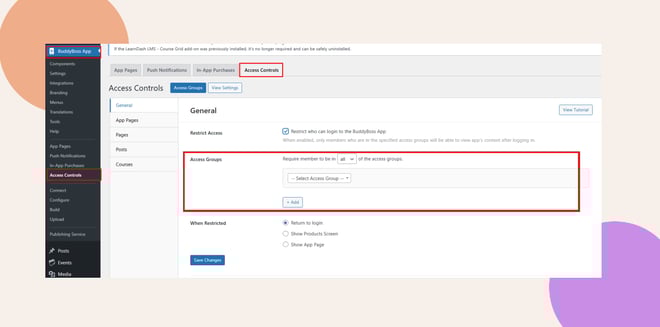
This is where membership content restriction becomes operational.
For pages and posts, use your membership plugin’s restriction settings. MemberPress adds a “Membership Access” meta box to every page where you can select which levels can view it.
For BuddyBoss groups, navigate to Groups > All Groups, edit a group, and find the “Group Membership Access” section. Select which membership levels can see and join the group.
For courses (if using LearnDash), set access controls at both the course level and individual lesson level. This creates progressive unlocking as members advance through tiers.
How to configure Member Access Controls in BuddyBoss
Step 5: Customize Access Messages
Default restriction messages are generic: “You don’t have permission to view this content.” That’s a missed opportunity.
Replace them with messages that explain the value behind the restriction:
“This advanced masterclass is available to Premium Members. Upgrade now to access 40+ expert-led sessions, downloadable templates, and our private coaching community.”
Include a clear call-to-action button that links directly to your upgrade page. Make the path forward obvious.
Step 6: Test Access as a New User
Create test accounts at each membership level. Never assume your restrictions work, verify them.
Log in as a free member. Can they access paid content? Do restricted groups show in the directory? Check every critical piece of content.
Log in as a paid member. Does everything they should access actually load? Are there any broken permission rules causing unnecessary restrictions?
Always test with a non-admin account to see the member experience firsthand. Admin accounts often bypass restrictions by default, giving you a false sense of security.
Step 7: Monitor and Adjust Access Rules
Membership content restriction isn’t set-it-and-forget-it. As your community grows, you’ll add content, create new tiers, and refine your access structure.
Schedule monthly audits. Review:
- New content added without access rules applied
- Member feedback about confusing restrictions
- Support tickets related to access issues
- Membership level distribution (are most members stuck at one tier?)
Adjust rules based on actual member behavior, not assumptions about what they want.
Best Practices for Membership Content Restriction
Keep access rules simple and easy to understand. Members shouldn’t need a flowchart to figure out what they can access. If you’re explaining tier differences in paragraphs, simplify your structure.
Use clear messaging for restricted pages. Every restriction should include context. Why is this locked? What do I get if I upgrade? Make the value proposition explicit.
Regularly audit your content permissions. Set a recurring calendar reminder. Check for orphaned content (created but never assigned to a tier) and overly restricted resources (locked by accident).
Offer previews to encourage upgrades. Show the first lesson of a course, the first paragraph of an article, or sample questions from a private forum. Give free members a taste that makes them want the full meal.
Update rules as you add features. New content types require new restriction rules. When you launch a podcast feed, Q&A section, or resource library, immediately determine access levels.
BuddyBoss documentation provides detailed guides for advanced restriction scenarios. Reference their knowledge base when implementing complex permission structures.
Common Mistakes to Avoid
Over-restricting content frustrates members. Locking basic navigation, member profiles, or introductory resources behind paywalls creates a hostile first impression. Give free members enough value to experience your community before asking for payment.
Forgetting to update rules after site changes. Plugin updates, theme changes, and site redesigns can break existing restrictions. Test thoroughly after any major site modification.
Using too many membership tiers. Three to four tiers is ideal. Beyond that, members face decision paralysis and you create a maintenance nightmare. More isn’t better.
Not testing access before launch. Discovering broken restrictions after members join damages credibility. Test extensively, then test again.
FAQs on Membership Content Restriction
How do I restrict access to specific BuddyBoss groups?
Navigate to Groups > All Groups in your WordPress dashboard. Edit the group you want to restrict, scroll to the “Group Membership Access” section, and select which membership levels can view or join. Members outside those levels won’t see the group in directories or searches.
Can I show teaser content to non-members?
Yes. Most membership plugins include excerpt or preview functionality. Display the first 200 words of an article, the introduction video of a course, or sample forum posts. This demonstrates value without giving away premium content. BuddyBoss also supports custom messages on restricted pages where you can embed preview content.
Does BuddyBoss work with LearnDash or MemberPress for content restriction?
BuddyBoss integrates natively with both LearnDash and MemberPress. The integration connects membership levels with course access, group permissions, and site features. You manage membership plans in MemberPress or LearnDash, then apply those membership levels throughout your BuddyBoss community. This creates unified membership content restriction across your entire site.
Building a Secure Membership Community with BuddyBoss
Effective membership content restriction protects your revenue, enhances member experience, and creates clear upgrade paths. BuddyBoss gives you the tools to implement sophisticated access controls without technical complexity.
The platform’s integration with leading membership plugins, combined with native social features and group management, makes it uniquely suited for community-focused membership sites. You’re not just selling access to content—you’re building an exclusive space where members connect, learn, and grow together.
Start building your secure, scalable membership community with BuddyBoss today.
Set up your first restricted group, create your membership tiers, and give your community the structure it needs to thrive.

 Article