











LearnDash LMS + BuddyBoss Integration
Turn Your Online Courses Into a Thriving Learning Community
What is LearnDash?
LearnDash is the leading WordPress LMS plugin for building and selling online courses. It gives you a drag-and-drop course builder, 8 quiz question types, drip content scheduling, certificates, and detailed progress reporting.
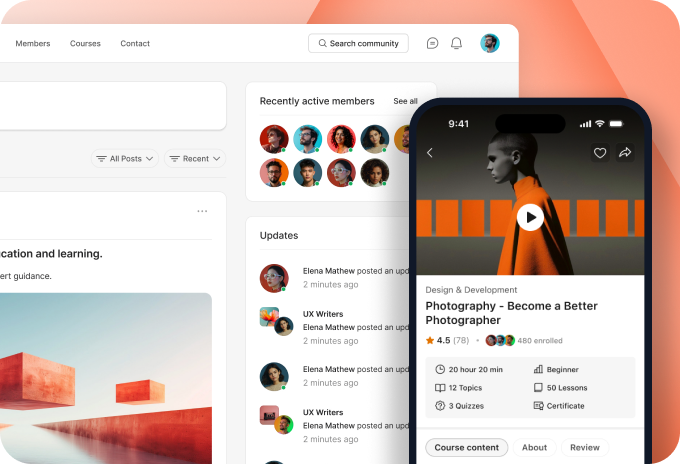
When integrated with BuddyBoss, your courses connect directly to your community. Student enrollment and course completions post to member activity feeds, course-specific social groups give learners a place to collaborate, and student progress displays in BuddyBoss member profiles.
You get a fully social learning platform where courses and community reinforce each other.
Key Features of LearnDash LMS
Drag-and-Drop Course Builder
Build structured courses with lessons, topics, and assessments using a visual interface. Organize content in any order and restructure your curriculum without touching code.
8-Type Quiz Engine
Create quizzes using multiple choice, essay, fill-in-the-blank, sorting, matching, and more. Set time limits, passing scores, and conditional messaging per quiz.
Drip Content Scheduling
Release lessons on a set schedule after enrollment or on specific calendar dates. Keep students progressing at a pace that works for your curriculum.
Certificates and Badges
Award custom certificates and badges when students complete courses or pass assessments. Set completion thresholds and expiration dates for each credential.
Prerequisites and Learning Paths
Require students to complete specific courses or lessons before advancing. Build structured learning paths that guide members through your content in the right order.
ProPanel Reporting Dashboard
Track enrollment numbers, course completion rates, quiz performance, and learner progress in real time. Export data and monitor revenue from a single dashboard.
See LearnDash and BuddyBoss Working Together
Watch how to build a fully integrated course and community site using LearnDash and BuddyBoss. See course pages, student progress, and social learning features in action.
▶
Ready to Make Your Courses Social?
Combine LearnDash’s powerful LMS tools with BuddyBoss community features and give your students more than content. Give them a place to connect and grow.
Use Cases and Examples
Online Course Creators Scaling Student Engagement
Course creators who want more than passive video consumption use LearnDash with BuddyBoss to build active student communities. When a student completes a module, it posts to their BuddyBoss activity feed, and fellow students can comment, congratulate, or ask questions. Instructors see higher course completion rates because students are accountable to a community, not just a personal dashboard.
Add Use Case Image 1
Coaching Programs with Cohort-Based Learning
Coaches running cohort programs enroll groups of students together using LearnDash Groups and sync them to private BuddyBoss social groups. Each cohort gets its own group activity feed, forum, and messaging space, so students in the same stage support one another. Coaches manage multiple cohorts independently and communicate with each group without mixing audiences.
Add Use Case Image 2
Membership Sites Combining Courses and Community Access
Membership site owners use LearnDash to gate courses by subscription tier and BuddyBoss Member Types to display the right content and profile badges for each level. A Basic member sees introductory courses; a Pro member unlocks advanced content and gets access to a private group with direct instructor access. Members can see what the next tier unlocks, which drives upgrades without additional sales effort.
Add Use Case Image 3
How to Integrate LearnDash with BuddyBoss
Setting up LearnDash with BuddyBoss takes just a few minutes. Follow these steps to get started:
1
Install LearnDash
Purchase and download LearnDash from learndash.com, then install and activate it via Plugins > Add New in your WordPress admin. Make sure you are running LearnDash 3.0 or higher for full BuddyBoss Theme compatibility.
2
Enable the BuddyBoss Integration
In your WordPress admin, go to BuddyBoss > Settings > Integrations > LearnDash and enable the integration. This connects course activity to member profiles, activity feeds, and social groups automatically.
3
Sync Groups with BuddyBoss
Navigate to LearnDash > Groups and link each LearnDash Group to a corresponding BuddyBoss Social Group. Students enrolled in a LearnDash Group will be added to the matching BuddyBoss group, giving them access to the group feed, forum, and messaging.
4
Configure Course Display
Under Appearance > Theme Options > LearnDash, set your preferences for course author display, enrolled participants, and course catalog layout. These settings control how courses appear across your site using the BuddyBoss Theme.
5
Test the Student Experience
Enroll a test user in a course and verify that course progress appears in their BuddyBoss profile, that completion activity posts to their feed, and that group membership is working correctly before launching to real students.
Benefits of Integrating LearnDash with BuddyBoss
Add Benefit Image 1
- Course Progress in Member Profiles: Every LearnDash course a student enrolls in displays directly in their BuddyBoss member profile under the Courses tab. Students track completed lessons, passed quizzes, and earned certificates without leaving the community.
- Social Learning Through Activity Feeds: When students complete a course, pass a quiz, or earn a certificate, BuddyBoss posts the achievement to their personal activity feed. Friends and group members see the update, can comment, and are motivated to progress in their own courses.
- Dedicated Groups for Every Course: LearnDash Groups sync directly to BuddyBoss Social Groups, giving each course or cohort its own private space with a group activity feed, forum, and messaging. Students connect, ask questions, and share resources without mixing conversations from other courses.
- Gamified Learning with Badges and Points: LearnDash certificates and badges display on BuddyBoss member profiles and in activity feeds, turning course completions into visible achievements the community can recognize. Pair with GamiPress to award points for quiz scores, lesson completions, and group contributions.
Add Benefit Image 2
Add Benefit Image 3
- Mobile Learning via BuddyBoss App: Students access LearnDash courses, track progress, and engage with course groups from the BuddyBoss native mobile app on iOS and Android. Offline course downloads let learners continue without a connection and sync progress automatically when back online.
- Tier-Based Course Access with Member Types: Use BuddyBoss Member Types to assign different course access levels per subscription tier. Basic members see introductory courses; premium members unlock advanced content and exclusive groups with instructor access. Profile badges show each tier visibly, encouraging upgrades without extra marketing.
Trusted by Thousands of Community Builders
Ready to Add LearnDash to Your Community?
Follow our setup guide to start building courses your members can take, discuss, and complete together inside your BuddyBoss community.