Creating a multilingual community isn’t just about swapping words into another language, it’s about building cultural bridges.
The real challenge?
Many international community see higher drop‑off when language selection is clunky or onboarding feels culturally off. Reducing friction at language selection materially improves registration completion.
With built-in app support for interface localization, BuddyBoss can match a user’s device language (showing translated menus, buttons, and prompts if language files exist for that language). This reduces language barriers, streamlines the onboarding experience, and helps communities connect with a truly global audience.
👉 Get BuddyBoss & Build Your Community Now
Ready to go global with your community? Let’s build it together with ease.
Launching Your Multilingual Community with BuddyBoss: Step-by-Step
Step 1: Set Up WordPress & BuddyBoss
Before you can go global, you need a rock-solid foundation. Your hosting and initial setup will determine how fast, secure, and scalable your multilingual community becomes so don’t cut corners here.
1⃣ Choose a Reliable Hosting Environment
BuddyBoss recommends cloud hosting or high-performance VPS over shared hosting, due to the platform’s dynamic nature and high resource demand.
You can choose Rapyd– an optimized hosting for BuddyBoss built on AWS using LiteSpeed Enterprise and MariaDB for maximum speed and stability.
Note: Hosts like SiteGround, WP Engine, and Bluehost can be great starting points for many BuddyBoss communities. As your community grows and traffic increases, you’ll benefit from hosting that’s specifically optimized for BuddyBoss performance like Rapyd Hosting to ensure speed, stability, and a seamless member experience.
2⃣ Install WordPress
Most high-quality hosts offer 1-click WordPress installs. Once WordPress is ready, you’re set to add the necessary plugins and themes.
3⃣ Add the BuddyBoss Platform & Theme
Install the BuddyBoss Platform plugin from your WordPress Dashboard (Plugins → Add New) using the downloaded ZIP file. Here’s the detailed guide for you-
Install and activate the BuddyBoss Theme (and optionally a child theme) through the Appearance → Themes upload interface.
4⃣ (Optionally) Use the BuddyBoss Setup Process
BuddyBoss provides a “Quick Start” screen after activation to enable or disable core features, set community basics, and manage menu/layout essentials. While not a full guided onboarding wizard, these setup options let you activate components and basic settings for your community foundation quickly.
Jump to Setup Guide
Tip: Stick to configuring only the essentials at this stage, you can customize deeply later, once your structure is in place.
Step 2: Choose & Install a Multilingual Plugin
Once your WordPress and BuddyBoss setup is in place, it’s time to give your community the ability to speak multiple languages without creating a chaotic, plugin-heavy mess. The right multilingual plugin is the backbone of your global expansion strategy, so choose wisely.
a. Understand What You Need from a Multilingual Plugin
Not all translation tools are created equal. In a community platform, your plugin needs to handle:
Core page translation (Home, About, Dashboard, Groups, Forums)
Dynamic content translation (profile fields, activity feeds, notifications)
Seamless BuddyBoss integration for both web and mobile
Multilingual SEO so your community ranks in every target market
b. Recommended Plugins for BuddyBoss Communities
# Choice 1. WPML (WordPress Multilingual Plugin) – Best for full control and native WordPress integration. Supports granular translations, multilingual SEO, and complex content structures.
# Choice 2. TranslatePress – User-friendly with real-time, visual editing. Ideal if you want to see translations live as you make them.
# Choice 3. Weglot – Cloud-based, lightning-fast setup. Great for quick deployment with minimal configuration.
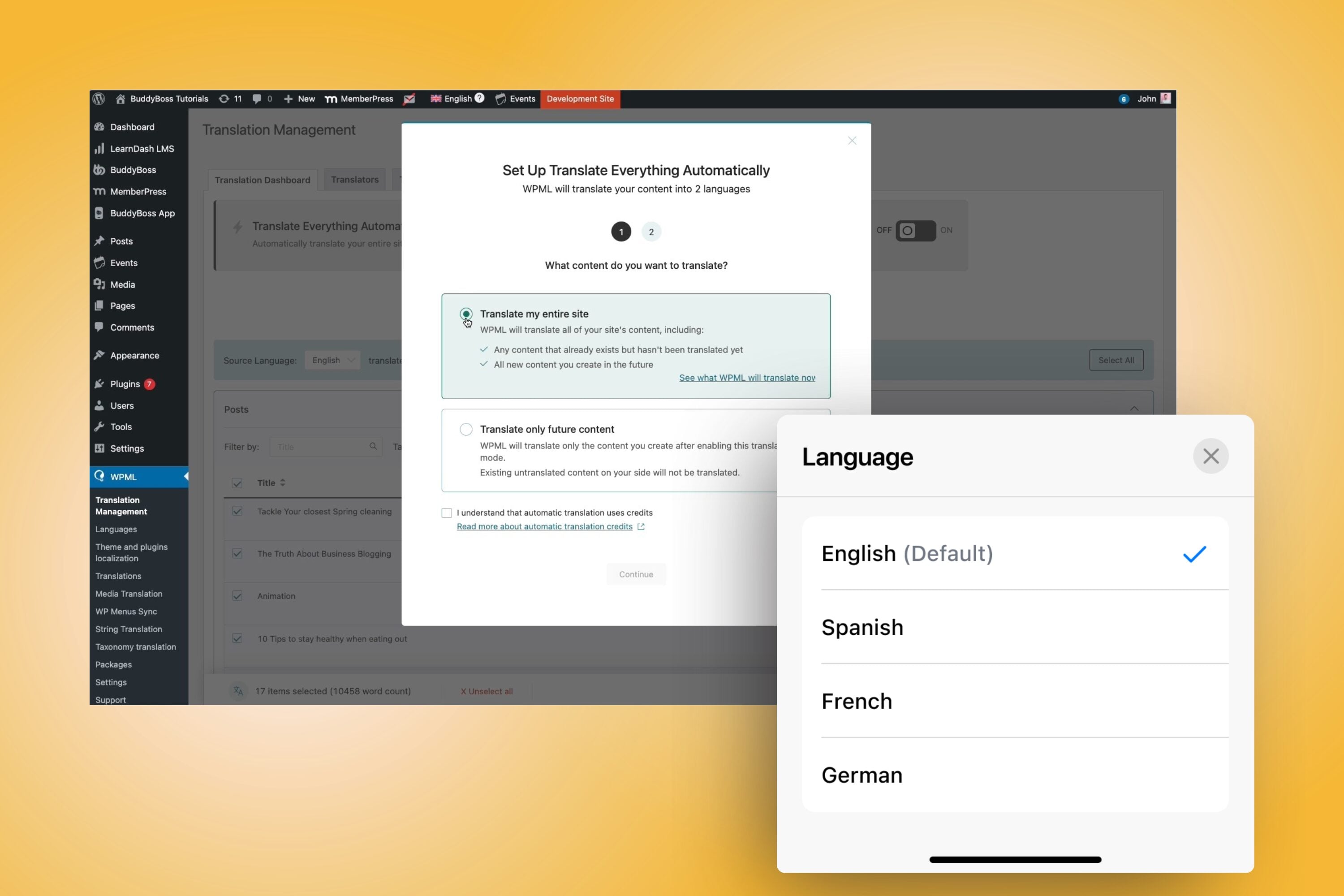
Note:- BuddyBoss works with leading multilingual plugins like WPML, TranslatePress, and Weglot. For the most seamless web and app integration, WPML is a recommended solution, as it has been thoroughly tested for both BuddyBoss Platform and App.
Our recently launched app multilingual support is deeply integrated with WPML, making it the officially recommended solution for seamless web and mobile language parity with BuddyBoss.
c. Install & Activate Your Plugin
→ From your WordPress dashboard, go to Plugins > Add New
→ Upload the plugin file (for premium options like WPML) or search directly in the repository (for free versions)
→ Click Activate and follow the setup prompts
d. Ensure BuddyBoss Compatibility
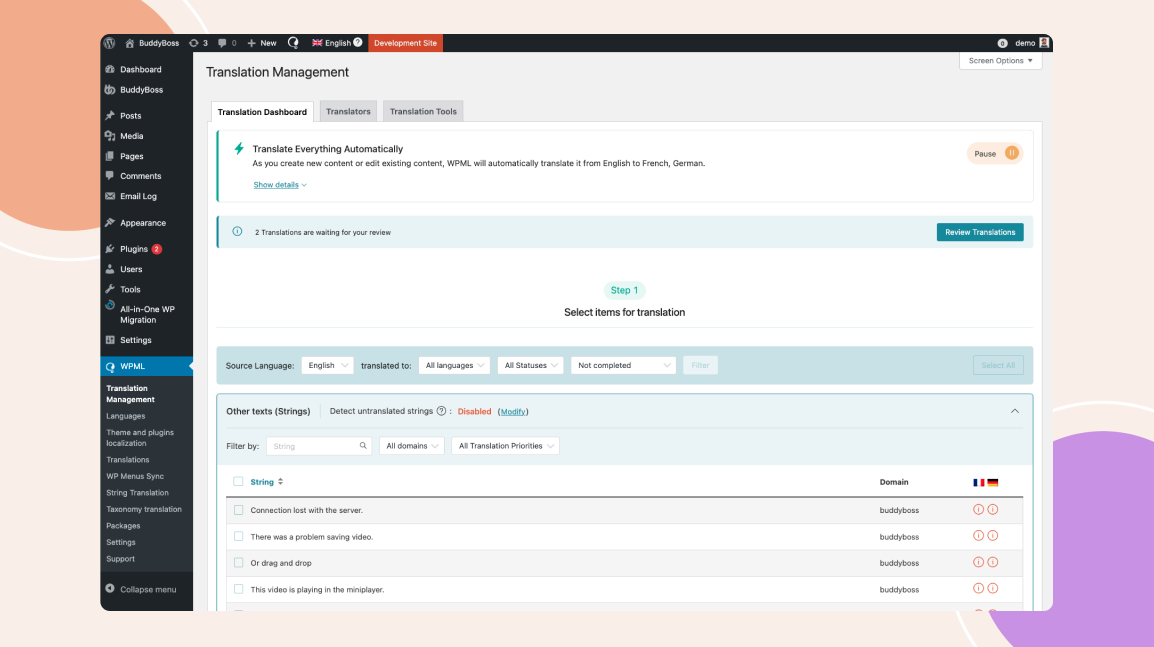
BuddyBoss works seamlessly with major multilingual plugins, but it’s smart to double-check your plugin’s settings to ensure all BuddyBoss-specific elements like activity feeds, profile fields, and group names are translation-ready.
Step 3: Configure Your Multilingual Plugin
With your plugin installed, it’s time to configure it for maximum impact. This step transforms your platform from “multi-language ready” into a seamlessly bilingual or multilingual community hub where members feel instantly at home.
a. Set Your Default Language
Choose the primary language your community will operate in. This will be the baseline for all content creation and translations.
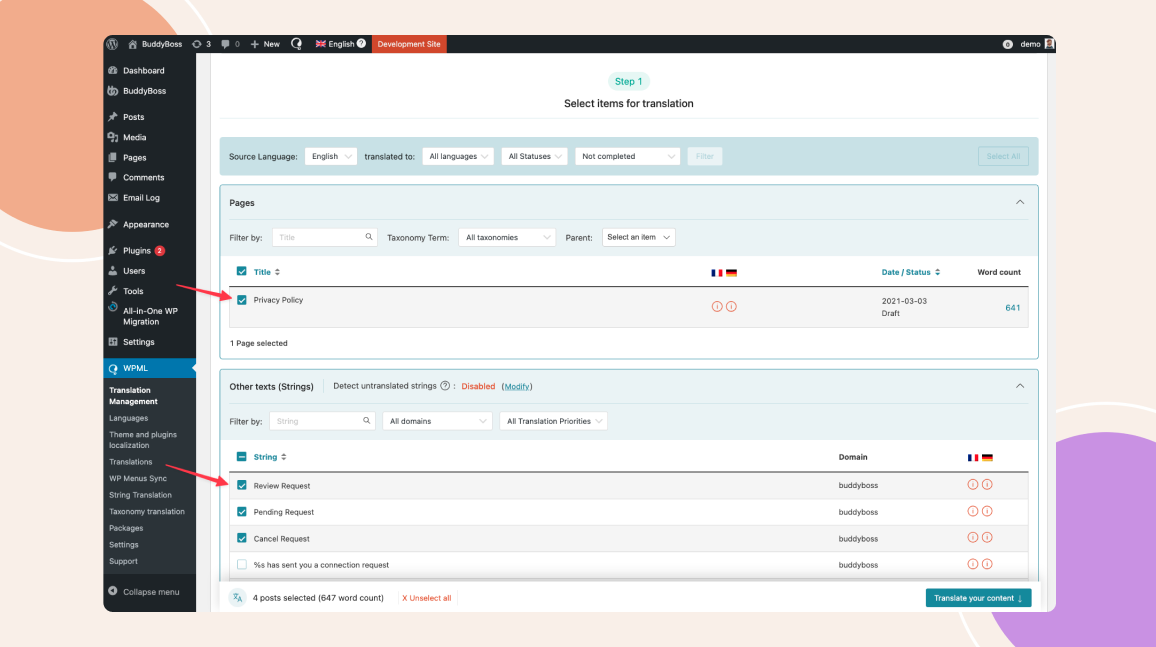
Select the language that matches your largest or most active user base this ensures the majority of members get the smoothest experience from day one.
b. Add Target Languages
Using your plugin’s dashboard:
Add each language you plan to support (focus on your top 2–3 markets for best results). Ensure language codes and country variants are accurate (e.g., Spanish for Spain vs. Spanish for Mexico).
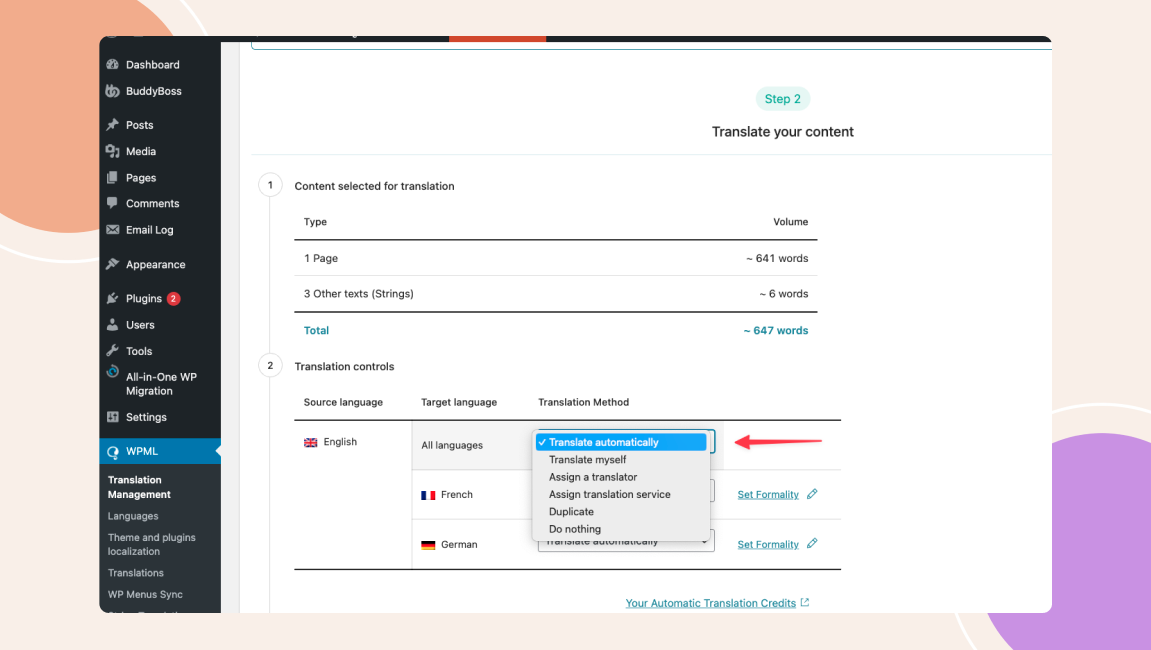
c. Enable the Language Switcher
Make it immediately visible so members can change their preferred language without hunting through settings.
Common placements: Top navigation bar (BuddyBoss-compatible location), Header or footer menus, and Mobile hamburger menu for easy app access.
Use both text and flag icons for clarity, but keep in mind that some countries share the same language flags alone can be misleading.
d. Configure Automatic Language Detection
If your plugin supports it (like Weglot or WPML with add-ons), turn on browser/device language detection. This auto-sets the interface language based on the user’s device, eliminating manual selection and increasing registration completion rates.
e. Test Across Devices
Switch between languages on: Desktop web, Mobile browsers, BuddyBoss mobile app (if applicable). Confirm that navigation menus, buttons, and user-generated content display correctly in each language.
Step 4: Translate Core Pages & Content
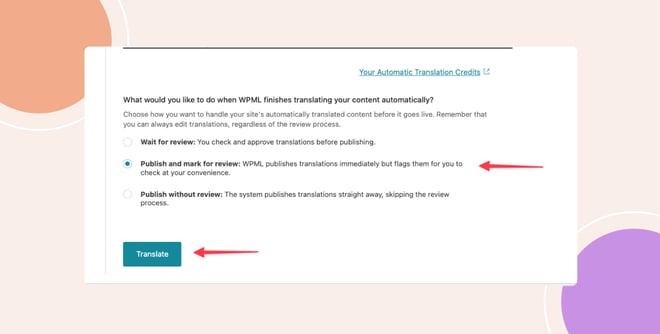
Now that your multilingual plugin is configured, it’s time to actually bring your community to life in multiple languages. This is where your site begins to feel truly international, not just technically bilingual.
a. Prioritize High-Traffic Pages First
Focus on the pages that matter most to user onboarding and engagement:
Homepage – Your first impression; ensure messaging resonates culturally, not just linguistically.
About Page – Build trust with localized storytelling.
Dashboard – The control center for members; must be perfectly clear in every language.
Groups & Forums – Core community hubs where interaction starts.
Note: If you’re running online courses with LearnDash or LifterLMS, include course pages and lesson content in your priority list.
b. Use a Mix of Automated & Manual Translation
- Automatic Translation: Fast and efficient for large amounts of text. Good for functional or informational content.
- Manual Refinement: Essential for brand messaging, community guidelines, and marketing copy to ensure cultural relevance and tone accuracy.
c. Translate Dynamic Elements
Don’t forget about interactive and user-facing elements like: Call-to-action buttons, Menu items, Form labels and placeholder text, and Notifications and error messages. These often get overlooked but play a big role in smooth navigation.
d. Keep Formatting Consistent Across Languages
Different languages vary in length. German text often runs longer, while Chinese is more compact. Adjust font sizes, spacing, and button widths so your layout remains clean in every language.
e. Maintain SEO in Each Language
If your plugin supports multilingual SEO (like WPML or Weglot), make sure to: Translate meta titles and descriptions, Localize URLs (e.g., /es/ for Spanish, /fr/ for French), and Submit separate language sitemaps to Google Search Console.
Why This Step Matters:
Core content is your community’s front door. If it feels clumsy, incomplete, or culturally off, international users will bounce before they even explore. Properly translating and optimizing your core pages sets the tone for a welcoming, professional, and culturally aware community experience.
Step 5: Translate BuddyBoss Community Elements
Translating your core pages is only half the story. The real magic of a multilingual community happens when the social, interactive parts of BuddyBoss profiles, groups, forums, notifications speak your members’ language as naturally as their own conversations.
a. Localize Member Profile Fields
- Translate default BuddyBoss profile fields (Name, Bio, Location).
- Translate any custom fields you’ve added, such as skill sets, interests, or certifications.
- Ensure field descriptions and placeholders are culturally clear (avoid slang that may not translate well).
In some cultures, users prefer more formal introductions; in others, casual and fun prompts encourage better engagement. Adjust field tone accordingly.
b. Translate Groups & Forums
- Group names and descriptions should be translated for clarity, not just word-for-word accuracy.
- Forum topics, pinned posts, and rules must be localized so members understand both the content and the tone.
- If you have region-specific groups, tailor them with culturally relevant imagery and examples.
c. Localize Notifications & Messages
Translate system notifications (friend requests, mentions, group invites) to keep user engagement high.
For private messages, ensure any default templates (welcome messages, onboarding tips) are available in each language.
Use your plugin’s string translation tool (WPML or TranslatePress) to find and localize all BuddyBoss-generated text.
d. Adapt Activity Feeds for Each Language
- Translate action verbs and status prompts (“posted an update,” “joined the group”).
- Consider culturally customizing featured posts that sparks engagement in one culture might not resonate in another.
- Keep emojis and visual elements consistent to bridge cultural differences visually.
e. Translate Roles & Permissions
- Member roles (Admin, Moderator, Participant) should be in the user’s language for clarity.
- Translate role descriptions so new members understand their privileges and responsibilities.
f. Check Mobile App Consistency
If you’re using the BuddyBoss App, ensure all translated elements sync seamlessly between web and mobile. A mismatched interface between platforms is a fast way to lose trust.
Step 6: Optimize for Global SEO & User Experience
Your community is multilingual, but to truly thrive globally, you need to help people find it and make them love using it.
SEO for Each Language: Configure hreflang tags so search engines know which language version to show to which audience. Customize meta titles, descriptions, and keywords for each translation instead of just duplicating the original.
Localized Content Marketing: Create blog posts, guides, and community announcements tailored to cultural interests in each region. What resonates with your Spanish audience may not be as engaging for your Japanese audience.
Fast Loading Worldwide: Use a Content Delivery Network (CDN) like Cloudflare or Bunny.net to ensure your site loads quickly everywhere. A slow site is the fastest way to lose international members.
Check for Accessibility: Make sure fonts, layouts, and colors work well for all languages, including right-to-left scripts like Arabic.
Test the User Flow: Have real users in different countries navigate your site. This reveals small usability issues that automated testing can miss.
Step 7: Launch Your Multilingual Community Platform & Monitor Engagement
With everything set, it’s time to open the virtual doors of your multilingual community but the work doesn’t stop at launch.
- Soft Launch First – Invite a small group of trusted members or beta testers from each language group. This helps catch translation errors, cultural missteps, or technical glitches before a wider release.
- Announce with Impact – Create launch campaigns tailored for each language. Use localized social media ads, email campaigns, and influencer shoutouts to spark interest.
- Track Engagement Metrics – Monitor sign-ups, time on site, and active participation per language. Tools like Google Analytics 4, Matomo, or BuddyBoss’s own engagement reports can break down performance by region.
- Gather Member Feedback – Encourage users to share what they love and what could be better. Set up multilingual surveys or dedicated feedback forums for each language.
- Iterate & Expand – Based on insights, refine translations, adjust community rules, add culturally relevant features, or launch sub-groups for niche interests in each language.
- Celebrate Milestones – Recognize early members, share success stories, and highlight cross-cultural collaborations to inspire more participation.
Why Most Multilingual Community Platforms Fail
Too many platforms approach multilingual support like “adding extra rooms to a house” they slap on translations, duplicate the same content, and wait for people to magically fill the space.
The outcome? A hollow community experience that feels more like an afterthought than a welcoming home.
Fragmented Journeys – Members in different languages get siloed, losing the sense of shared belonging.
Language Selection Roadblocks – Forcing users to manually pick a language before they’ve even seen value creates unnecessary friction.
Cultural Disconnects – Word-for-word translation may be technically correct but lacks the cultural nuance that sparks true connection.
Many users abandon registration if forced to select a language, creating unnecessary friction. And for those who stay, communities that stop at basic translation often feel sterile, accurate in words, but empty in emotion.
In short, language alone doesn’t build community — shared meaning does. Without cultural empathy, multilingual efforts risk becoming nothing more than a neatly translated ghost town.
BuddyBoss’s Advantage- Language as a Foundation
Unlike many platforms that add multilingual support as an afterthought, BuddyBoss is translation‑ready. Its UI strings can be localized. For running the same site in multiple languages (navigation, posts, groups, SEO), pair BuddyBoss with a multilingual plugin such as WPML, TranslatePress, or Weglot.
This ensures every user gets a smooth, localized experience from the start without extra setup for admins.
Menus, buttons, and prompts can display in a member’s language if the relevant translation files are installed or available (not machine-translated live).
Device language detection so users see the platform in their preferred language instantly. (automatic language switching requires support from your selected multilingual plugin e.g., WPML’s browser language detection)
Consistent experience across web and mobile, eliminating duplicate work.
Because it’s built at the architecture level, multilingual support in BuddyBoss isn’t just about switching languages, it’s about removing friction, improving retention, and making your community accessible to a truly global audience.
FAQs on Multilingual Community Platform
1. Can I run a community in multiple languages at the same time?
Absolutely. With the right plugin, you can offer a fully multilingual experience, where users choose their preferred language for navigation, posts, and discussions.
2. Will switching to a multilingual setup affect my site speed?
A properly configured multilingual setup has minimal impact on performance. For larger communities, we recommend optimized hosting like Rapyd to handle higher traffic smoothly.
3. Do I need coding skills to make my BuddyBoss site multilingual?
No coding is required. Most multilingual plugins offer intuitive interfaces or visual editors, so you can manage translations without technical expertise.
Your Global Community Awaits!
A true multilingual platform is more than a feature, it’s a competitive edge. BuddyBoss is designed with localization in mind, providing translation-ready UI, device language matching in the app (when translation files are installed), and seamless integration with top multilingual plugins for both web and mobile. With the right multilingual plugin, you can offer a culturally and linguistically tailored experience for your entire global audience without coding.
🚀 Ready to launch your truly global community?
Get Started with BuddyBoss Today →

-
 Article
 Article
- Growing Your Online Community