When Netflix introduced its binge-watching features and achievement-style viewing progress bars, Streaming services, including Netflix, have surpassed traditional TV in terms of viewing hours, reflecting a significant shift in entertainment consumption patterns.
This same psychological framework now drives everything from fitness apps that celebrate daily step goals to corporate training programs that turn mundane compliance courses into competitive challenges.
Just like the same way, your membership community already has valuable content and a growing audience.
To take engagement to the next level, you need a way to keep members consistently motivated and excited to participate.
Gamification adds the motivation and fun that keep people coming back, transforming casual visitors into committed contributors.
By introducing points, badges, and rewarding milestones, you create a dynamic experience where every interaction feels meaningful and engaging.
By 2027, the gamification market is projected to reach $30.7 billion, and 70% of Global 2000 companies use gamification in some form.
The reason is simple: gamification increases employee engagement by up to 48% and boosts retention rates by as much as 90%.
This guide walks you through the BuddyBoss gamification setup in your membership community step-by-step, with specific instructions for BuddyBoss, a platform that makes implementing badges, points, and rewards surprisingly simple, without writing a single line of code.
What Is Gamification and How Does It Work in Membership Communities?
Gamification setup involves adding game-like mechanics to your membership site to drive specific behaviors.
Instead of hoping members engage, you create a system that rewards participation with points, badges, levels, and tangible perks.
Why gamification works: The neuroscience is straightforward. When members earn rewards, their brains release dopamine, the “feel-good” chemical that generates pleasure and reinforces behavior.
This creates a psychological loop: complete action → receive reward → feel good → seek more rewards.
Studies show that gamified learning experiences can increase retention rates by as much as 90%, and 78% of employees say gamification makes their work more enjoyable.
The effect isn’t limited to corporate training; it transforms membership communities by making every interaction feel rewarding.
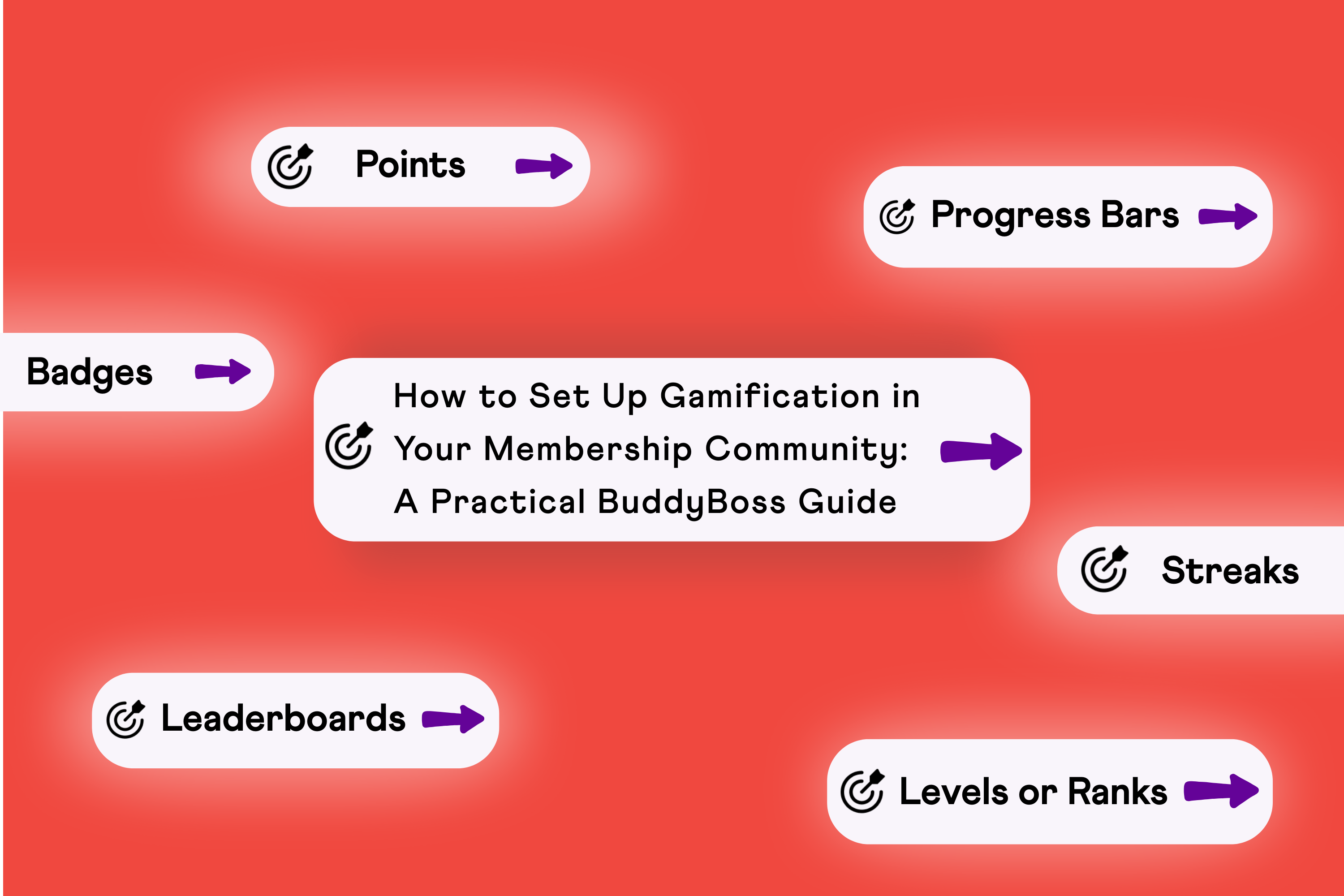
Common Gamification Elements In An Online Community
Let’s look at the most common gamification elements that make communities more interactive and enjoyable:-
Badges: Visual achievements displayed on member profiles (e.g., “First Post,” “Helpful Member,” “Course Completionist”)
Points: Digital currency earned for actions like posting, commenting, completing lessons
Levels or ranks: Progressive tiers that unlock as members accumulate points (Bronze, Silver, Gold, Platinum)
Leaderboards: Rankings that show top contributors, fostering friendly competition
Progress bars: Visual indicators showing how close members are to their next achievement
Streaks: Consecutive days of activity that members work to maintain
Core Elements of Gamification Setup
Before diving into technical implementation, understand the building blocks of effective gamification setup:
Points: The Foundation
Points are your gamification currency. Members earn them for completing desired actions, creating immediate feedback that reinforces behavior.
Strategic point allocation:
- Low-value actions (1-10 points): Logging in daily, updating profile, reacting to posts
- Medium-value actions (25-50 points): Creating posts, commenting thoughtfully, completing lessons
- High-value actions (100+ points): Referring new members, getting upvotes on answers, finishing entire courses
Keep point values meaningful. If everything earns 1 point, members won’t perceive value. Create clear hierarchies where significant contributions earn proportionally more.
Badges: Visual Status Symbols
Badges tap into our psychological need for recognition and achievement. They’re digital trophies that members display with pride.
Badge categories that work:
- Onboarding badges: First login, completed profile, first post (encourage initial engagement)
- Milestone badges: 10 posts, 100 posts, 1000 posts (mark progress)
- Behavioral badges: Helpful member (for answering questions), Welcoming committee (for greeting new members)
- Time-based badges: 30-day streak, 1-year member, early adopter
- Exclusive badges: Course graduate, VIP access, community champion (make some rare and aspirational)
Make badge designs visually distinctive. Members should feel proud displaying them on their profiles.
Levels and Ranks: Progressive Achievement
Levels give members a clear path forward. Instead of an endless point accumulation, levels segment progress into achievable goals.
Example level structure:
- Newcomer: 0-100 points
- Regular: 101-500 points
- Contributor: 501-1,500 points
- Expert: 1,501-5,000 points
- Legend: 5,000+ points
Each level should unlock something meaningful—access to exclusive content, special badges, or recognition in the community. This gives members reasons to climb the ladder.
Leaderboards: Friendly Competition
Leaderboards leverage our competitive nature, but use them carefully. The key is making competition feel motivating rather than discouraging.
Leaderboard best practices:
- Monthly or weekly resets (give everyone regular chances to rank)
- Multiple leaderboards (total points, most helpful answers, course completions)
- “Rising stars” sections highlighting newer members climbing fast
- Team-based leaderboards (groups compete rather than individuals)
Gamification elements like leaderboards are recommended as proven strategies to increase the effectiveness of referral programs. Competition works when it’s designed thoughtfully.
Rewards and Perks: Tangible Incentives
While points and badges provide psychological rewards, tangible perks create additional motivation.
Reward ideas:
- Discount codes on premium courses or products
- Access to exclusive content or community areas
- One-on-one consultations or coaching sessions
- Physical items (t-shirts, books, swag)
- Featured member spotlights
- Extended trial periods or upgraded membership tiers
Align rewards with your community’s purpose. A fitness community might offer workout gear; a business community might provide consulting hours.
How to Set Up Gamification in Your BuddyBoss-powered Community
BuddyBoss provides native GamiPress integration, making rewards visible in profiles, groups, and the app. It is a free WordPress plugin specifically designed for this purpose. Here’s your step-by-step implementation guide and complete BuddyBoss gamification setup.
Step 1: Install and Activate GamiPress
Install GamiPress plugin:
- Navigate to WordPress Dashboard > Plugins > Add New
- Search for “GamiPress”
- Click “Install Now” on the GamiPress plugin
- Click “Activate” once installation completes
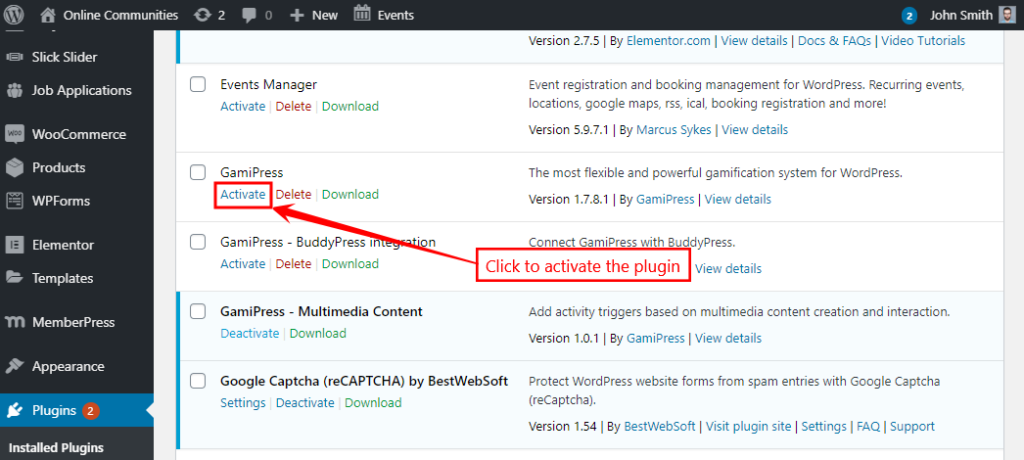
Install BuddyBoss integration:
- Return to Plugins > Add New
- Search for “GamiPress BuddyBoss Integration”
- Install and activate this plugin
The integration plugin ensures gamification elements display seamlessly within your BuddyBoss theme and platform, blending points, achievements, and ranks naturally into your community interface.
Jump to Full Guide
Step 2: Configure Initial Settings
Before creating specific awards, configure how gamification displays in your community.
Configure display settings:
- Go to WordPress Dashboard > GamiPress > Settings > Add-ons > BuddyBoss
- In the Points tab, select where points appear on user profiles (above content, below content, or dedicated tab)
- In the Achievements tab, choose achievement display locations
- In the Ranks tab, set rank display preferences
- In the Activity section, decide which achievements appear in the activity feed
- Click “Save Settings”
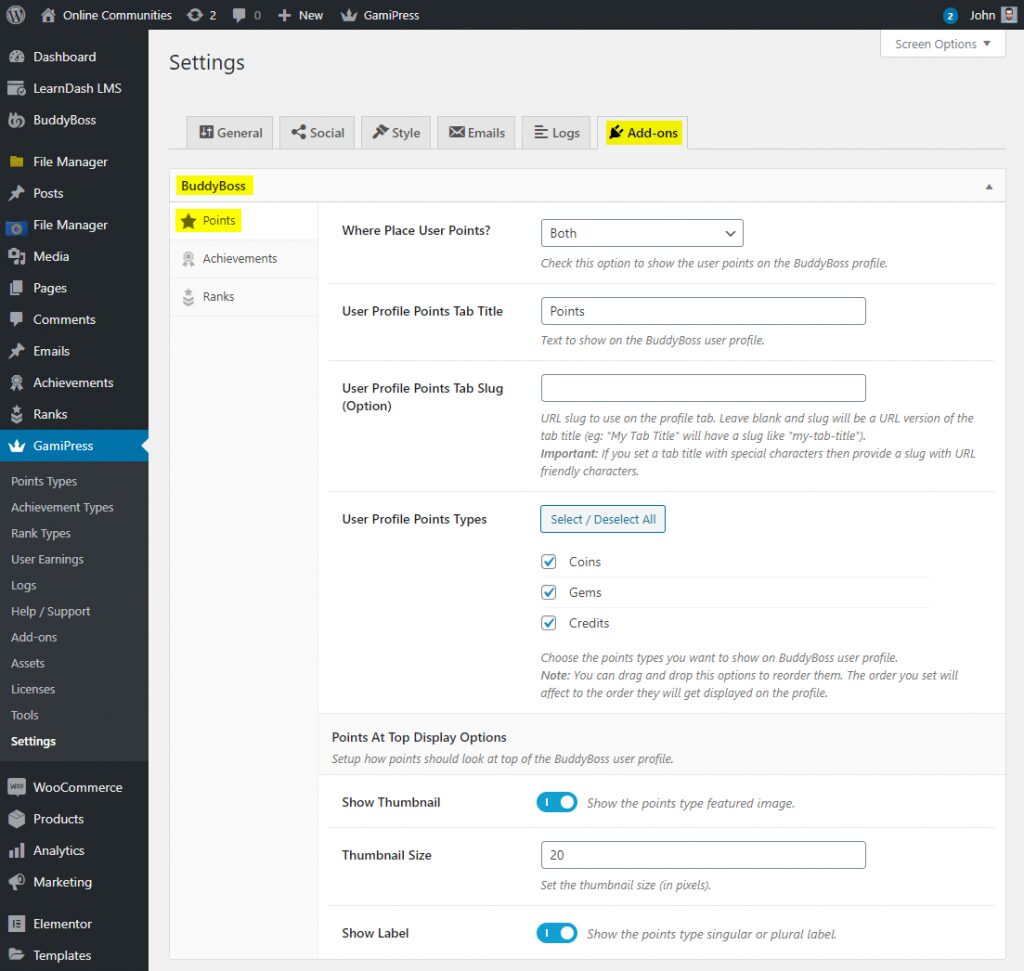
These settings control visibility. Make achievements prominent enough to motivate members but not so overwhelming that they clutter the interface.
Step 3: Create Point Types
Point types let you create different point systems for different purposes. You might have “Community Points” for social interactions and “Learning Points” for course completions.
Create your first point type:
- Go to WordPress Dashboard > GamiPress > Point Types
- Click “Add New”
- Enter a point type name (e.g., “Engagement Points”)
- Write a description explaining what members earn these points for
- Upload a custom icon (optional but recommended—makes points visually distinctive)
- In the BuddyBoss Member Activity section, toggle “Award activity entries” and “Deduct activity entries” to automatically create activity feed posts when points are awarded or removed
- Click “Publish”
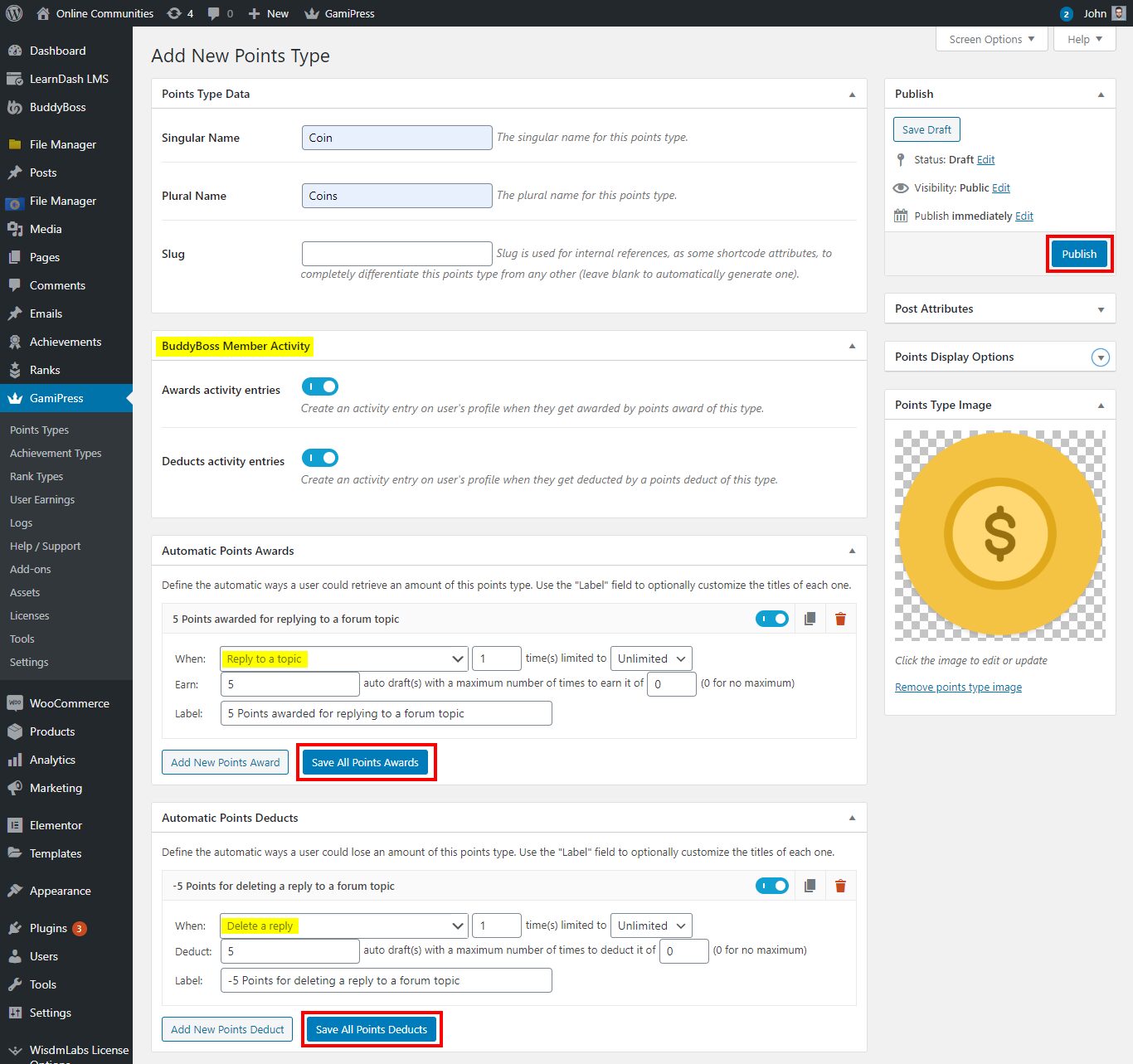
You can create multiple point types if your community has distinct areas for example, “Forum Points” for discussion participation and “Course Points” for learning activities.
Step 4: Set Point Rules (The Heart of Gamification Setup)
Point rules define what actions earn rewards. This is where BuddyBoss gamification setup gets strategic to choose actions that drive your community goals.
Create automatic point awards:
Within your Point Type, scroll to the “Automatic Points Awards” section. (take a look at above image for Automatic Points Awards)
Click “Add New”
In the “When” dropdown, select a BuddyBoss trigger:
→ Reply to a topic
→ Post an update
→ Comment on an activity
→ Complete profile
→ Send friendship request
→ Join a group
→ Upload avatar/cover image
Set how many times members can earn points for this action:
- “Unlimited” for actions you want to encourage repeatedly
- Specific numbers for one-time achievements
Enter the number of points to award
Add a descriptive label (members see this in their activity feed)
Click “Save All Points Awards”
Example point rule structure:
- Post an update: 25 points (unlimited)
- Reply to topic: 15 points (unlimited)
- Complete profile: 100 points (1 time)
- Upload avatar: 50 points (1 time)
- Join a group: 30 points (unlimited)
- Receive likes on post: 5 points per like (unlimited)
Create 5-10 core rules initially. You can always add more as you identify which behaviors need reinforcement.
Step 5: Create Badges and Achievements
Achievements are milestone-based rewards that recognize specific accomplishments. They’re more prestigious than points because they’re earned through significant effort.
Create your first achievement:
- Go to WordPress Dashboard > GamiPress > Achievement Types
- Click “Add New” (or use default types like “Badge” or “Quest”)
- Name your achievement type (e.g., “Community Badges”)
- Configure display settings
- Click “Publish”

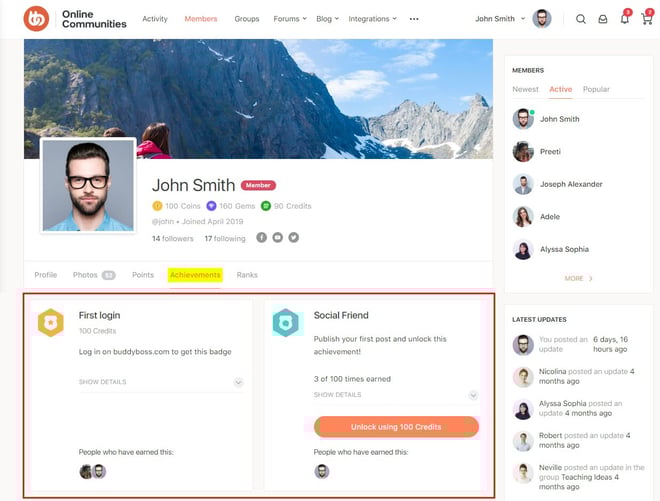
Create individual achievements:
- Navigate to GamiPress > Achievements > [Your Achievement Type]
- Click “Add New”
- Enter the achievement name (e.g., “Conversation Starter”)
- Write a description explaining what members must do to earn it
- Upload a distinctive badge image
- In the Requirements section, set unlock criteria:
- Earn X points
- Complete specific actions X times
- Reach specific ranks
- In the BuddyBoss Member Activity section, toggle to create activity feed posts when members earn this achievement
- Click “Publish”
Strategic achievement examples:
- Newcomer: Complete profile (100% completion)
- Conversation Starter: Create first topic in forums
- Helpful Member: Reply to 25 topics
- Dedicated Learner: Complete 3 courses
- Community Champion: Earn 5,000 points
- 30-Day Streak: Log in 30 consecutive days
- Networking Pro: Connect with 50 members
Make achievements feel meaningful. If everyone earns every badge in their first week, they lose value.
Step 6: Configure Levels and Ranks
Ranks create a progression system where members “level up” as they accumulate points or achievements.
Create rank tiers:
Go to WordPress Dashboard > GamiPress > Rank Types
Click “Add New”
Name your rank type (e.g., “Community Ranks”)
Configure settings
Click “Publish”
Create individual ranks:
- Navigate to GamiPress > Ranks > [Your Rank Type]
- Create ranks in ascending order:
- Newcomer (0-100 points) – Starting rank for all new members
- Member (101-500 points) – Shows basic participation
- Active Contributor (501-1,500 points) – Regular engagement
- Expert (1,501-5,000 points) – Significant contributions
- Community Leader (5,000+ points) – Top tier
For each rank:
- Add rank name and description
- Upload a unique icon/badge
- Set requirements (usually point thresholds)
- Click “Publish”
Members automatically move up ranks as they meet requirements. This creates visible progression that motivates continued engagement.
Step 7: Set Up Leaderboards
Leaderboards display rankings, creating healthy competition. GamiPress includes leaderboard shortcodes you can place anywhere on your site.
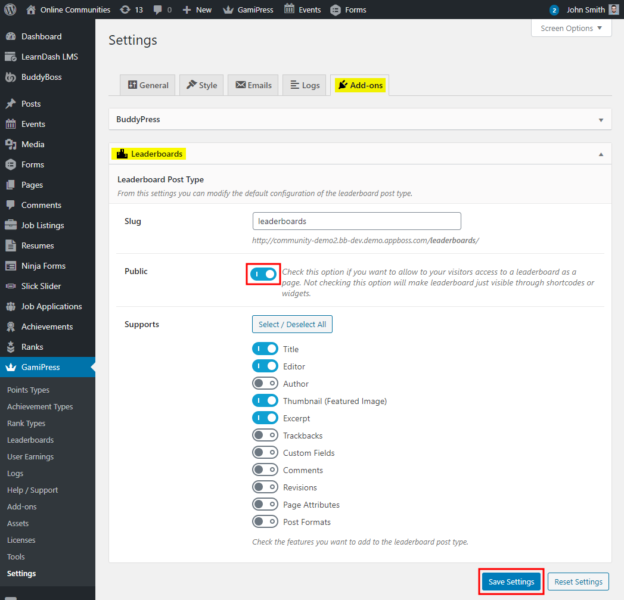
Create a leaderboard page:
- Go to WordPress Dashboard > Pages > Add New
- Title the page “Leaderboard” or “Top Contributors”
- Insert the shortcode: [gamipress_leaderboard]
- Customize with attributes:
- type=”points” or type=”achievements” or type=”ranks”
- columns=”position,avatar,user,points”
- limit=”25″ (shows top 25)
- period=”month” (monthly leaderboard that resets)
- Publish the page
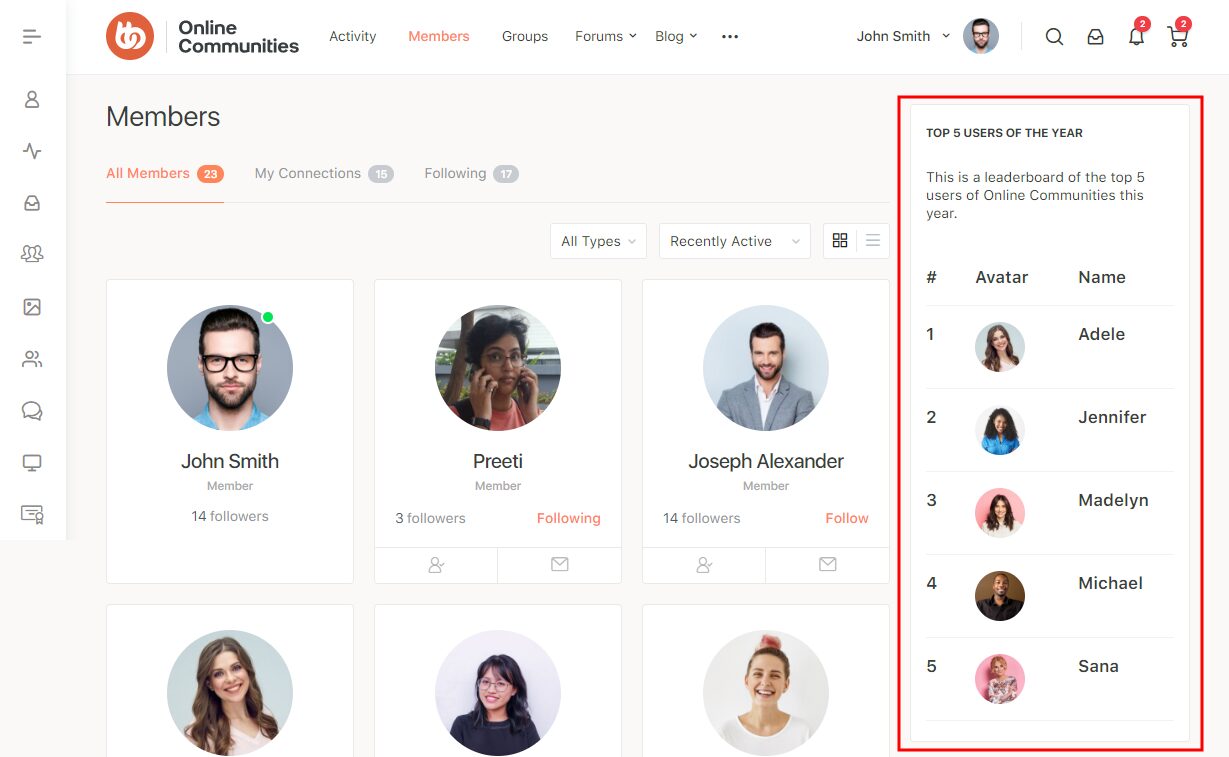
Add this page to your main menu so members can easily find it. Consider creating multiple leaderboards for different categories most helpful answers, top course completers, most active forum participants.
Step 8: Test Your Gamification Setup
Before announcing your gamification system, test everything thoroughly.
Testing checklist:
- Create a test account and perform point-earning actions
- Verify points are awarded correctly
- Check that badges unlock when requirements are met
- Confirm ranks update automatically
- Test that achievements display properly on profiles
- Verify activity feed posts show gamification events
- Check mobile display using the BuddyBoss app
Fix any issues before launching to your full community. First impressions matter, BuddyBoss gamification setup should feel polished and seamless.
Step 9: Launch and Announce
Roll out your gamification with excitement. Don’t just flip the switch make it an event.
Launch strategies:
- Create a “Gamification Week” announcement with daily reveals of different features
- Post a comprehensive guide explaining how to earn points and badges
- Award retroactive achievements for past contributions (if possible)
- Host a Q&A session where members can ask questions
- Create exclusive launch-only badges for early adopters
- Run a contest during launch week with prizes for top earners
Sample announcement structure:
Day 1: Introduce the concept and why you’re adding gamification
Day 2: Explain the points system and how to earn them
Day 3: Showcase available badges and achievements
Day 4: Reveal rank levels and progression paths
Day 5: Launch leaderboards and announce launch week contests
Make the launch feel celebratory. Members should be excited to start earning, not confused about what changed.
Try BuddyBoss Demo
Experience Points, Badges & Rewards Live
Advanced BuddyBoss Gamification Setup Strategies
Once your basic system runs smoothly, level up your gamification with these advanced techniques.
Automate Recognition and Celebrations
Use automation tools like Uncanny Automator to celebrate member achievements automatically:
Automated celebration examples:
- Send personalized email when members reach new ranks
- Post congratulatory messages in the activity feed when badges are earned
- Share top performer achievements on social media (with permission)
- Award bonus points for members who achieve multiple badges in one week
These automated touches make members feel valued without requiring constant manual moderation.
Integrate with LearnDash for Course Gamification
If you use LearnDash for courses within BuddyBoss, GamiPress integrates seamlessly:
- Award points for starting courses, completing lessons, and finishing entire courses
- Create course-specific badges (e.g., “Marketing Master,” “Design Expert”)
- Set up course completion leaderboards
- Unlock advanced courses based on points or ranks
This integration turns passive course consumption into an engaging achievement hunt.
Seasonal Challenges and Limited-Time Events
Keep gamification fresh with rotating challenges:
- Monthly themed challenges (e.g., “March Mentorship Month”—bonus points for helping new members)
- Quarterly competitions with special prizes
- Limited-edition badges available only during specific periods
- Holiday-themed achievements
Scarcity creates urgency. Members engage more when they know rewards won’t always be available.
Tiered Reward Systems
Link gamification to tangible business outcomes:
- Bronze members (0-500 points): Standard access
- Silver members (501-1,500 points): 10% discount on premium courses
- Gold members (1,501-5,000 points): 20% discount + early access to new content
- Platinum members (5,000+ points): 30% discount + quarterly group coaching call
This creates an upsell opportunity while rewarding your most engaged members.
Why Gamification Setup Matters for Community Growth
Effective gamification setup doesn’t just make things more fun; it drives measurable business results.
Retention skyrockets: The use of badges, is a key motivator and can significantly increase user engagement and retention in online communities and learning environments. When people invest time earning points and achievements, they develop emotional attachment to your community.
Daily activity increases: Gamification creates daily check-in habits. Duolingo’s streak feature, for example, has driven millions of users to practice languages daily for years. Members return to maintain streaks, check leaderboards, and work toward their next level.
Positive behaviors multiply: Want more members answering questions? Award 50 points for helpful replies. Need course completion rates to improve? Give badges for finishing each module. Gamification setup lets you incentivize exactly the behaviors your community needs.
Belonging deepens: When members see their rank, achievements, and progress displayed publicly, they feel like recognized contributors rather than anonymous users. This sense of status and belonging reduces churn dramatically.
Organizations with gamified loyalty programs see a 22% increase in customer retention. The return on investment for proper gamification setup is clear: engaged members stay longer, buy more, and become advocates who recruit others.
Tips to Make Gamification Effective (Without Overdoing It)
Gamification can backfire if poorly implemented. Follow these principles to keep it motivating rather than manipulating:
Start simple: Launch with basic points and a few badges. Add complexity gradually as members adapt. Overcomplicating BuddyBoss gamification setup from day one overwhelms people.
Reward quality over quantity: Don’t just award points for posting—award extra points when posts receive likes or helpful reactions. This prevents spam and encourages thoughtful contributions.
Balance individual and community goals: While leaderboards foster competition, also create team challenges where groups work together toward shared objectives. This builds collaboration alongside competition.
Make early wins easy: New members should earn their first badge within their first session. Early success hooks people into the system.
Regular refresh: Update challenges quarterly, rotate featured badges seasonally, and adjust point values if certain actions become too easy or too hard. Stale gamification loses effectiveness.
Combine with human recognition: Gamification supplements personal appreciation—it doesn’t replace it. Community managers should still personally thank helpful members and highlight great contributions.
Track analytics: GamiPress provides reports on which achievements members pursue most, which points awards drive behavior, and which badges people display proudly. Use this data to refine your system.
Gather feedback: Ask members what motivates them. Some prefer competition, others like milestone achievements. Create systems that appeal to different motivational styles.
Building a Motivating Experience with BuddyBoss
BuddyBoss’s integration with gamification plugins creates a seamless experience that feels native rather than bolted-on.
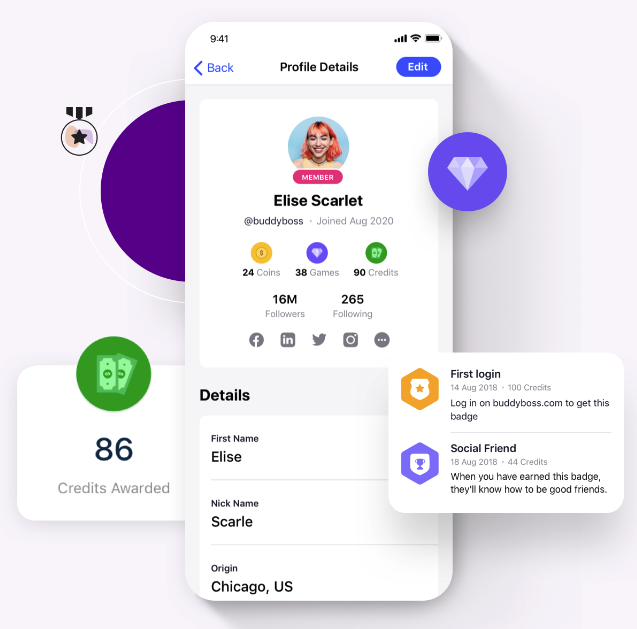
Seamless ecosystem integrations:
LearnDash: Award achievements for course progress
MemberPress: Create membership level perks based on points/ranks
WooCommerce: Offer point-based discounts on products
bbPress: Gamify forum participation
BuddyPress: Reward social interactions
These integrations mean your entire community ecosystem works together, reinforcing engagement at every touchpoint.
Mobile-friendly gamification: The BuddyBoss app displays points, badges, and achievements on mobile devices. Members can check leaderboards, track progress, and earn rewards from their phones. Mobile accessibility keeps engagement high even when members aren’t at their desks.
Scalability: BuddyBoss is architected to scale effectively, its performance for large communities being primarily dependent on robust hosting infrastructure and server optimization, rather than inherent platform limitations. Your gamification setup scales automatically.
FAQs on BuddyBoss Gamification Setup
How do you set up gamification?
Begin by setting clear goals for engagement or learning. Decide which user actions you want to encourage, then pick game elements like points, badges, or leaderboards that match your audience’s interests. Integrate these elements smoothly into your platform and review user activity regularly to refine your setup as needed.
Can gamification be done correctly?
Yes, when game elements connect directly to meaningful goals and user motivation. The best approach is to design strategically, use feedback to improve, and avoid superficial rewards that don’t match real value.
Can we add custom badges?
Definitely! Custom badges are a great way to reward important actions or milestones, boosting motivation and helping users feel recognized for their unique achievements.
How does gamification affect learning?
It makes learning enjoyable and interactive. Learners stay motivated through features like instant feedback, progress tracking, and engaging challenges, which help improve knowledge retention and completion rates.
How can I gamify my curriculum?
Start with one or two game elements like points or quests linked to specific learning goals. Use pilot programs to see what works; then expand and fine-tune based on student feedback and engagement.
How do I measure gamification success?
Track activity rates, assignment completions, and test or survey results. Watch for improvements in participation, performance, and satisfaction to see if your system is working.
How does gamification increase user engagement?
It motivates users by creating clear challenges, goals, and rewards. Social features and friendly competition foster a sense of belonging, keeping people returning and participating more fully.
How much gamification is too much?
Too much can distract from your purpose. Keep mechanics meaningful and embedded in your experience, if users focus more on collecting rewards than learning or contributing, it’s time to scale back.
How to plan a marketing gamification strategy?
Clarify your campaign goals, explore what motivates the audience, and select relevant game mechanics to fit your brand. Measure results with analytics and adjust your approach to maximize success.
Is gamification only for learning?
Not at all. It’s used in marketing, HR, health, product design, and customer loyalty, anywhere you want people more engaged or motivated.
What tools can help gamify a classroom?
Platforms like Moodle, Canvas, Kahoot, ClassDojo, and Open Badges add points, quizzes, and badges to lessons, making learning more fun and interactive.
What game elements suit different age groups?
Kids: Bright visuals, simple points, and stories.
Pre-teens: Badges, team activities, and clear goals.
Teens: Leaderboards, more advanced challenges, and customization.
Adults: Achievements tied to real benefits and skill-building.
Ready To Build Your Gamified Membership Experience?
Start with BuddyBoss and GamiPress today. Your first badge could be “Gamification Pioneer” awarded to community creators who set up their first gamification system this week.
What achievement will your members chase first?
Stats source-
https://www.fortunebusinessinsights.com/industry-reports/gamification-market-100632

-
Article
 Article
- Building Your Online Community