Growing your online community to or even beyond 10,000 members is an incredible milestone, it means your platform is resonating, your members are engaged, and conversations are thriving.
But with this exciting growth also comes new responsibilities. More members mean more discussions, diverse opinions, and the need to maintain harmony at scale.
This is where a community moderation framework becomes your strongest ally. With the right balance of clear rules and supportive moderators, you can nurture a safe, vibrant, and scalable community without feeling overwhelmed.
In this blog, we’ll walk you through the complete framework to help you not only manage but truly thrive with a 10,000+ member community.
- What is Community Moderation?
- Build a Strong and Scalable Moderation Team
- Use Proactive and Reactive Moderation Strategies
- How BuddyBoss Supports Scalable Moderation
- Foster a Positive Community Culture
- Online Community Moderation: Continuous Improvement and Adaptation
- FAQs on Online Community Moderation
- Online Community Moderation: Scaling Without Losing Control
- Subscribe to Our Newsletter
Let me explore BuddyBoss community features at a glance!
What is Community Moderation?
Community moderation is the practice of managing, guiding, and protecting an online community to ensure it remains safe, respectful, and engaging for its members.
It involves setting rules, monitoring interactions, addressing conflicts, and encouraging positive participation all while balancing freedom of expression with community standards. These are the types of community moderation:-
- Pre-Moderation – Content is reviewed before going live. (Good for sensitive communities like health forums.)
- Post-Moderation – Content is published instantly but reviewed afterward.
- Reactive Moderation – Members can report inappropriate content for moderators to review.
- Proactive Moderation – Using tools like AI filters, automated flagging, and human oversight together.
- Community-Driven Moderation – Empowering members to self-moderate by voting, reporting, or mentoring.
BuddyBoss Moderation Component | BuddyBoss Platform
Now let’s talk about how to build a strong moderation team and why its essential.
Build a Strong and Scalable Moderation Team
Even the best rules won’t enforce themselves. At scale, a dedicated and well-structured moderation team becomes the backbone of a healthy community.
Public support for active moderation is common; for example, 65% of Americans support tech companies moderating false information online.
Who Does What? Defining Moderator Responsibilities
To prevent confusion and burnout, clearly assign responsibilities within your team:
- Lead Moderator: Oversees strategy, ensures guidelines are up to date, and manages moderator performance.
- Content Reviewers: Handle daily scanning, approvals, and removal of harmful content before it spreads.
- Engagement Moderators: Step in during disputes, maintain a welcoming tone, and keep conversations on track.
Large platforms like Reddit and Discord follow similar tiered moderation structures, relying heavily on distributed teams of volunteer and lead moderators to keep discussions civil across thousands of sub-communities.
How to Set Moderator on Groups- Detailed Guide on group moderator
Steps to Build a Scalable Moderation Team
Recruit from Within
Many of the best moderators are already your most engaged members; they understand the culture, care about the space, and have earned the community’s trust.
Reddit, for example, thrives on volunteer moderators who were once just passionate contributors.
Invest in Training
Equip moderators with clear documentation, conflict resolution techniques, and platform-specific tools. This helps ensure consistent enforcement and avoids bias.
Create A Private Space For Collaboration
Whether it’s a Slack channel, a Discord server, or an internal forum, moderators need a secure place to share updates, flag issues, and coordinate actions.
Set Up An Escalation Process
Not every case can be solved at the same level. Establish clear rules for when issues should be escalated to lead moderators, community managers, or even legal/PR teams in extreme cases.
Use Proactive and Reactive Moderation Strategies
In January 2021, Reddit’s r/WallStreetBets surged to mainstream attention. Moderation combined both rules (e.g., AutoModerator) and human interventions.
The surge brought valuable discussions but also spam, misinformation, and heated conflicts. What helped the community survive this explosive growth was a mix of proactive safeguards (like Automoderator keyword filters) and reactive interventions from human moderators when disputes broke out.
This balance is exactly what large-scale communities need. Moderation works best when you combine proactive prevention with reactive problem-solving.
One keeps trouble from surfacing, while the other ensures issues are dealt with fairly when they inevitably occur.
Proactive Methods: Preventing Problems Before They Start
- Pre-moderation for new members and posts: Many Facebook Groups require moderator approval for first-time posts, reducing spam from fake accounts.
- Keyword filters and automation: Automated filters can block offensive language, scams, or unwanted promotions before they go live. Reddit’s Automoderator is a prime example of this in action.
- Rule-based onboarding: Communities like Stack Overflow require users to agree to or demonstrate understanding of posting rules before contributing. This sets the tone from day one.
Check How Moderation Works with the Activity Posts in BuddyBoss
Reactive Methods: Responding Quickly and Fairly
- Timely interventions – Fast responses de-escalate heated debates. Research shows that quick moderation prevents negative behavior from spreading across threads.
- Reporting systems – YouTube/Instagram rely heavily on member reports to surface harmful or abusive content, allowing moderators to prioritize issues.
- Structured complaints process – A clear, transparent way of handling violations builds trust. Members should know what happens after a report is filed and how appeals are managed.
Why the Dual Approach Works
Proactive strategies reduce the sheer volume of issues, while reactive methods ensure the remaining conflicts are handled with fairness and consistency. Together, they create a self-regulating ecosystem where moderators are not overwhelmed, and members feel safe and respected.
How BuddyBoss Supports Scalable Moderation
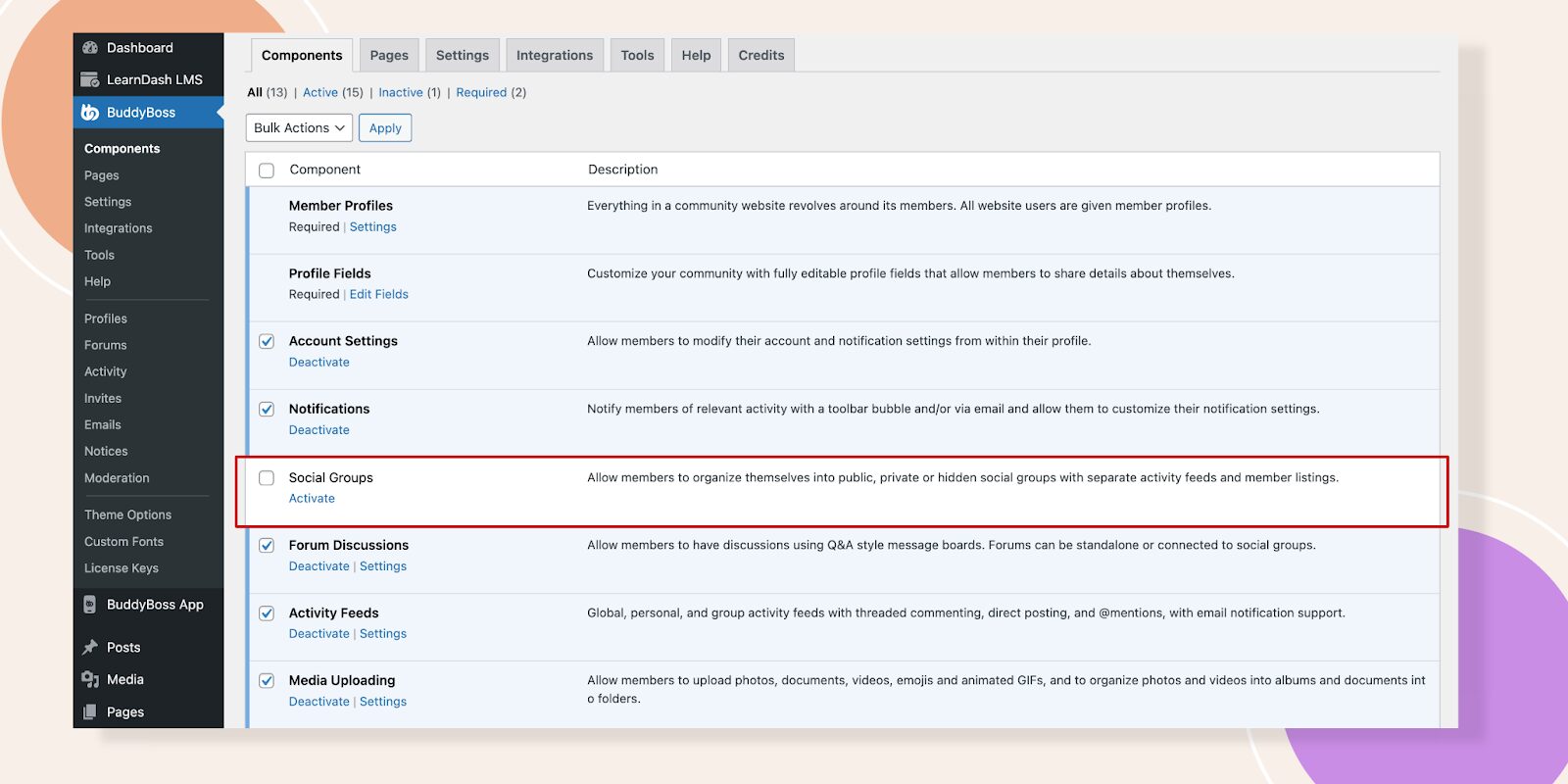
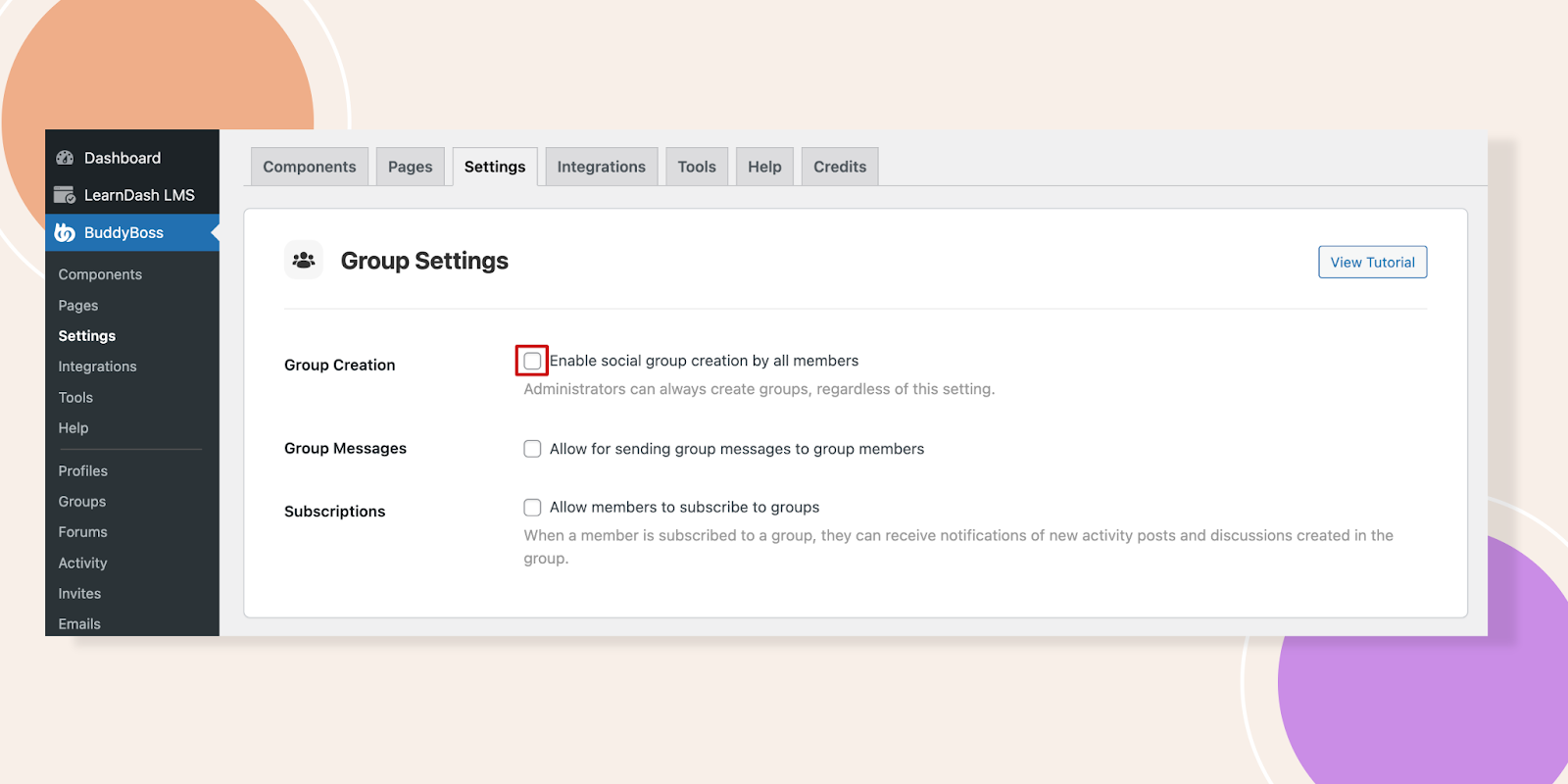
BuddyBoss includes powerful native moderation features and offers integrations for advanced workflows. Here’s what’s possible:
Settings Example in BuddyBoss:
Moderation settings: Turn on group moderation, set new member review queues.
Content approval: Create approval rules for posts, media, and comments.
Reporting: Members can flag inappropriate content, triggering moderator review.
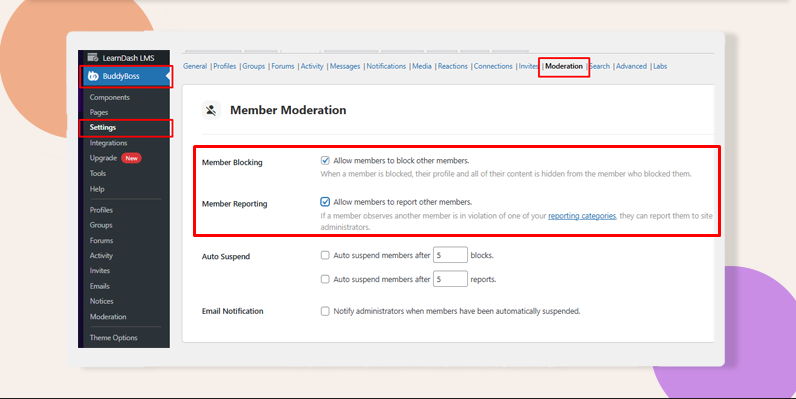
Roles: Use built‑in Group Organizers and Moderators; optionally create custom WordPress roles or Member Types to mirror ‘Lead/Reviewer/Engagement’ responsibilities.
Important: BuddyBoss does not natively provide AI-driven moderation. For advanced automation (spam AI, sentiment analysis, etc.), integrate third-party tools using APIs or services like Zapier.
Let me talk to BuddyBoss DFY Team to handle advanced customization.
Settings You Should Turn On BuddyBoss
To help you quickly implement effective moderation in your community, here are some concise, step-by-step “How-To” mini-guides using BuddyBoss.
Set Group Moderators
Dashboard → Groups → Edit Group → Members → Change role to Moderator → Save.
Here’s the detailed guide for you
Enable Content Reporting & Auto-Hide
BuddyBoss > Settings > Moderation → Enable Reporting → Choose content types → Set Auto
Hide threshold → Enable email notifications.
Moderation Settings in BuddyBoss
Set Auto-Suspend Thresholds
BuddyBoss > Settings > Moderation → Auto Suspend → Set number of reports/blocks to suspend → Save.
Member Moderation Guide on BuddyBoss
Registration Approval (Optional)
Install BuddyPress Registration Options → Approve/Deny new members manually.
Plugin Documentation and explore BuddyPress moderation tools to make your job easier.
View Pricing Plans
Manage and grow your community effortlessly with BuddyBoss
Foster a Positive Community Culture
Moderation isn’t just about removing negativity, it’s about actively shaping a space where members feel safe, valued, and motivated to contribute. A strong culture doesn’t happen by accident; it’s built through intentional actions and consistent reinforcement.
Best practices for handling conflicts fairly and openly:
Address disputes privately first. Direct messages or one-on-one communication can help de-escalate tensions before they spiral publicly. (Example: Reddit moderators often begin with private messages before issuing warnings or bans.)
Communicate decisions clearly. Don’t leave members guessing why action was taken. Explain which rule was broken and why moderation was necessary. This builds credibility and reduces perceptions of bias.
Offer an appeals process. Giving members a chance to present their side fosters fairness. Platforms like Stack Overflow allow users to flag unfair moderation for review, ensuring no one feels powerless.
Stay consistent in enforcement. Apply the same standards to all members, whether they’re new or long-time contributors. Inconsistency is the #1 driver of resentment in online communities.
Balance firmness with empathy. Not all conflicts stem from malice misunderstandings, cultural differences, or even tone can create friction. Acknowledging these factors while enforcing rules helps maintain respect.
See How to Moderate Members in BuddyBoss for guides on handling reports, suspensions, and member blocks.
Online Community Moderation: Continuous Improvement and Adaptation
Communities are living ecosystems that evolve with their members, making moderation policies and practices more effective when treated as adaptable guidelines rather than rigid rules.
What works for 1,000 people may collapse under the weight of 10,000 or 100,000, which is why continuous improvement is key. Regular audits (quarterly or bi-annual) help ensure policies reflect new behaviors, technologies, and social norms similar to Reddit’s frequent updates to tackle misinformation and harassment.
Closing the feedback loop by inviting members to share what’s working (and what isn’t) can also pay off; CMX’s 2022 report found that communities leveraging member feedback enjoy 25% higher retention.
Equally important is experimenting with tools whether AI-driven filters, gamified badges, or Discord’s AutoMod since these innovations reduce moderator workload and build trust.

Above all, staying adaptable ensures resilience; a viral post bringing in a sudden wave of new members, for example, may demand stricter onboarding or more proactive moderation to keep the space safe, engaging, and scalable.
FAQs on Online Community Moderation
Q1. What is online community moderation?
Moderation refers to managing member content and behavior to ensure safety and engagement.
Q2. What’s the difference between proactive and reactive moderation?
Proactive prevents problems (e.g., filters); reactive addresses violations after they occur (e.g., member reporting).
Q3. Does BuddyBoss natively include AI-powered moderation?
No. For AI moderation, integrate third-party tools via APIs (learn more in BuddyBoss documentation).
Q4. How can I scale moderation efforts as my community grows?
Build diverse teams, use clear roles, adopt approval/reporting systems, and supplement with integrations as needed.
Online Community Moderation: Scaling Without Losing Control
Managing a 10,000+ member community might sound overwhelming, but with the right community moderation and automation framework, it becomes not only manageable but sustainable.
By setting clear rules, empowering a capable moderation team, and fostering a culture of respect, you create a space where members feel safe, engaged, and valued.
The long-term payoff? A thriving community that grows without burning out its leaders.
If you’re serious about scaling your community, now’s the time to invest in a moderation strategy that blends human oversight with automation.
Ready to scale your community management?
Get BuddyBoss to support your moderation goals | Give our demo a try
For any feature, troubleshooting, or advanced setup details, visit our main documentation page.


 Article