
Introduction
Applying ReadyLaunch styling to your BuddyBoss pages creates a cohesive, branded look across key areas of your site. With ReadyLaunch, you can easily enable ReadyLaunch styling on important pages like login, registration, and courses, ensuring a consistent experience for all members.
Enable ReadyLaunch Styling
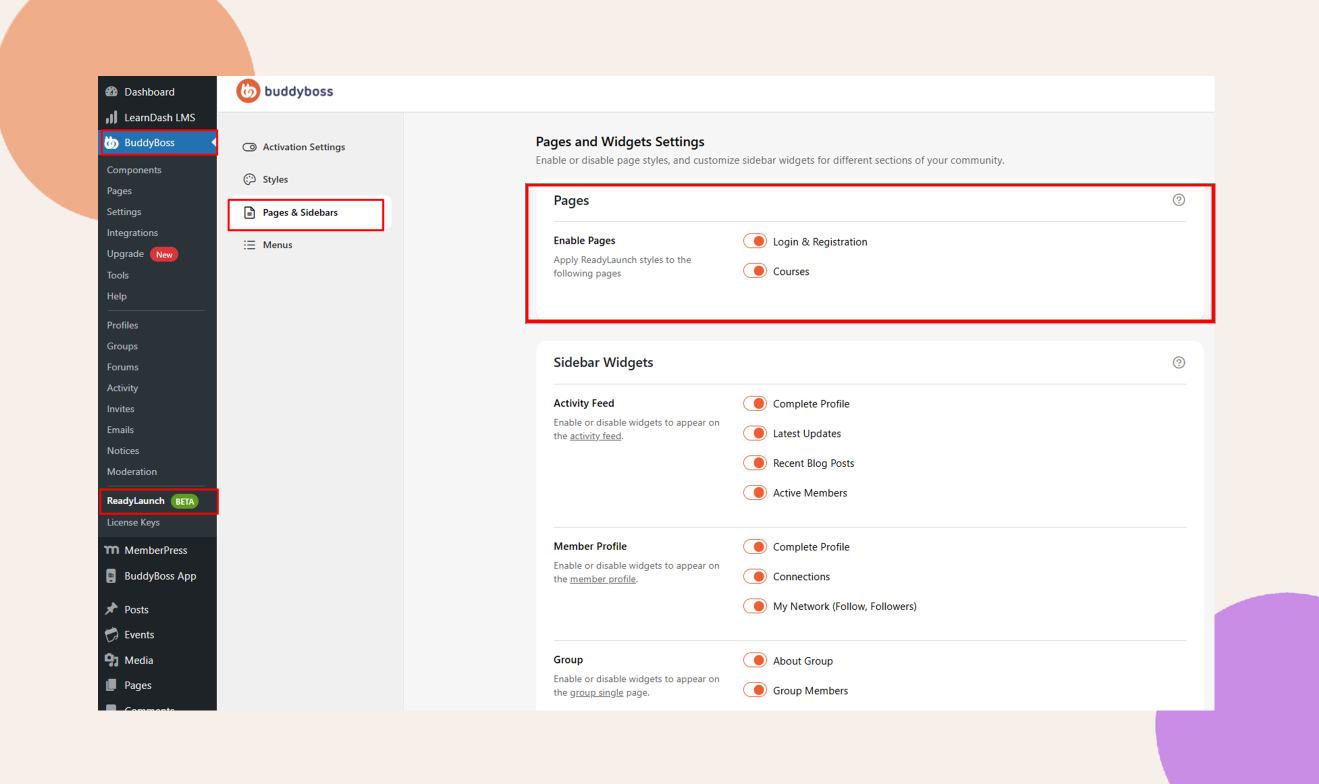
- In your Dashboard, navigate to ReadyLaunch > Pages & Sidebars > Pages.
- Locate the page(s) you want to style (for example, Login & Registration or Courses).
- Toggle Enable Pages on for each selected page.
Troubleshooting and FAQs
Q: Why am I seeing No Pages Found on the Enable Pages section?
A: The login and registration page will only appear if user registration is enabled in BuddyBoss Dashboard > Settings > General Settings.
Similarly, the Courses page will only display if an LMS plugin such as LearnDash, and MemberPress LMS is installed and activated on your site.
Q: My pages still display the old layout after enabling ReadyLaunch.
A: Clear your site and browser cache, then revisit the page. Ensure Enable Pages is toggled on for the correct page.
Q: How do I revert a page back to the default template?
A: Go to ReadyLaunch > Pages & Sidebars > Pages, toggle Enable Pages off for that page, and save your changes.


