
Introduction
The Members I’m Following Widget displays the list of members that a logged-in user is following. Adding this widget helps users easily track the people they follow, improving social engagement and connection within your BuddyBoss community.
Adding and Configuring the Widget
- Go to Appearance > Widgets in your WordPress Dashboard.
- Select the widget area where you want the list to appear (e.g., Activity Directory Left).
- Click the + icon and search for Members I’m Following.
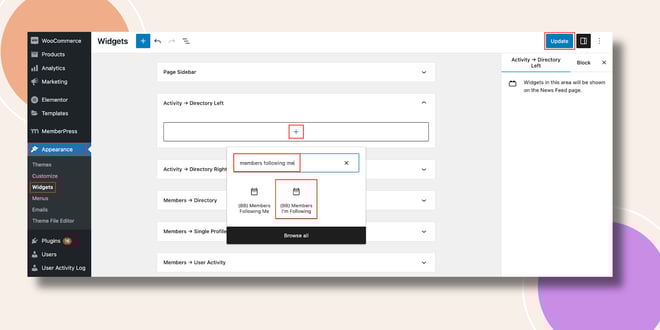
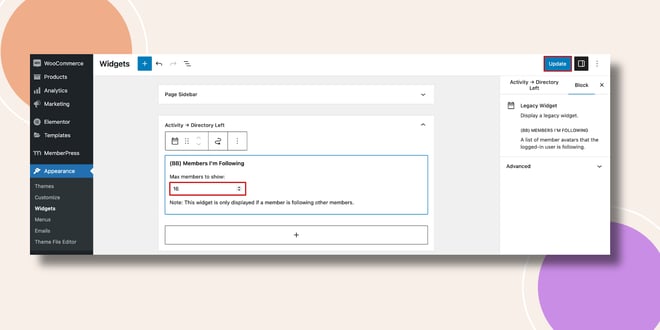
- Add the Members I’m Following Widget to the selected area.
- Set the Max Members to Show (this defines how many followed members will be displayed).
- Click Update to save your changes.
Verifying the Widget
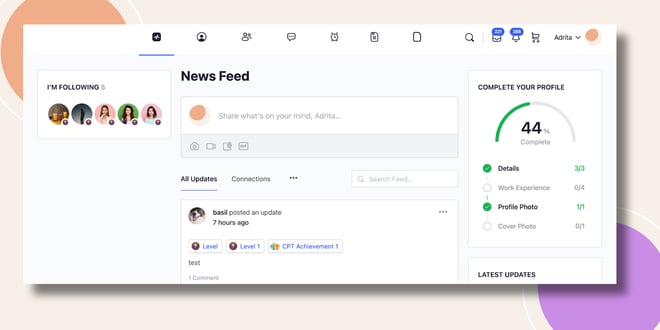
- Go to the Activity Feed on the frontend.
- The Members I’m Following Widget will appear in the sidebar (e.g., left side of the Activity Directory) as I’m Following, displaying the members the user follows.
Troubleshooting and FAQs
Q: The widget isn’t showing on my sidebar.
A: The widget only appears if the member is following others. Ensure that the user is following at least one member.
Q: Can I change the number of members displayed?
A: Yes. You can set the Max Members to Show value in the widget settings.
Q: Can I display the members followed by someone else?
A: No. The Members I’m Following Widget only displays the followed members of the currently logged-in user.


