⚡️Cyber Monday Flash Sale 70% Off:
H :
M :
S
⚡️

Changing LearnDash Quiz Icon

Table of Content

By default, the platform does not have the option to change the LearnDash Quiz Icon. You can use the following CSS code.

Please follow the steps below:

1. On the WordPress Dashboard, click on ‘Appearance‘ and select ‘Customize

2. After getting routed to the following page, click on ‘Additional CSS

3. Insert the code in the space provided

.learndash-wrapper .ld-item-list-item-quiz .ld-item-name .ld-item-title:before, .bb-icon-question:before{ content: 'ef01'; }

4. Click on publish and review the changes made to the LearnDash Quiz Icon. 

Additionally, you may modify the icon by changing only its Unicode based on the following link https://www.buddyboss.com/resources/font-cheatsheet/

Note: Any modifications are considered as custom work already. Know more about our Support policy here: https://www.buddyboss.com/support-policy/

Screenshots

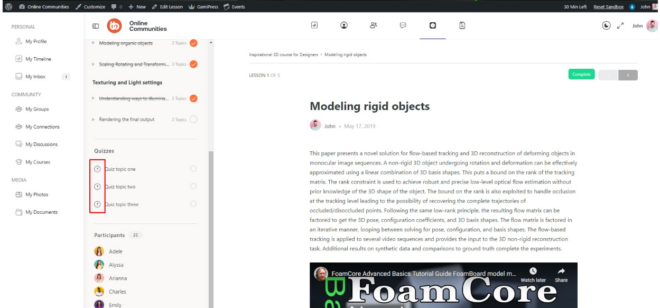
Without code

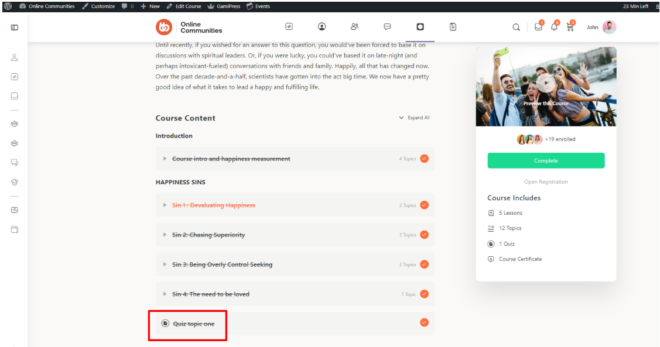
With code

Was this article helpful?

Related Articles

Subscribe to Our Newsletter

Stay In Touch

Subscribe to our Newsletter, and we’ll send you the latest news from BuddyBoss

  • This field is hidden when viewing the form
  • This field is for validation purposes and should be left unchanged.

To speak to our Agency consultant, fill in the form found at our Contact Page.

  • Get Started

    Enter your name and email address to get started with your project...

  • This field is for validation purposes and should be left unchanged.