Keeping your WordPress site secure is more important than ever in 2025 as cyber threats continue to evolve and target websites of all sizes.
With WordPress powering a significant portion of the internet, having a reliable security plugin is your best defense against malware, hacking attempts, and data breaches.
In this ultimate guide, you’ll discover the top free and premium WordPress security plugins available today, understand their key features, and learn how to select the right protection tailored to your site’s unique needs, helping you safeguard your online presence with confidence.
Why WordPress Security Matters (Stats)
Security researchers documented 5,948 new vulnerabilities in WordPress plugins and themes in 2023 alone, representing a staggering 24% increase from the previous year.
Here’s a reality check: Nearly 120,000 attacks on WordPress sites happen every day worldwide, including brute force, XSS, and SQL injection attempts.
64% of WordPress users have suffered a full site breach at least once, and 96% have experienced a security incident.
These aren’t just numbers; they represent real businesses losing revenue, customers, and reputation to preventable attacks.
Sources for the stats: Patchstack, Nitropack, MalePress
How Security Works in WordPress – A Quick Overview
WordPress security is managed through a combination of core software safeguards, user practices, plugins, and server configurations that work together to protect sites from threats.
Core Security Maintenance: The WordPress Security Team continuously identifies vulnerabilities in the WordPress core software, releasing timely updates and patches to fix known issues and harden the platform.
User Authentication & Access Control: Strong passwords, two-factor authentication (2FA), and limiting login attempts prevent unauthorized access. WordPress allows plugins to enforce these protections, adding layers like CAPTCHA and login URL customization.
Plugin and Theme Security: Since many vulnerabilities arise in third-party plugins or themes, WordPress security involves careful management through trusted sources, regular updates, and vulnerability monitoring. Plugins may also scan for malware or suspicious activity.
File and Directory Protection: WordPress supports disabling PHP execution in specific directories, hiding sensitive files (like wp-config.php), and disabling directory browsing to reduce attack surfaces.
Web Application Firewalls (WAF): Many security tools integrate WAFs that block malicious traffic at the network level, preventing attacks such as SQL injection, cross-site scripting, and brute force attempts before they reach the site.
Automated Patching and Monitoring: Newer security services offer virtual patching via firewalls and continuous vulnerability scanning to reduce response time and improve protection against emerging threats.
Security Event Monitoring: Enterprise setups use Security Information and Event Management (SIEM) systems that gather and analyze security data from plugins, firewalls, and logs to detect complex attack patterns.
Defense in Depth: WordPress’s ecosystem encourages layered security, no single method is foolproof. Combining core updates, strong authentication, plugin vigilance, firewalls, and user education creates a resilient defense against attacks.
Overall, WordPress security is a collaborative effort between the platform’s built-in protections, proactive user management, and supplementary tools that continuously secure and monitor the website environment.
What to Look For in WordPress Security Plugins
Not all WordPress security plugins are created equal. Understanding key features helps you choose solutions that provide genuine protection rather than false security.
Real-Time Threat Detection: Continuous monitoring to block attacks as they happen, with frequent updates for new threats.
Comprehensive Malware Scanning: Deep scans across all files, plugins, themes, and databases using multiple detection methods.
Robust Firewall Protection: Web Application Firewalls that filter traffic before it reaches your site, ideally cloud-based for better performance.
Advanced Login Security: Two-factor authentication, CAPTCHA, login attempt limits, and other features to prevent unauthorized access.
Regular Updates and Compatibility: Plugins should be frequently updated and compatible with your WordPress setup to avoid conflicts.
User-Friendly Management: Easy-to-use dashboards and alerts that help implement security without technical difficulties.
Pricing and Support: Free options can be good, but premium plugins often offer advanced features and faster support.
10 Best Free WordPress Security Plugins for 2025 and Beyond
These free WordPress security plugins offer solid protection without costing you a dime, making them great options to start securing your site. Each one has its own strengths and different approaches, so you can pick the one that fits your needs and how comfortable you are with handling security tools.
1. Wordfence Security – Comprehensive Free Protection
Wordfence stands out among free WordPress security plugins with over 5 million active installations and a feature set that rivals many premium solutions. Developed by a team of security experts, Wordfence has become the gold standard for free WordPress security protection.
Comprehensive Feature Set:
- Application-level firewall that operates at the WordPress level, examining requests in the context of WordPress code before they reach your site’s core files.
- Comprehensive malware scanner with over 44,000 malware signatures that examines files, posts, comments, and database entries.
- Real-time IP blacklist that automatically blocks IP addresses attacking other Wordfence-protected sites globally.
- Live traffic monitoring with detailed analytics showing human visitors, search engine bots, and malicious automated traffic.
- Two-factor authentication supporting TOTP apps like Google Authenticator, Authy, and FreeOTP.
- Country blocking capabilities allow you to restrict access from specific geographic regions.
- Login security features including CAPTCHA integration, password strength requirements, and login attempt limiting.
- File integrity monitoring that alerts you when core WordPress files are modified.
- Security scanning scheduler with customizable scan frequency and email alerts.
Advanced Protection Capabilities:
Wordfence’s firewall stands out because it’s built specifically for WordPress. Unlike generic security tools, it recognizes normal WordPress actions and can tell those apart from malicious attacks targeting WordPress vulnerabilities.
This means it blocks threats more accurately and helps keep your site safe without interfering with legitimate activities.
The Wordfence malware scanner does a lot more than just look for known bad files. It digs deep into all your files and even checks your database for hidden malware.
It can spot tricky malware that tries to hide itself, plus it looks for backdoor files, suspicious redirects, and any changes to core WordPress files. This thorough scanning helps catch problems other scanners might miss.
Performance Considerations:
While Wordfence provides exceptional protection, it can impact site performance during scans on resource-limited hosting. The plugin includes scheduling options to run scans during low-traffic periods and can be configured to limit CPU usage during scanning operations.
User Experience:
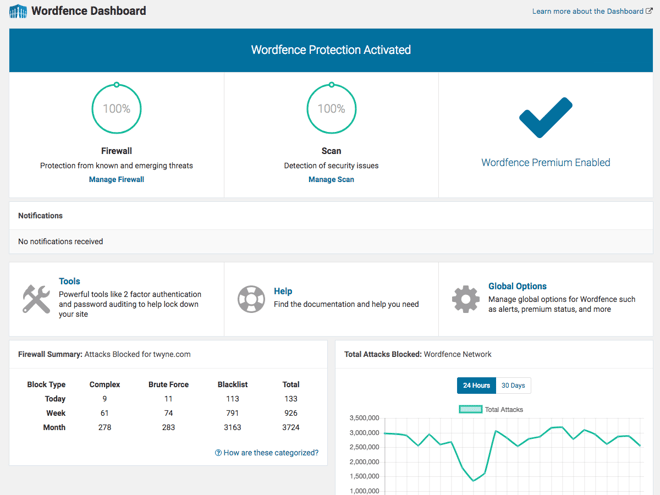
The Wordfence dashboard provides clear, actionable security information without overwhelming users. Security issues are categorized by severity level with specific remediation steps. The live traffic view helps site owners understand attack patterns and legitimate traffic sources.
Pros:
- Exceptionally thorough malware detection with industry-leading signature database
- User-friendly dashboard with clear security insights and actionable recommendations
- Regular updates with new threat signatures and attack pattern recognition
- Strong community support with extensive documentation and active forums
- No limitations on scan frequency or number of scanned files
- Detailed attack blocking logs with IP geolocation information
- Integration with popular caching plugins to minimize conflicts
Cons:
- Premium threat intelligence updates delayed by 30 days in free version
- Can consume significant server resources during full scans on shared hosting
- Complex interface with many options may overwhelm beginners initially
- Some advanced features like real-time IP blacklist updates require premium upgrade
- Email alerts can be overwhelming if not properly configured
Best Use Cases:
Wordfence excels for sites that need comprehensive protection without budget constraints. It’s particularly valuable for content-rich sites, blogs with comment systems, and small business websites that can’t afford premium security services but need professional-level protection.
The free version of Wordfence provides enterprise-level security features that many paid WordPress security plugins don’t match, making it the top choice for budget-conscious website owners who don’t want to compromise on security quality.
2. iThemes Security/Solid Security (Free) – Solid Foundation Protection
Now known as Solid Security, this plugin from the iThemes team (part of Liquid Web) focuses on implementing WordPress security best practices and providing solid foundational protection.
With over 1 million active installations, it has proven its reliability across diverse WordPress environments.
Core Security Features:
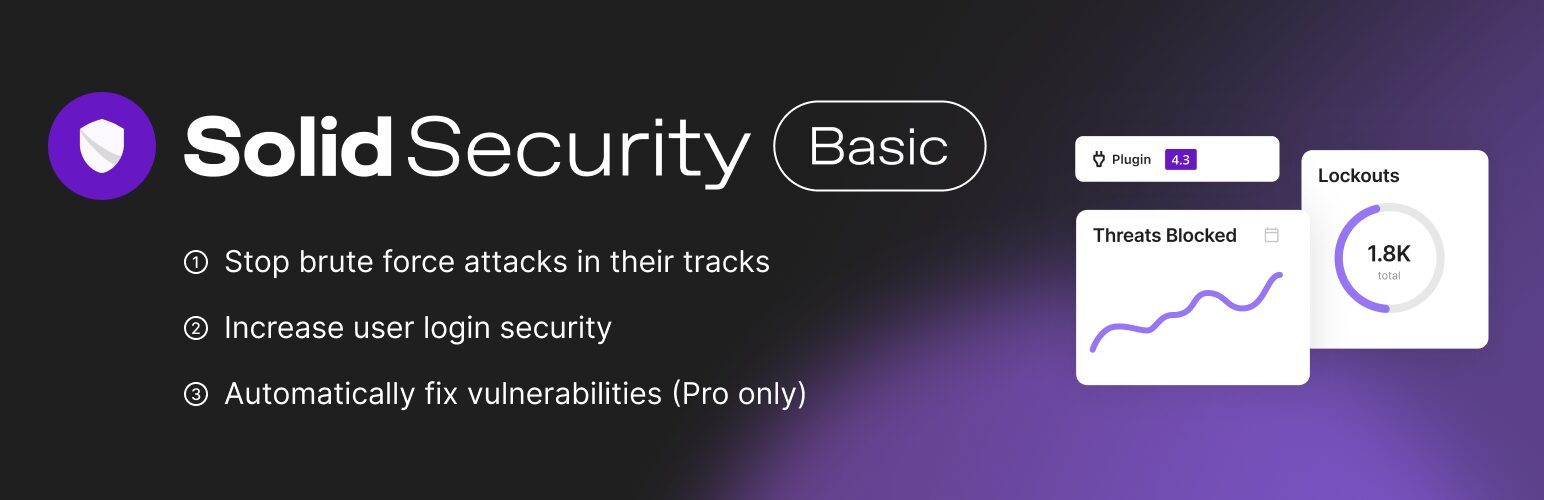
- Brute force attack protection with intelligent lockout policies that distinguish between legitimate users and attackers
- File change detection for core WordPress files, themes, and plugins with detailed change reporting
- Strong password enforcement with customizable password requirements across all user levels
- Security hardening recommendations with one-click implementation for most common security measures
- Security dashboard with clear scoring system and priority-based improvement suggestions
- WordPress version hiding to prevent attackers from targeting known vulnerabilities in specific versions
- Login URL customization to move login pages away from default WordPress locations
- User action logging to track administrative changes and user activities
- Database backup functionality with automated scheduling options
- Automated security hardening recommendations with one-click implementation for common protections
- Advanced firewall protection integrated with Patchstack for real-time vulnerability patching (new under Solid Security)
Security Hardening Focus:
iThemes Security is great at locking down the basics that a lot of WordPress users overlook. It guides you step-by-step through important settings like changing default database prefixes, hiding unnecessary site info, and securing key files like wp-config.php.
The idea is to stop attacks before they start by setting up your site securely from the beginning, rather than just reacting to threats after they happen.
Resource Efficiency:
Unlike resource-intensive scanning solutions, iThemes Security operates efficiently with minimal server impact. Most security measures operate passively, only consuming resources when blocking attacks or generating reports.
Educational Value:
The plugin includes detailed explanations for each security recommendation, helping users understand why specific measures matter and how they contribute to overall site security. This educational approach builds user knowledge over time.
Pros:
- Lightweight and fast-loading with minimal server resource requirements
- Excellent for implementing comprehensive security hardening measures
- Clear explanations of security recommendations with educational value
- Good compatibility with other plugins and themes
- Regular updates from established developer with strong WordPress community ties
- One-click implementation for most security hardening measures
- Detailed security scoring system with improvement guidance
Cons:
- Limited malware scanning capabilities compared to dedicated scanning solutions
- No firewall protection in free version, requiring premium upgrade for advanced blocking
- Basic feature set compared to comprehensive solutions like Wordfence
- Premium upgrade required for advanced features like malware scanning and two-factor authentication
- Less frequent updates to threat detection compared to specialized security plugins
Best Use Cases:
iThemes Security is perfect for people who want solid WordPress security without getting overwhelmed by complexity. It’s especially good for new sites that need guidance on hardening security, for setups with limited server resources, or for users who prefer learning as they go. It walks you through important security steps in a clear, easy-to-understand way.
3. All In One WP Security & Firewall – Beginner-Friendly Protection
This WordPress security plugin has earned over 1 million active installations by emphasizing ease of use while providing comprehensive basic protection.
Developed with beginners in mind, it makes enterprise-level security practices accessible to users at any technical level.
User-Focused Features:
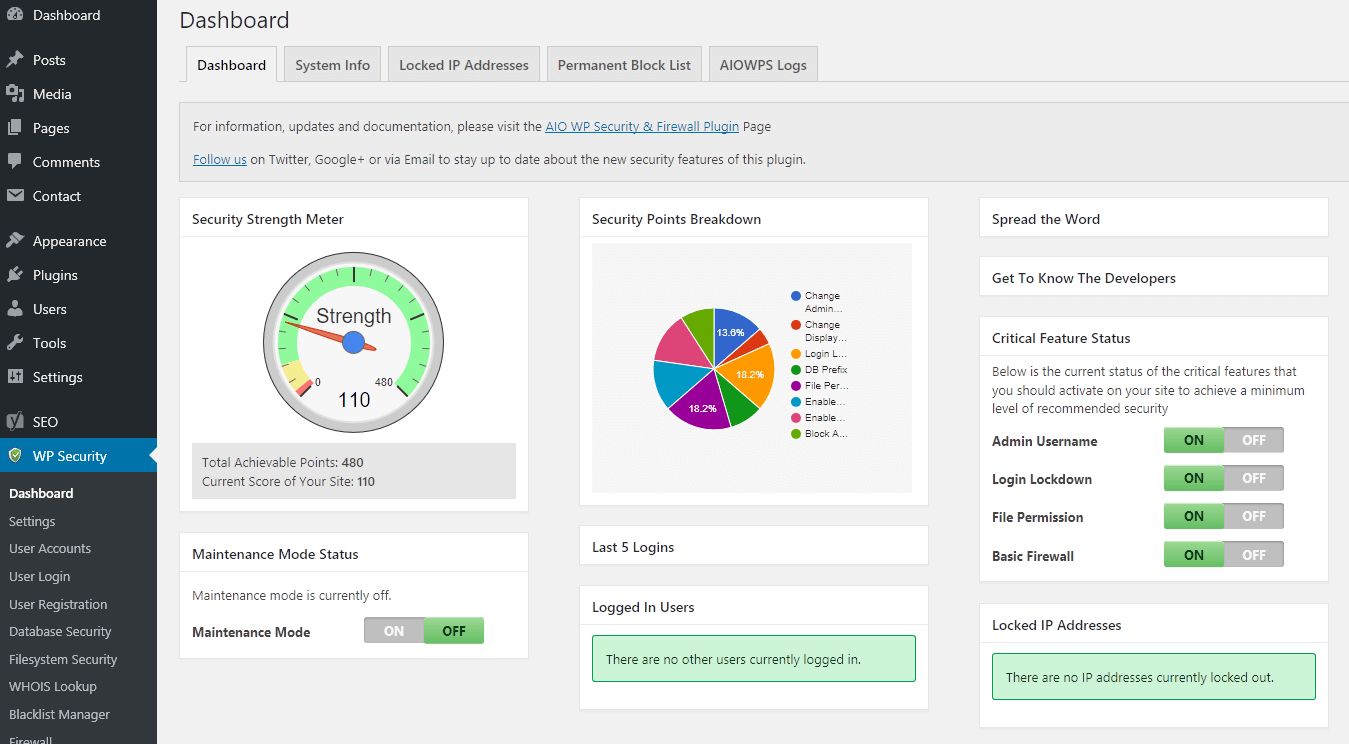
- Visual security strength meter that shows overall security posture with specific improvement recommendations
- Login lockdown protection with customizable policies for failed login attempts
- File permission scanner that identifies and corrects improper file permissions automatically
- Database security features including prefix changing and backup functionality
- Firewall rules implementation based on Jeff Starr’s proven 6G firewall methodology
- Comment spam protection with multiple filtering and blocking options
- User account security with password strength enforcement and user enumeration protection
- File system security including .htaccess optimization and directory browsing prevention
- Basic malware scanning for common infection patterns and suspicious files
Educational Interface Design:
The plugin’s interface uses traffic light color coding (green, yellow, red) to indicate security status levels, making it immediately clear which areas need attention. Each security measure includes detailed explanations written in plain English rather than technical jargon.
Comprehensive Coverage:
While focusing on ease of use, the plugin doesn’t sacrifice security coverage. It addresses all major WordPress security categories: login security, file system security, database security, firewall protection, and user management.
Step-by-Step Guidance:
The plugin guides users through security implementation with clear prioritization. Critical security measures are highlighted first, followed by recommended and advanced options. This prevents users from becoming overwhelmed while ensuring essential protections are implemented.
Performance Optimization:
All In One WP Security implements security measures efficiently, with most protections operating at the server configuration level rather than consuming WordPress resources during normal operation.
Pros:
- Extremely user-friendly interface with visual security guidance and progress tracking
- Comprehensive security hardening features covering all major vulnerability categories
- Detailed explanations of each security measure written for non-technical users
- No performance impact on most sites during normal operation
- Completely free with no premium upsells or feature limitations
- Regular updates with new security recommendations and WordPress compatibility
- Good integration with popular hosting environments and caching solutions
Cons:
- Limited real-time threat detection compared to active scanning solutions
- Basic malware scanning capabilities without advanced signature databases
- No cloud-based protection features or threat intelligence integration
- Fewer advanced customization options compared to professional security plugins
- Interface, while beginner-friendly, may seem simplistic to advanced users
Best Use Cases:
All In One WP Security excels for WordPress beginners who want comprehensive protection with guidance, small business owners who need security without complexity, and sites that prioritize ease of management over advanced features.
It’s particularly valuable for users who want to learn about WordPress security while implementing protection.
4. BulletProof Security – Database and Login Protection
BulletProof Security takes a focused approach among WordPress security plugins, specializing in login security and database protection with over 30,000 active installations. This plugin excels in specific security areas rather than attempting to be a comprehensive security solution.
Specialized Security Focus:
- Advanced login security with multiple protection layers including IP whitelisting and login page customization
- Database backup and monitoring tools with automated scheduling and integrity checking
- File upload security scanning that examines uploaded files for malicious content
- Login page customization options to hide WordPress login pages from automated attacks
- Security logging and monitoring with detailed attack attempt tracking
- Maintenance mode functionality for secure site updates and modifications
- File system monitoring for unauthorized file changes and uploads
- HTTP authentication implementation for additional login security layers
Database Security Specialization:
The plugin provides comprehensive database protection including automated backups with integrity verification, database table monitoring for unauthorized changes, and SQL injection prevention measures. The database backup system includes compression and incremental backup options to minimize server resource usage.
Login Security Innovation:
BulletProof Security implements several unique login security features, including the ability to completely hide login pages from unauthorized users, implement IP-based access controls, and create custom login URLs that change periodically.
Resource Efficiency:
Designed for optimal performance, the plugin operates efficiently without impacting normal site operations. Database operations are optimized to minimize server load, and security monitoring operates passively until threats are detected.
Customization Options:
Advanced users can customize security rules, logging levels, and monitoring parameters to match specific security requirements and server environments.
Pros:
- Strong focus on login and database security with specialized expertise
- Good performance with minimal resource usage during normal operations
- Detailed security logs for threat analysis and attack pattern identification
- Effective against brute force attacks with multiple protection layers
- Unique features like login page hiding and custom authentication methods
- Regular updates focused on login and database security improvements
Cons:
- Limited malware scanning capabilities compared to comprehensive security solutions
- Smaller user base means less community support and fewer third-party resources
- Interface could be more intuitive for beginners
- Some features overlap with WordPress core functionality
- Narrower security focus may require additional plugins for complete protection
Best Use Cases:
BulletProof Security works well for sites that need specialized login and database protection, membership sites with user authentication requirements, and websites that prioritize database security over general malware protection. It’s particularly valuable when used alongside other security measures to create layered protection.
5. WP Cerber Security – Advanced Free Protection
WP Cerber Security represents one of the most advanced free WordPress security plugins available, with over 300,000 active installations.
Developed by security professionals, it offers a generous free tier (firewall, malware scanner, 2FA). Premium removes the 30-day delay on real-time updates.
Comprehensive Security Features:
- Intelligent brute force protection with adaptive algorithms that distinguish between legitimate users and attackers
- Advanced firewall rules with custom rule creation and threat pattern recognition
- Real-time malware monitoring with signature-based and behavioral detection methods
- IP address management with sophisticated whitelisting, blacklisting, and geolocation controls
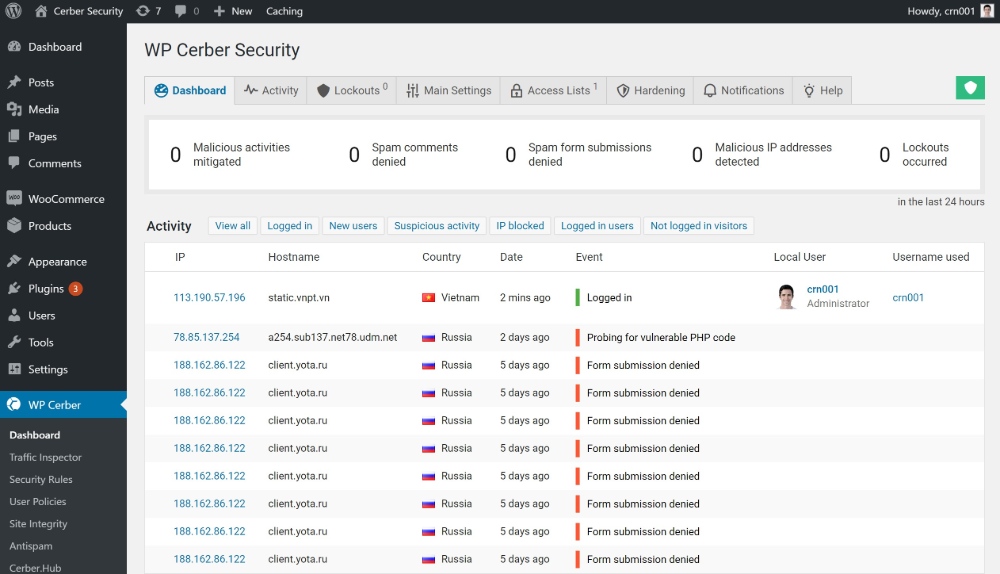
- Activity monitoring with detailed logging of all user actions and security events
- Anti-spam protection for comments and contact forms using multiple filtering methods
- Login security enhancement including custom login URLs and two-factor authentication
- File integrity monitoring with automated alerts for unauthorized changes
Advanced Threat Detection:
WP Cerber implements sophisticated algorithms for identifying attack patterns, including distributed brute force attacks, credential stuffing attempts, and automated vulnerability scanning. The plugin learns from attack patterns and adapts protection measures accordingly.
Global Threat Intelligence:
The plugin participates in a global threat intelligence network, sharing information about attack sources and patterns with other WP Cerber installations to provide collective protection against emerging threats.
Professional-Grade Features:
Despite being free, WP Cerber includes features typically found in enterprise security solutions, such as detailed forensic logging, advanced IP management, and sophisticated attack pattern recognition.
Pros:
- Advanced threat detection capabilities rivaling premium solutions
- Sophisticated attack pattern recognition and adaptive protection
- Global threat intelligence integration for enhanced protection
- Detailed logging and forensic capabilities for security analysis
- Regular updates with new threat signatures and protection methods
- Professional-grade features available at no cost
Cons:
- Complex interface that may overwhelm beginners
- Requires more configuration than simpler security plugins
- Can be resource-intensive during active threat detection
- Limited documentation compared to more established plugins
- Smaller community support network
Best Use Cases:
WP Cerber Security is ideal for technically-minded users who want advanced protection capabilities, sites that face frequent attack attempts, and users who need detailed security logging and analysis capabilities without premium costs.
Note: Not distributed via Blog Tool, Publishing Platform, and CMS – WordPress.org , available directly from the vendor.
6. Shield Security – Privacy-Focused Protection
Shield Security offers a unique approach among WordPress security plugins by emphasizing privacy protection alongside traditional security measures. With over 60,000 active installations, it provides comprehensive protection while maintaining strict privacy standards.
Privacy-Centered Security:
- Privacy-compliant monitoring that protects user data while detecting threats
- GDPR-compliant logging with automatic data purging and minimal data collection
- Anonymous threat detection that doesn’t compromise user privacy
- Local data processing to minimize external data sharing
- Transparent security practices with clear privacy policy and data handling documentation
Core Protection Features:
- Malware scanning with privacy-conscious detection methods
- Firewall protection with customizable rules and threat blocking
- Login security including two-factor authentication and brute force protection
- User activity monitoring with privacy-preserving audit logs
- Comment spam protection without compromising user privacy
Unique Privacy Features:
Shield Security implements security measures while maintaining user privacy through techniques like data anonymization, local processing, and minimal data retention policies.
Pros:
- Strong privacy protection alongside security measures
- GDPR and privacy regulation compliance
- Comprehensive security features with privacy focus
- Transparent data handling practices
- Regular privacy and security updates
Cons:
- Smaller user base and community support
- Privacy focus may limit some advanced security features
- Less comprehensive than dedicated security solutions
- Newer plugin with less established track record
Best Use Cases:
Shield Security is ideal for sites that need to comply with strict privacy regulations, European websites subject to GDPR requirements, and users who prioritize privacy alongside security protection.
Best Paid WordPress Security Plugins (Updated)
Premium WordPress security plugins offer advanced features, professional support, and comprehensive protection services that justify their cost for serious websites.
7. Sucuri Security – Complete Website Protection Platform
Sucuri has established itself as a leading website security provider, offering comprehensive protection that extends far beyond typical WordPress security plugins.

Key Features:
- Cloud-based Web Application Firewall (WAF) with global CDN
- Professional malware removal with unlimited cleanup guarantee
- Real-time malware monitoring and scanning
- DDoS protection and traffic filtering
- Website performance optimization through CDN
- Post-hack security hardening services
Pricing:
- Website Firewall: $9.99/month
- Complete Platform: $199.99/year
Pros:
- Comprehensive security platform beyond just WordPress
- Professional malware removal with guarantee
- Cloud-based protection doesn’t impact server performance
- Excellent reputation and track record
- 24/7 security monitoring
Cons:
- Higher cost than plugin-only solutions
- Free plugin has limited functionality
- Setup can be complex for beginners
- Some features may be overkill for small sites
Sucuri works best for business-critical websites that need professional-grade security and can’t afford any downtime.
8. MalCare – Smart Scanning and One-Click Removal
MalCare stands out among WordPress security plugins by performing scans on their own servers rather than using your site’s resources, ensuring better performance and more thorough detection.
Key Features:
- Server-side malware scanning that doesn’t slow your site
- One-click malware removal for most infections
- Intelligent scanning that adapts to different malware types
- Basic firewall protection
- Automatic daily scanning
- Staging site integration for safe testing
Pricing:
- Plus Plan: $149/year
- Prime Plan: $199/year
- Pro Plan: $299/year
Pros:
- Scanning doesn’t impact site performance
- High accuracy malware detection rates
- Quick and effective malware removal
- Good customer support
- Regular feature updates
Cons:
- Newer compared to established competitors
- Limited firewall features compared to Sucuri
- Higher pricing for multiple sites
- Some advanced features still in development
MalCare excels for users who want powerful malware protection without the complexity of full security platforms.
Get started with BuddyBoss now!
Ready to protect your WordPress site and build a thriving community?
9. Jetpack Security – Integrated WordPress Protection
Developed by Automattic (the team behind WordPress.com), Jetpack Security provides integrated protection that works seamlessly with WordPress core functionality.
Key Features:
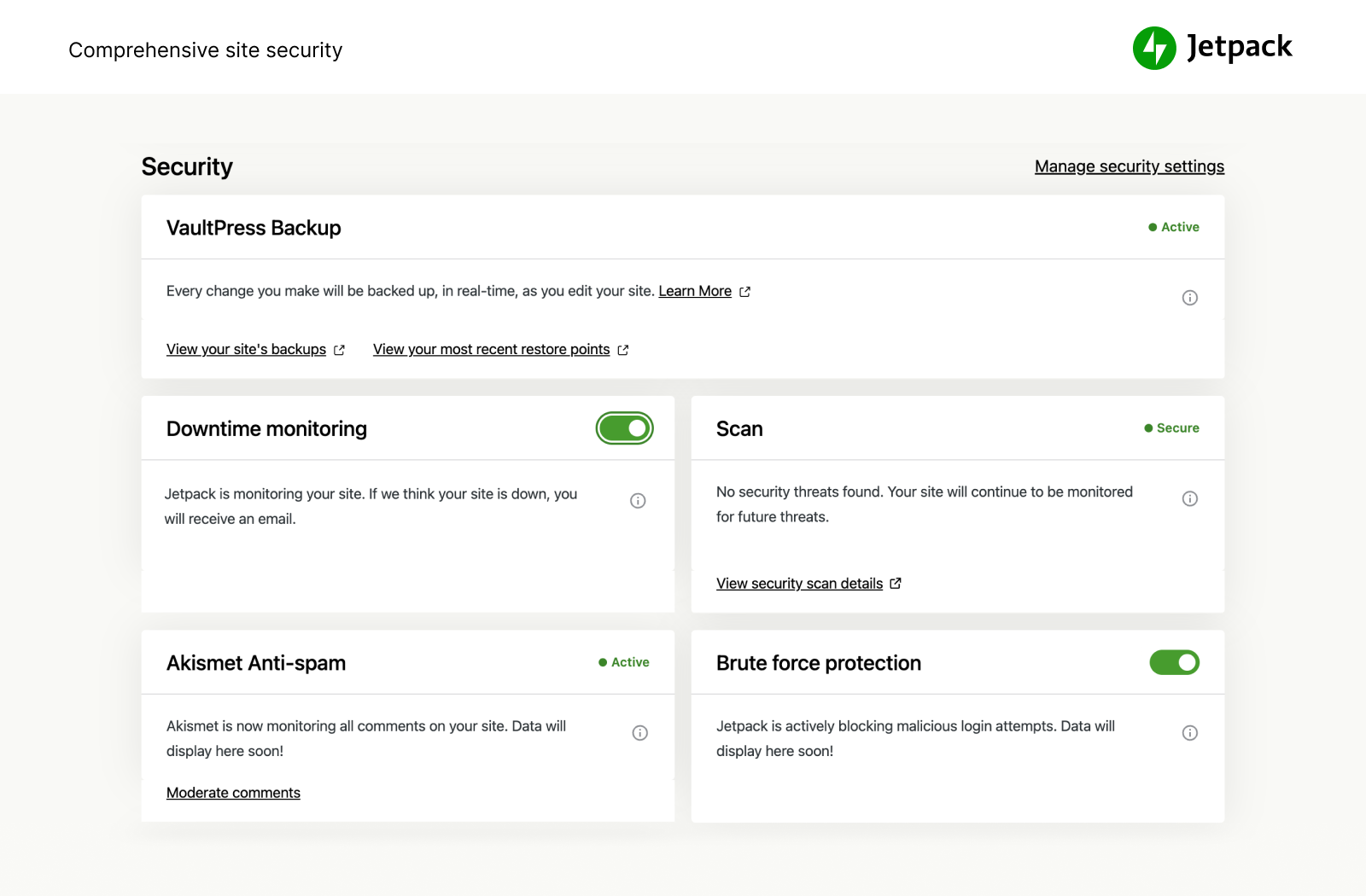
- Real-time backup with one-click restoration
- Malware scanning with automated threat removal
- Brute force attack protection
- Spam filtering for comments and contact forms
- Activity log monitoring
- Downtime monitoring and notifications
Pricing: $6.65/month (price may vary please check official website)
Pros:
- Seamless WordPress integration
- Comprehensive backup and security combination
- Regular updates from WordPress core team
- Good performance optimization features
- Reliable uptime and support
Cons:
- More expensive than specialized security plugins
- Some users prefer standalone security solutions
- Limited advanced firewall options
- Pricing includes features beyond security
Jetpack Security works well for users who want integrated WordPress functionality with solid security features.
Note:- Jetpack often offers a promotional discount for the first year, but renewal prices can be higher thereafter; it’s best to check the official website for the latest pricing details.
WPScan – Vulnerability Database Monitoring
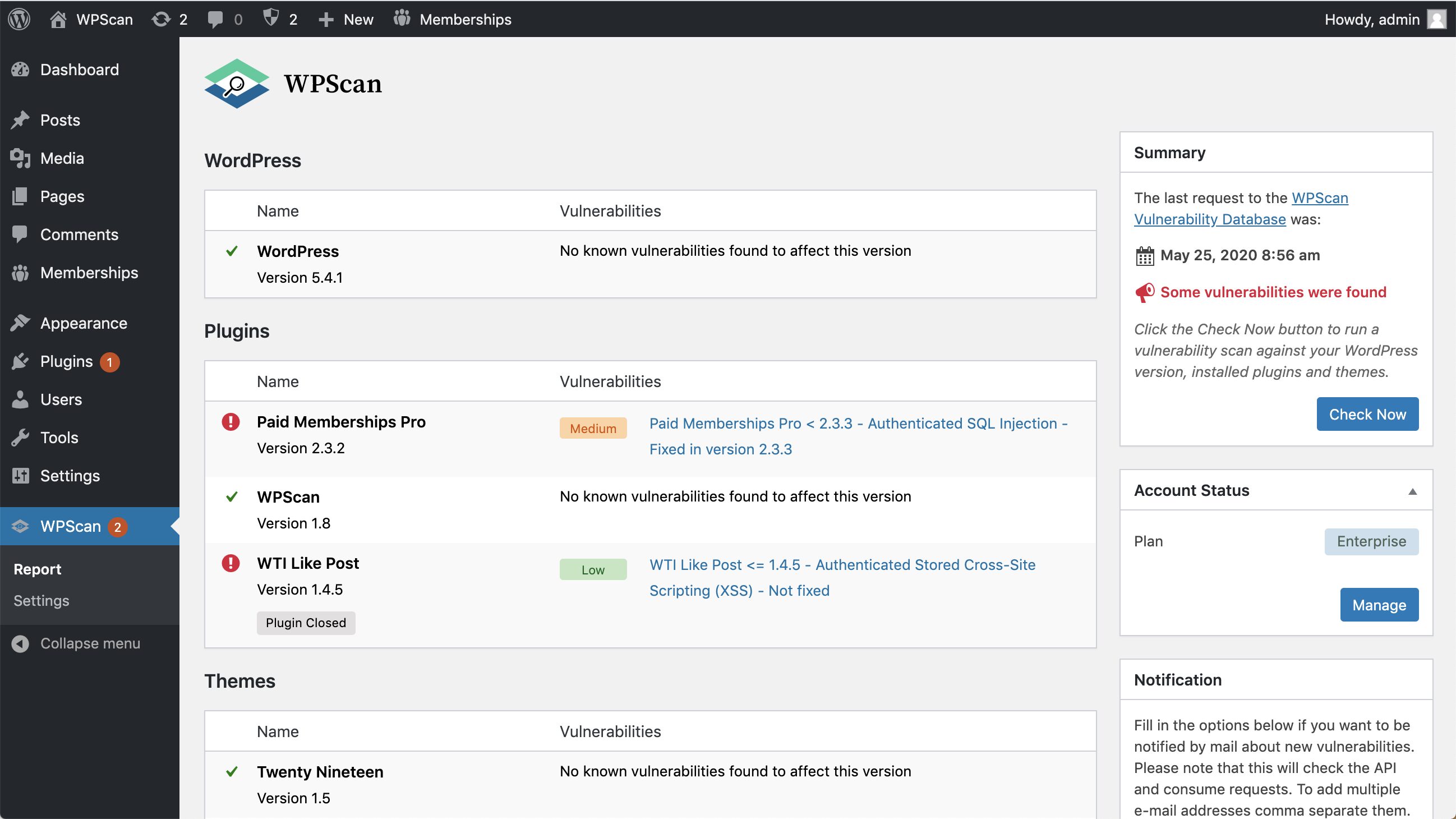
WPScan provides access to the most comprehensive WordPress vulnerability database, making it valuable for security professionals and agencies managing multiple sites.
Key Features:
- Comprehensive WordPress vulnerability database
- API access for custom security implementations
- CLI scanner for penetration testing
- Real-time vulnerability alerts
- Professional security assessment tools
- Integration with other security platforms
Pricing:
- Starter: $25/month for 25 API requests
- Professional: $250/month for 1000 API requests
- Enterprise: Custom pricing for unlimited access
Pros:
- Most complete vulnerability database available
- Professional-grade security tools
- Regular vulnerability research and updates
- API integration capabilities
- Trusted by security professionals
Cons:
- Requires technical expertise to use effectively
- Higher cost than typical WordPress security plugins
- Focused on vulnerability detection rather than protection
- Not suitable for beginners
WPScan is ideal for security professionals, agencies, and advanced users who need detailed vulnerability intelligence.
Free vs Paid WordPress Security Plugins
Choosing between free and premium WordPress security plugins depends on your site’s risk profile, budget, and security requirements.
When Free WordPress Security Plugins Are Sufficient
Free options like Wordfence provide excellent protection for many websites:
Low-risk sites including personal blogs, portfolio sites, and informational websites with minimal user data or e-commerce functionality benefit from comprehensive free protection.
Technical users who can manage security configurations, perform regular updates, and handle basic malware cleanup may not need premium support services.
Budget-conscious projects in early stages can start with free WordPress security plugins and upgrade as they grow.
Sites with good hosting security that already include server-level protection may only need application-level security plugins.
When Premium WordPress Security Plugins Make Sense
Several situations justify investing in paid WordPress security plugins:
Business-critical websites where downtime costs money need professional malware removal guarantees and priority support.
E-commerce sites handling payment data face regulatory requirements and higher attack risks that premium features address.
High-traffic websites benefit from cloud-based protection that doesn’t consume server resources.
Non-technical users value professional support, automated responses, and comprehensive protection without configuration complexity.
Sites with previous security issues often need professional cleanup services and enhanced monitoring to prevent reinfection.
Must-Have Security Practices Beyond WordPress Plugins
WordPress security plugins provide crucial protection, but they work best as part of comprehensive security strategies that address all potential vulnerabilities.
Keep WordPress core, plugins, and themes updated to patch vulnerabilities.
Use strong, unique passwords and enable two-factor authentication (2FA).
Regularly back up your site and store backups offsite.
Choose secure hosting with SSL certificates and firewall protection.
Limit login attempts to prevent brute force attacks.
Restrict user permissions to only what’s necessary.
Disable file editing in the WordPress dashboard for added security.
Restrict access to sensitive files like wp-config.php using proper permissions.
Scan your site frequently for malware and security issues.
Test backups regularly to ensure quick restoration when needed.
Comprehensive Security Features and Best Practices in BuddyBoss
BuddyBoss delivers advanced, multi-layered security to ensure that community sites and private member environments stay safe, private, and compliant. Its architecture and features focus on both prevention of threats and flexibility around privacy, so every site owner, whether running a learning platform, membership site, or social network you can tune access and data handling to your needs.
How BuddyBoss Protects Your Community
Secure Profile URLs: BuddyBoss enhances privacy by generating unique, random identifiers for member profile URLs rather than displaying usernames, which are sometimes tied to email addresses. This prevents user enumeration and makes it much harder for attackers to target specific accounts or scrape member data. Admins can toggle this security option while retaining backward compatibility with older profile links. Switching back to username-based links is possible at any time, maintaining platform flexibility.
Granular Member Access Controls: With BuddyBoss Platform Pro, every content type including activity posts, groups, forums, and messaging can be gated by membership status, role, profile type, or achievements. Admins can precisely manage who can view, contribute to, or moderate any area of the platform, supporting public communities, private cohorts, and paid memberships. These finely tuned controls are essential for upholding privacy and building trust at scale.
Website Authentication and App Security: For staging and development, or when restricting access to select audiences, BuddyBoss supports website-wide authentication. You can require a password to view the whole site, keeping it hidden from the public until ready for launch; this works alongside the BuddyBoss mobile app, so testing isn’t interrupted for team members or beta users. For more robust mobile login security, Single Sign-On (SSO) can be enabled, leveraging trusted identity providers to lock down accounts and eliminate password overload.
Privacy and Regulatory Compliance (GDPR): BuddyBoss is designed with privacy-by-default. It integrates tightly with WordPress data export and erasure tools (per GDPR regulations) for both BuddyBoss and bbPress data, empowering site owners to fulfill data requests and right-to-erasure claims with just a few clicks. Plugins and documentation ensure admins can comply with privacy best practices and legal frameworks anywhere in the world.
Integration With Security and Anti-Spam Plugins: BuddyBoss is compatible with the leading WordPress security plugins (like Wordfence and Solid Security), allowing for even greater layers of protection: firewalls, malware scanning, brute-force protection, and IP blacklisting. Security best practices, such as two-factor authentication, strong password enforcement, and login attempt limitations are easy to implement in tandem with BuddyBoss Platform features.
Modular Feature Controls and Data Sensitivity: Admins can activate or deactivate any BuddyBoss component such as messaging, group creation, media uploads, or profile visibility, directly from the dashboard. You choose which member data fields are visible, which feature tabs appear, and how user information is displayed, supporting both open and highly private social networks. This modularity makes it easy to respond to new threats or changing privacy norms without coding.
Multi-Device and Network Security: Whether your members use the web version or the dedicated mobile app, session management and user permissions remain consistent across devices. The architecture supports secure API calls and access control, so information remains protected as your platform grows in members and usage.
FAQs on WordPress Security Plugins
What is the best free WordPress security plugin?
Wordfence Security is the top free choice, with malware scanning, firewall, and 2FA, used by 5M+ sites.
Do I really need a security plugin for WordPress?
Yes. With thousands of vulnerabilities discovered yearly, a security plugin is essential for automated protection.
Which paid plugin offers the best value?
MalCare is great at $99/year with scanning & malware removal. Sucuri is ideal at $199/year for cloud protection & 24/7 monitoring.
Can I use more than one security plugin at once?
No. Running multiple security plugins can cause conflicts and reduce protection. Stick to one reliable plugin.
How often should I scan my WordPress site?
Daily scans are best. Premium plugins often provide real-time monitoring, while free ones usually offer daily or on-demand scans.
Security Plugins and Tools Integrated with BuddyBoss (BB)
BuddyBoss integrates well with several popular WordPress security plugins to help maintain a secure environment for community sites.
Notable among these are Wordfence Security, which offers comprehensive firewall protection, malware scanning, and login security features that help guard against common threats.
Another strong option is iThemes Security, now known as Solid Security, which provides protection against brute force attacks, detects file changes, and offers easy-to-follow security hardening steps for BuddyBoss users.
Sucuri Security is also widely used, delivering malware scanning, blacklist monitoring, and activity auditing to keep the site clear of infections and unauthorized changes. Jetpack Security, developed by Automattic, combines real-time backups with malware scanning and downtime monitoring, providing a broad set of protections that work smoothly with BuddyBoss.
Additionally, All In One WP Security & Firewall provides advanced firewall rules and database security tailored to BuddyBoss environments.
Keeping your WordPress site secure is simpler than it seems. By using trusted security plugins like Wordfence, Solid Security, Sucuri, and Jetpack, combined with basics like regular updates, strong passwords, two-factor authentication, and backups, you create a strong defense.
This layered approach helps protect your site and community, giving you peace of mind in an ever-evolving digital world.

 Article