It starts with a routine check.
Just logging into your hosting dashboard like you do every month. Except this time, there’s a number that makes your stomach drop.
$547 for media storage.
You scroll up to last month’s invoice. $280. Six months ago? $95.
Wait. How did this happen?
Your community is thriving. 8,000 members. High engagement. Members post workout videos, transformation photos, and progress updates constantly. Exactly what you wanted when you launched.
The storage bill? Not what you wanted.
You do the math. At this rate, you’ll hit $800/month by January and over $1,000 by March. Storage costs are scaling faster than your revenue.
Three options sit in front of you: raise prices and risk losing members, restrict uploads and kill engagement, or fix the problem you don’t fully understand yet.
You’re not alone. Thousands of community founders hit this exact wall.
Also the $547 bill? That’s just the symptom. The real problem runs deeper.
- The Performance Crash That Comes Before The Bill
- The Hidden Mechanics of Media Storage for Online Communities
- The Real Cost Breakdown Nobody Shows You
- Here’s What Your Hosting Actually Costs at Each Growth Stage
- What Your Hosting Bill Doesn't Show
- FAQs About Media Storage for Online Communities
- How Successful Communities Scale and What You Should Do
The Performance Crash That Comes Before The Bill
Here’s what nobody warns you about: the money problem shows up second. The performance problem shows up first.
It starts subtly. Your site feels slightly slower. Page loads that used to be instant now take 2-3 seconds. You refresh a few times. Seems fine. You move on.
A few weeks later, members start mentioning it. “Is the site slower for anyone else?” in your community chat.
You check, everything looks normal on your end. Must be their connection.
Then the real problems start.
When Your Infrastructure Buckles
I have a large film website that hit 200 GB of uploads … the only option was to spend $600/year for more space. — WordPress User on Reddit, profmoxie
A member uploads a 200MB video during your community’s peak hours.
Your server tries to process it, generating thumbnails, creating database entries, handling the file transfer.
Meanwhile, 50 other members are trying to load pages, stream videos, and upload their own content.
Your server maxes out its resources. Pages time out. The video uploader gets an error message.
Three other members get white screens trying to access their profiles. Your hosting provider sends an automated email: “High resource usage detected.”
You upgrade your hosting plan. Problem solved. Only for now.
The Cascade Effect
As your video library grows, everything compounds. Your admin dashboard now takes 45 seconds to load the video library.
Moderators complain they can’t review flagged content efficiently. You try to find a specific member’s uploaded photo, the page times out before loading all the thumbnails.
Even members start reporting buffering videos. A 2-minute workout clip stutters every 10 seconds.
Comments roll in: “Anyone else having playback issues?” You test it—plays fine for you.
But you’re on fast Wi-Fi. Your members? They’re on mobile data, at the gym, streaming from a server that’s already handling 50 simultaneous video requests.
When Performance Becomes a Crisis
The breaking point usually arrives during your best moments. A course launch. A challenge kickoff. A viral post that drives traffic.
Suddenly hundreds of members are uploading content simultaneously.
Your server can’t handle it. The site slows to a crawl. Then it crashes completely. Error 503: Service Unavailable.
It’s down for 2 hours while your hosting provider “investigates resource usage.”
Members flood your email. Some request refunds. Others just leave quietly, assuming your platform isn’t reliable.
When service returns, you get the diagnosis: your video library is overwhelming your server.
The hosting bill hasn’t spiked yet, but your infrastructure is already breaking. The costs come later, after the damage to member trust is done.
This is the pattern successful communities need to avoid. Performance degradation isn’t a maybe, it’s a when. Understanding the economics of storage means planning for this moment before it arrives.
The Hidden Mechanics of Media Storage for Online Communities
At first, media storage feels like a small detail. A few videos here, a couple of members uploaded there.
But as your online community starts thriving, those “small details” quietly grow into a costly problem.
As one community manager put it:
Our library is 72 GB and going up around 1.5 GB per month … It’s just the storage that is an issue. — Reddit user on WordPress media scale
Every new course module, tutorial recording, or shared image adds weight to your hosting server.
And it’s not just about the space those files occupy. Each upload affects your bandwidth, backups, and performance — multiplying costs in ways that aren’t always visible at first.
But behind the scenes, your hosting plan is struggling to keep up and your monthly bill is growing faster than your membership count.
That’s the $500/month trap so many creators fall into.
If you’re running a community on WordPress or BuddyBoss Platform, understanding how file uploads impact hosting performance is crucial.
What starts as a shared hosting plan for $50 quickly snowballs as your media library expands.
Soon, you’re paying for additional storage, premium bandwidth, and constant backups, just to keep your site running smoothly.
The irony? The more engaged your community becomes, the more you end up paying to support that success.
This is where understanding the cost you pay for media storage becomes critical.
If you’re still in the early growth phase, We have a blog, where we’ve broken down how structured learning pathways can help you create engagement that scales without unnecessary bandwidth spikes.
The Real Cost Breakdown Nobody Shows You
Most hosting providers advertise their plans based on “unlimited storage” or generic tier names.
Here’s what those plans truly cost (approx.) when you’re running a real community with real users uploading real content.
Here’s What Your Hosting Actually Costs at Each Growth Stage
The Starter Tier: $20-50/Month (Until Reality Hits)
What you get: 50GB storage
What they tell you: Perfect for small businesses and growing sites
What works: 500-1,000 members in a text-focused community
This tier works if your community is primarily discussion-based. Forum posts, text updates, maybe small profile avatars.
The moment members start uploading workout photos, recipe images, or any kind of media content, you’re done.
A single high-resolution photo from a modern smartphone is 3-5MB. Do the math: 50GB divided by 4MB per image equals roughly 12,500 photos.
Sounds like a lot until you have 800 members each uploading 15-20 images over a few months.
Breaking point: Around 800-1,200 members with moderate image sharing.
The Growth Tier: $100-200/Month (The False Security Zone)
What you get: 200GB storage
What they tell you: Designed for growing businesses
What works: 3,000-5,000 members, light media usage
You upgrade here thinking you’ve solved the problem. You haven’t. You’ve bought yourself 6-12 months.
This tier handles text discussions plus regular photo sharing. Members can upload progress pics, event photos, the occasional short video.
But the ceiling comes fast once you hit critical mass.
At 4,000 members posting an average of 3 images per month at 4MB each, you’re generating 48GB of new content monthly.
You’ve got four months of runway, maybe five if members are less active than average.
Breaking point: 5,000-7,000 members, or earlier if video content becomes popular.
The Reality Tier: $300-800/Month (Where Most Communities Live)

Welcome to where successful communities actually operate.
This is the tier nobody talks about in those “start your community for $50/month” blog posts.
1TB sounds massive until you break it down.
A community with 8,000 members uploading workout videos, transformation photos, and tutorial content will fill 1TB in 12-18 months.
Then you’re looking at the 2TB plan, which is closer to $600-800/month depending on your provider.
At this tier, you’re not just paying for storage. You’re paying for the bandwidth to deliver all that content, the processing power to handle uploads, and the backup systems to not lose years of member content.
Breaking point: 10,000-15,000 members, or sooner with heavy video usage.
The Enterprise Tier: $1,000+/Month (Where Growing Communities Get Stuck)
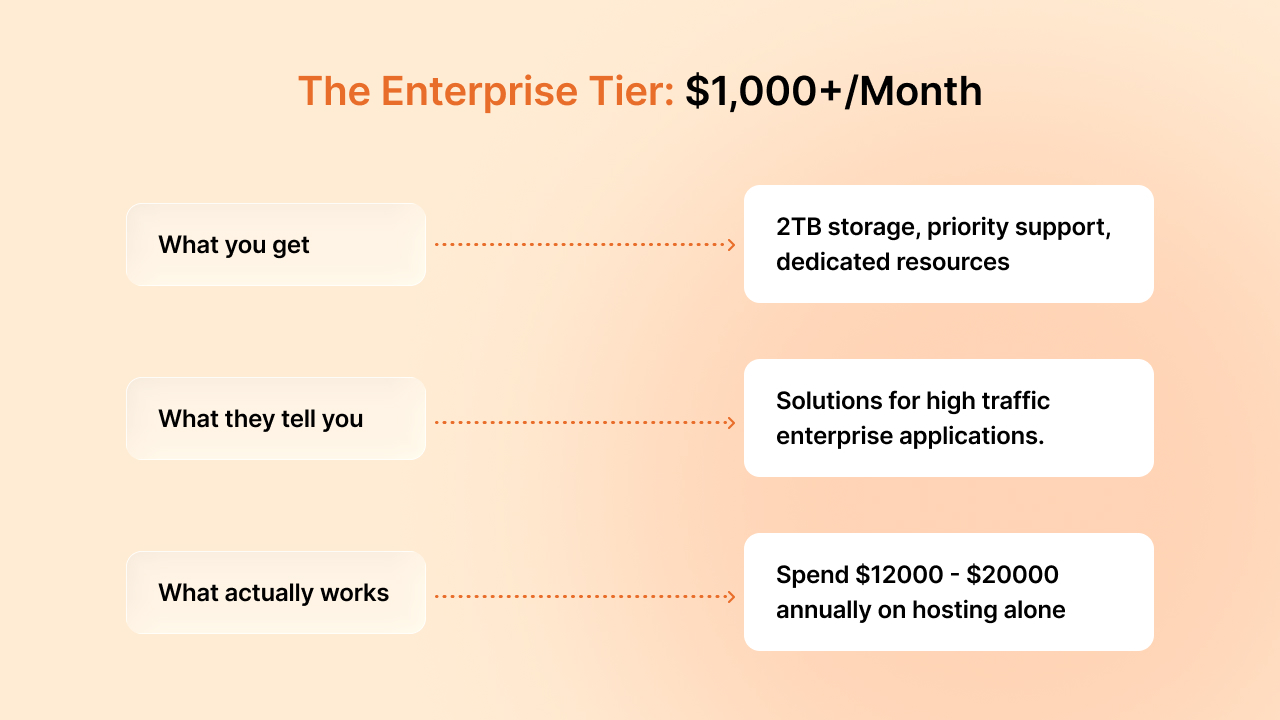
This is where community founders have their existential crisis.
You’re successful enough to need enterprise hosting but may not be successful enough to comfortably afford it.
Your community has 15,000+ members. Engagement is strong. Revenue is decent.
But 30-40% of your gross revenue goes to hosting infrastructure.
Investors (if you have them) start asking uncomfortable questions about unit economics. You start looking at alternatives because the math stops working.
The trap: You can’t go backwards. You can’t delete member content. You can’t restrict uploads without killing engagement. You’re stuck paying enterprise prices or rebuilding your entire infrastructure.
What Each Member Costs in Storage
Here’s the metric that truly matters when planning your community economics: cost per member per month.
Understanding this number helps you build sustainable pricing from day one.

Text-only community: $0.08/member/month
Forum-style communities with minimal media—profile photos, small avatars, and text-based discussions. This model scales beautifully at almost any size and keeps your storage costs predictable.
Photo-sharing community: $0.35/member/month
Members regularly share images like progress photos, event pictures, and visual updates. This covers most fitness communities, parent groups, and hobby-based platforms. Still very manageable with the right infrastructure.
Video-enabled community: $0.75-1.20/member/month
Members upload videos regularly—form checks, tutorials, transformation stories, video introductions. This is where infrastructure becomes a strategic consideration rather than an afterthought.
Let’s run the numbers: If you charge $29/month for membership and you’re running a photo-sharing community, you’re spending about 1.2% of gross revenue on storage ($0.35 per member). That’s healthy and sustainable.
For video-enabled communities at $0.75-1.20/member, you’re looking at 2.5-4% of revenue on storage. Add payment processing (2-3%) and platform costs, and suddenly infrastructure is a significant line item. Not a dealbreaker, but definitely something to plan for in your pricing strategy.
The good news? Knowing these numbers means you can make informed decisions about your membership tiers and what features to include at each level.
Note: Actual costs vary by vendor and region
What Your Hosting Bill Doesn’t Show
The storage bill you see every month? That’s not the full picture. It’s basically just the foundation.
As your community grows and becomes more sophisticated, you’ll need additional infrastructure pieces that work together to deliver a great member experience.
These costs typically show up as separate line items on your hosting bill, and they’re easy to miss when you’re planning your initial budget.
The good news is that these costs are predictable and directly tied to your growth. They’re not surprises, they’re milestones.
When you need CDN delivery or automated backups, it means your community is successful enough to require professional-grade infrastructure.
Here’s what to expect and when.
Bandwidth: The Other Half of the Equation
Storage is the space your files occupy. Bandwidth is how often members access those files.
Most hosting plans bill these separately, and understanding the difference matters—especially for video.
Here’s a practical example: You upload a 50MB workout video once. That’s 50MB of storage. But when 1,000 members view it, that’s 50GB of bandwidth.
Your hosting plan might include 1TB of monthly bandwidth, which covers most communities comfortably, until you have a few viral videos.
Bandwidth overages typically cost $0.10-0.20 per GB. If you’re consistently hitting your limits, it’s a signal that your community is thriving and it might be time to evaluate your hosting setup.
Planning tip: Track your bandwidth usage monthly. If you’re consistently using 70-80% of your allocation, it’s time to upgrade or explore alternative delivery methods before overages hit. Video streaming can consume 10-20x more bandwidth than photo viewing.
Backup: Your Insurance Policy
Backing up member content isn’t optional. It’s a trust issue.
Members are trusting you with their videos, photos, and content. A solid backup strategy protects that trust.
The standard approach is maintaining off-site backups of everything, which essentially doubles your storage costs. If you’re paying $400/month for 1TB of live storage, budget $200-300 for backup infrastructure.
Think of it like business insurance. You hope you never need it, but when you do need it, it’s invaluable.
A single server issue without backups can cost you far more in member trust and reputation than years of backup fees.
Planning tip: Automated daily backups with 30-day retention is a good starting point. Most hosting providers offer this as an add-on service for 30-50% of your hosting cost.
Many managed WordPress hosts, like Kinsta, include daily backups with multi-week retention for high-traffic sites and recommend keeping at least several weeks of restore points
CDN Delivery: The Global Experience Factor
Your hosting server lives in one location. Your members? They’re everywhere.
A member in Sydney accessing video content from a US server means longer load times and buffering.
Content Delivery Networks (CDNs) solve this by caching your files on servers worldwide.
Members get content from the closest server, which means faster load times and smooth video playback everywhere.
CDNs typically charge per GB delivered, expect to pay $0.08-0.12 per GB.
For a community serving 2TB of video content monthly to global members, that’s $160-240/month. It sounds like a lot until you realize it’s buying you a consistently fast streaming experience for members on every continent.
Planning tip: Start with CDN for video content first, that’s where you’ll see the biggest performance impact. Images can often wait until you’re serving truly global audiences.
Database Performance: Planning for Scale
Every media upload creates database records; file paths, timestamps, user associations, post connections.
Video files create even more: thumbnail references, processing status, duration metadata, view counts. Over months and years, these add up.
As your database grows, queries slow down. Load times increase.
Your hosting provider might recommend upgrading your database resources, typically adding $50-200/month to your costs.
The real cost isn’t the money, it’s maintaining that snappy, responsive experience members expect.
Slow-loading video galleries or laggy activity feeds impact engagement more than any feature you could add.
Planning tip: Database optimization isn’t just about upgrading. Regular maintenance, proper indexing, and strategic caching can extend your current setup significantly before needing the next tier.
FAQs About Media Storage for Online Communities
Let’s explore a few frequently asked questions about media storage and media offloading-
How much does media storage cost for a video-based community?
Media storage for video communities costs $0.75-1.20 per member per month when factoring in storage, bandwidth, backups, and CDN delivery. A 5,000-member community uploading videos regularly typically spends $400-600 monthly on infrastructure.
When should I upgrade my hosting plan for media storage?
Upgrade when you consistently use 70-80% of your storage or bandwidth allocation, or when page load times exceed 3 seconds. For video communities, this typically happens at 3,000-5,000 active members.
What’s the difference between storage and bandwidth costs?
Storage is the space your files occupy on servers. Bandwidth is how often those files are accessed and delivered. A 50MB video stored once but viewed 1,000 times generates 50GB of bandwidth, often costing more than the storage itself.
Can I use free hosting for my online community?
Free or shared hosting works for text-based communities under 1,000 members. For video content or communities over 2,000 members, you’ll need dedicated hosting or cloud storage solutions to maintain acceptable performance.
How do I calculate storage needs for my growing community?
Multiply your member count by average monthly uploads per member, then by average file size. Add 40-60% for backups, thumbnails, and metadata. Video communities should budget for 2-3x initial estimates to account for engagement growth.
What causes media storage costs to spike suddenly?
Viral content, challenge launches, or course releases trigger simultaneous uploads. A single popular video driving 10,000 views can generate unexpected bandwidth charges of $100-200 if you’re near your limit.
Is cloud storage better than traditional hosting for communities?
Cloud storage scales automatically and usually offers lower per-GB costs at high volumes, especially when combined with a CDN. Traditional single-server hosting is simpler at small scale, but for 5,000–8,000+ members with regular video uploads, it can become significantly more expensive and harder to scale.
How does WordPress handle community media differently than blog media?
WordPress generates several size variations per image (often 4–6 by default). Community platforms multiply this across profiles, groups, feeds, and forums — so each upload can result in many more database entries and file references than a simple blog.
How Successful Communities Scale and What You Should Do
You’re not stuck with escalating hosting bills.
Successful communities solve this through media offloading, infrastructure that separates media storage from WordPress hosting and delivers files from external sources designed for scale.
Media offloading comes in several forms: cloud object storage (AWS S3, Cloudflare R2, Wasabi), CDN delivery networks, hybrid setups combining both, or aggressive media compression. Each approach has tradeoffs in cost, complexity, and performance.
Some media offloading solutions are cheap but technically complex.
Others are simple but expensive at scale.
A few work great for standard WordPress but break with community-specific features like member profiles, activity feeds, and group uploads.
The right media offloading strategy depends on your community size, technical resources, and growth trajectory. There’s no one-size-fits-all answer.
Ready to compare your options? We’re coming soon with our next article- “WordPress Media Offloading: We Compared 5 Solutions for BuddyBoss Communities”
We break down actual implementation costs, technical requirements, and honest assessments of what works for video-heavy WordPress communities.
So, If your community’s media bills are getting out of hand, check out our detailed comparison of offloading solutions for BuddyBoss.


-
 Article
 Article
- Building Your Online Community