
Introduction
The Display Settings in BuddyBoss Gamification allow you to control where your members’ Points, Ranks, and Achievements appear on their profile pages and in the member directory. Configuring these options helps you decide how visible gamification elements are across your community. This guide explains how you can configure BuddyBoss Gamification display settings.
Access the Gamification Display Settings
- In your WordPress Dashboard, go to BuddyBoss > Gamification.
- Click on the General tab.
- You’ll find the Display Settings section at the top of the page.
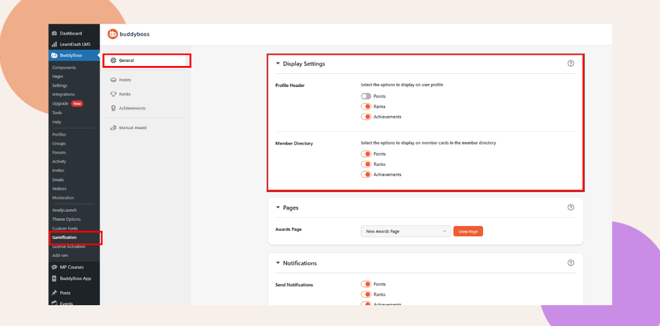
Configure Display Options
Within the Display Settings, you can choose what gamification details are shown in different areas of your site.
Profile Header
Under Profile Header, select which options to display on each member’s profile page:
- Points – Show total points earned by the member.
- Ranks – Display the member’s current rank.
- Achievements – Show badges or achievements earned by the member.
Toggle each switch on or off depending on what you want visible in profiles.
Member Directory
Under Member Directory, choose which gamification details to display on member cards in the community directory:
- Points – Display total points directly on the directory card.
- Ranks – Show the member’s rank.
- Achievements – Highlight badges or earned milestones.
This helps other members see progress at a glance, adding motivation and engagement to your community.
Troubleshooting and FAQs
Q: I don’t see the Gamification menu under BuddyBoss.
A: Ensure the BuddyBoss Gamification plugin is installed and activated. Once active, it appears under BuddyBoss > Gamification.
Q: My changes to the display settings aren’t showing up.
A: Try clearing your site and browser cache. Also, confirm that the display toggles are enabled and saved properly.
Q: Can I display only Points and hide Ranks or Achievements?
A: Yes. You can toggle each setting independently in the Display Settings section.
Q: Are these settings applied to all members?
A: Yes, display settings are global and affect how gamification information is shown across all user profiles and member listings.


