Activity posts are the lifeblood of any thriving online community, the dynamic conversations and updates that keep members engaged and informed. They are where ideas spark, announcements are shared, and connections deepen.
Recognising their pivotal role, we’re excited to unveil Activity Post Formatting Enhancements, a powerful new suite of tools designed to cultivate a more organised, visually compelling, and professional community experience for everyone.
These enhancements are rolling out from BuddyBoss Platform 2.13.0, Platform Pro 2.9.0, and BuddyBoss App 2.9.0 – empowering you to make every piece of content shine.
Transform Your Activity Feed, Professional Content, Powerful Engagement
Activity Post Formatting Enhancements empower community creators to elevate their content quality and cultivate a more organized and visually compelling community experience, ensuring their most valuable content always stands out. This feature transforms ordinary activity posts into professional, impactful content that drives greater engagement, enhances discoverability, and boosts your community’s SEO. It allows you to present information in a highly organized, readable, and visually compelling manner, making every post count.
Unlocking Content’s Full Potential: The Power of Enhanced Formatting
Before, important announcements and calls to action sometimes got lost in a stream of text, making it harder for members to quickly grasp critical information. Now, with Activity Post Formatting Enhancements, the struggle to create visually compelling and SEO-friendly posts is over. You can give every post a clear title, structured headings, and captivating featured images (Platform Pro required), instantly grabbing attention and making valuable content effortlessly discoverable. This transforms your activity feed into a dynamic and engaging hub, where every piece of content reflects your brand’s professionalism and sparks genuine interaction, fostering a truly vibrant community.
Who Benefits and How
Everyone benefits from a more organized and engaging community! You now have the power to make every single post count, ensuring your valuable content always stands out and delivers impact. Add clear, structured titles to every activity post so you can ensure your valuable content is easily found through searches and improves overall visibility. Utilize H3 and H4 headings within your posts so you can present information in a highly organized, readable, and professional manner, just like a blog post or article. Include eye-catching Featured Images in your activity posts (with Platform Pro) so you can make your admin and moderator updates pop and immediately grab your members’ attention.
Key Features In Action
Professional Post Creation
Give every post a purpose with structured titles (H2) and multi-level headings (H3/H4). Craft content that’s not just shared, but truly read and understood, elevating the professionalism of your entire community. This allows you to present information in a highly organized, readable, and professional manner.
Enhanced Discoverability
Make your valuable content effortlessly findable. Activity Post Titles integrate directly into your network searches, ensuring members can quickly locate specific information and boosting overall content visibility. This means your important announcements are easily seen and acted upon.
Visual Impact (Platform Pro)
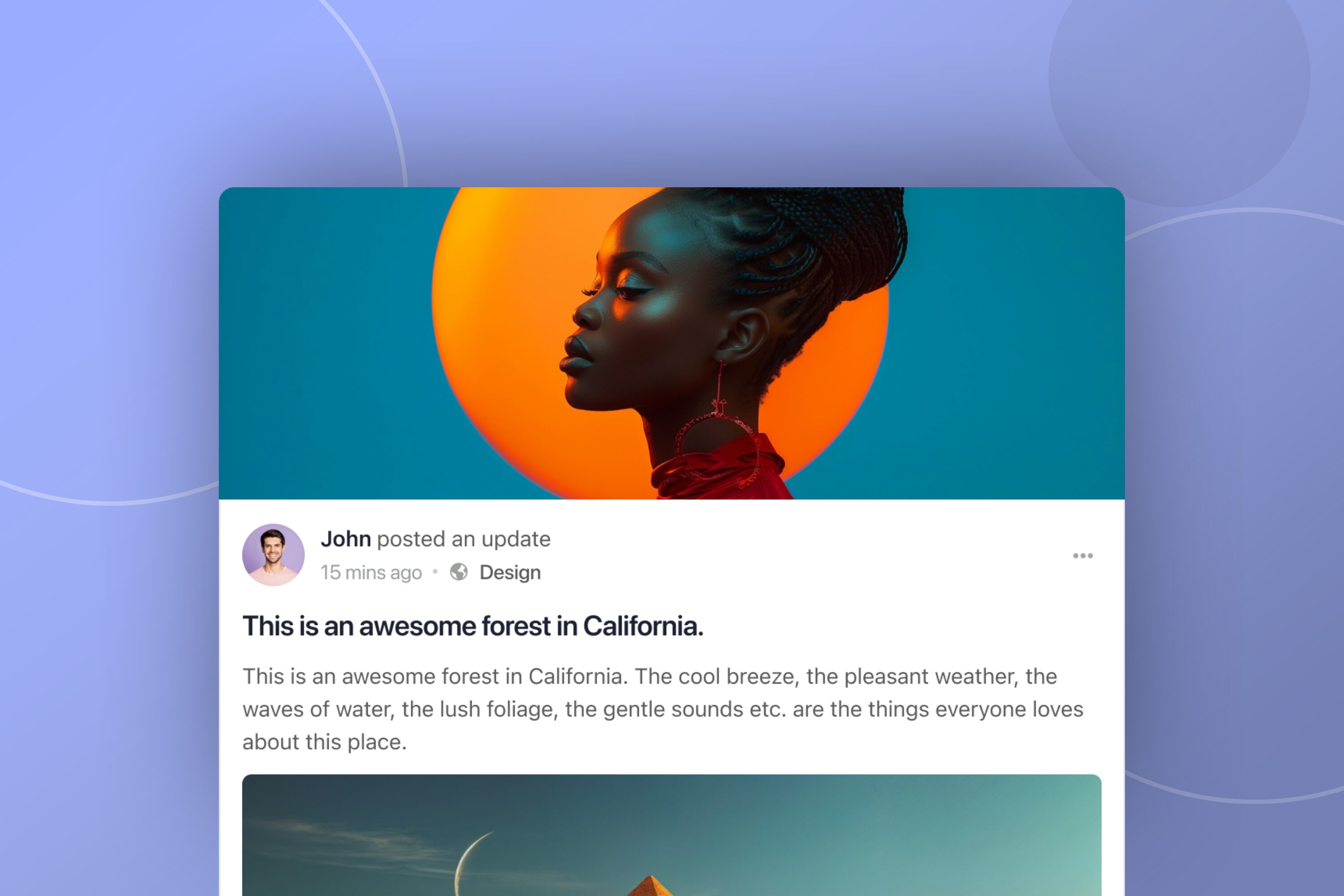
Capture attention instantly and make your important updates pop. Featured Images allow admins, group owners, and moderators to add eye-catching visuals, transforming your activity feed into a dynamic and engaging space. Transform posts into professional, branded content with these powerful visual tools.
How To Get Started With Activity Titles & Featured Images
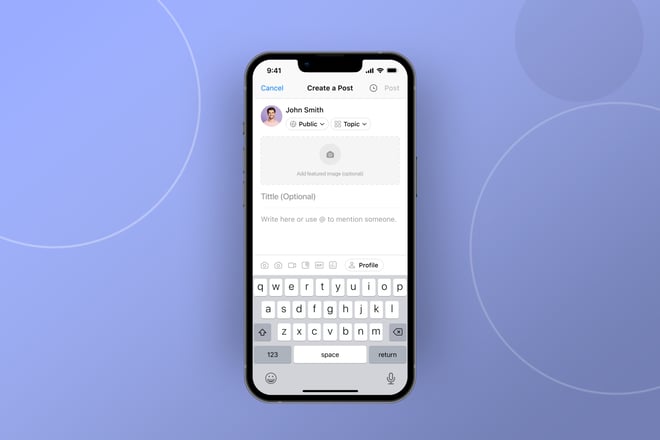
Elevating your content is now as intuitive as typing. Simply add titles, choose headings, and upload images with ease, directly within your activity composer. You can enhance your posts without interrupting your workflow, making powerful formatting part of your everyday routine. Ensure your platform is updated to the latest version to access these enhancements. Administrators can also optionally require titles for all activity posts, fostering a more structured content environment across the community. No complex design tools or coding required; just a few clicks to transform your activity posts.
What’s Included & Availability
Activity Post Formatting Enhancements are available to all users. The core functionality including Activity Post Titles (H2) and multi-level headings (H3/H4) are accessible to all. The eye-catching Featured Image capability requires Platform Pro. These features are designed for seamless integration within your existing activity feed composer on both web and mobile experiences. Keep an eye out for further updates and enhancements as we continue to evolve your community experience.
FAQ’s About the Feature
Q1. Do I need to be a coding expert to use these new formatting tools?
No, absolutely not! Elevating your content is now as intuitive as typing. Simply add titles, choose headings, and upload images with ease, directly within your activity composer. No complex design tools or coding required.
Q2. Are Featured Images available on all plans?
While Activity Post Titles and multi-level headings (H3/H4) are available to all users, the eye-catching Featured Image capability requires Platform Pro to unlock its full visual impact.
Q3. How do these enhancements improve content discoverability?
Activity Post Titles integrate directly into your network searches, ensuring members can quickly locate specific information. This boosts overall content visibility and helps your valuable content get found.
Q4. Can administrators require titles for all activity posts?
Yes, administrators have greater content control and can optionally require titles for all activity posts, fostering a more structured and professional content environment across the community.
Q5. Will these formatting enhancements work on existing posts?
These enhancements are primarily for new activity posts. However, you can edit existing posts to apply the new formatting options.
Q6. Will these new features slow down my community’s activity feed?
Not at all! These enhancements are designed for efficiency and seamlessly integrate without interrupting your workflow, ensuring a smooth and dynamic activity feed experience.
Q7. How does this compare to formatting options on other platforms?
Unlike major social media platforms that often offer basic text, BuddyBoss empowers you with structured titles, multi-level headings, and featured images for truly impactful content, surpassing typical community platforms.
Q8. What types of headings can I use in my posts?
You can utilize H2 titles for main headings, and H3 and H4 headings within your posts to present information in a highly organized, readable, and professional manner.
Q9. Is there any impact on public content’s search engine optimization (SEO)?
Yes! Activity Post Titles (H2) and subheadings (H3/H4) are leveraged for improved search engine indexing of public content, helping to attract more organic traffic to your community.
Q10. Where can I find more detailed instructions or support?
We recommend checking out our dedicated help guides and tutorial videos (links below) for comprehensive instructions on activating and utilizing all the new Activity Post Formatting Enhancements.
Related Resources
Help Guide – How to Use Activity Post Formatting Enhancements
Tutorial Video – Deep Dive into Activity Post Formatting

 Article