
Introduction
The Recently Active Members Widget displays members who have recently been active on your site. This widget helps showcase active users and encourages interaction by highlighting community engagement in your BuddyBoss website.
Adding and Configuring the Widget
- Go to Appearance > Widgets in your WordPress Dashboard.
- Select the widget area where you want to display the list (e.g., Activity Directory Left).
- Click the + icon and search for Recently Active Members.
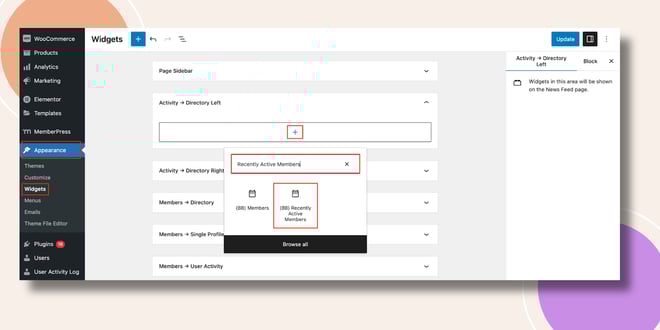
- Add the Recently Active Members Widget to the selected area.
- Configure the following options:
- Title – Enter a custom title (e.g., Recently Active Members).
- Max Members to Show – Define the maximum number of active members to display.
- Title – Enter a custom title (e.g., Recently Active Members).
- Click Update to save your changes.
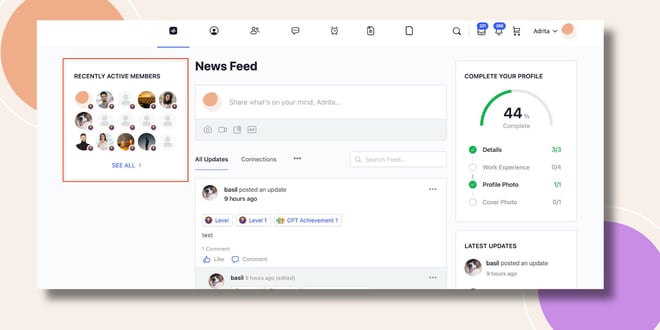
Verifying the Widget
- Go to the Activity Feed on the frontend.
- The Recently Active Members Widget will appear in the sidebar (e.g., left side of the Activity Directory), displaying members who have been active recently.
Troubleshooting and FAQs
Q: The widget isn’t showing up.
A: Ensure that you added it to an active widget area and clicked Update. Refresh the page or clear your cache if changes don’t appear.
Q: How is “recently active” determined?
A: The widget automatically detects members who have recently interacted with your site, such as posting updates, comments, or other activities.
Q: Can I limit how many members are displayed?
A: Yes. Adjust the Max Members to Show option in the widget settings.


