
Introduction
The Follow Us Widget lets you display social media links in your site’s sidebar or widget areas, helping members connect with your community across different platforms. Adding this widget enhances engagement and builds stronger connections beyond your BuddyBoss site.
Adding and Configuring the Widget
- Go to Appearance > Widgets in your WordPress Dashboard.
- Select the widget area where you want to display the social links (e.g., Activity Directory Left).
- Click the + icon and search for Follow Us.
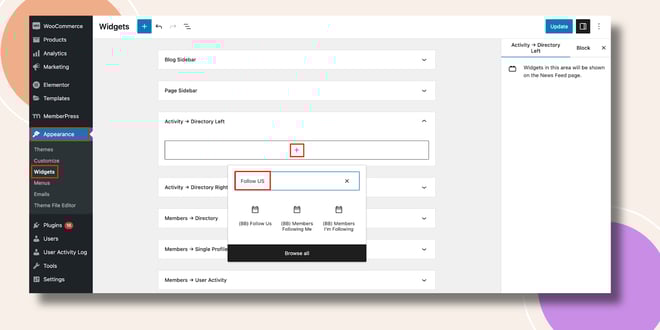
- Add the Follow Us Widget to the selected area.
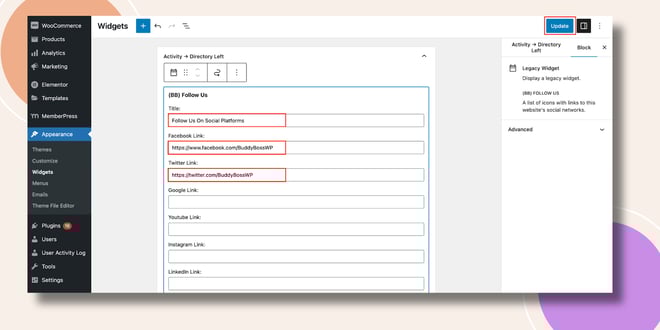
- Enter a Title (e.g., Follow Us or Stay Connected).
- Add links for your preferred social platforms, such as Facebook, Twitter, YouTube, or others.
- Click Update to save your changes.
Verifying the Widget
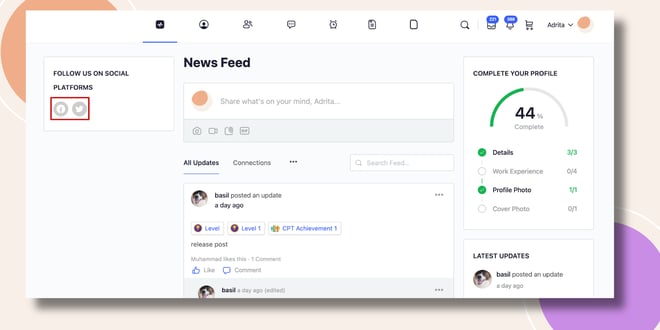
- Go to the Activity Feed on the frontend.
- The Follow Us Widget will appear in the sidebar (e.g., left side of the Activity Directory), displaying the social icons and links you added.
Troubleshooting and FAQs
Q: The social icons are not showing up.
A: Make sure you entered valid URLs for each social media platform and clicked Update to save your settings.
Q: Can I change the icon style or size?
A: The default icon design follows your theme’s styling. For further customization, use CSS in your child theme.
Q: Can I add more platforms beyond the default ones?
A: You can add links to any platform by entering the appropriate URL, though only supported icons will display automatically.


