
Introduction
The Forums Recent Topics Widget displays the latest topics created in your community forums. Adding this widget helps members quickly discover new conversations, keeping your BuddyBoss community active and engaged.
Adding and Configuring the Widget
- Go to Appearance > Widgets in your WordPress Dashboard.
- Choose the widget area where you want the recent topics to appear (e.g., Group Directory).
- Click the + icon and search for Forums Recent Topics.
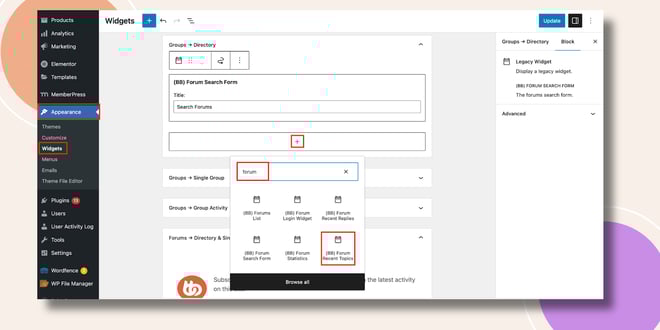
- Click to add the Forums Recent Topics Widget to the selected area.
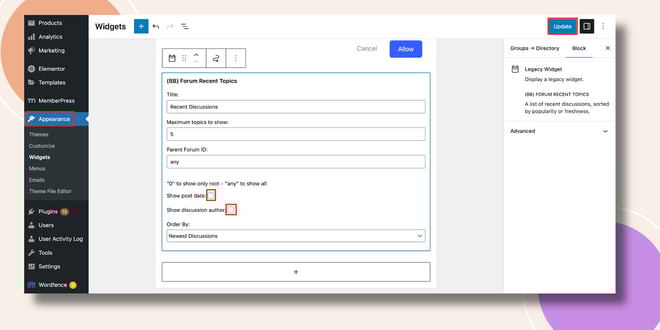
- Configure the widget settings:
- Title: Enter a custom title (e.g., Latest Discussions).
- Show Post Date: Check this box if you want the topic’s creation date displayed.
- Show Discussion Author: Check this box to display the name of the author who created the topic.
- Title: Enter a custom title (e.g., Latest Discussions).
- Click Update to save your changes.
Verifying the Widget
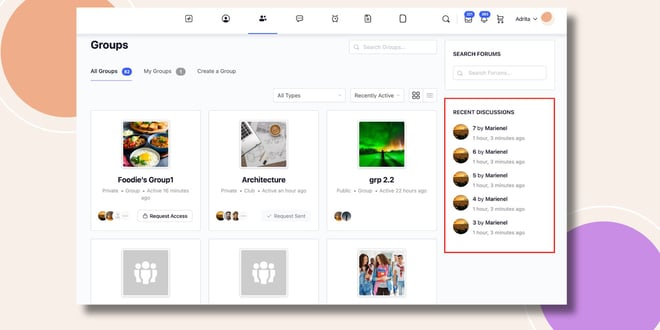
- Go to the Groups page on the frontend.
- The Forums Recent Topics Widget will appear in the sidebar (e.g., right-hand corner of the Group Directory), displaying the most recent forum topics along with the options you enabled.
Troubleshooting and FAQs
Q: The widget isn’t showing after I added it.
A: Make sure you placed it in an active widget area and clicked Update. Refresh your page or clear your cache if changes don’t appear.
Q: Can I limit how many topics are displayed?
A: The widget will display a set number of recent topics by default. Customization may require theme or child theme adjustments.
Q: Can I filter topics by forum or group?
A: No. The widget pulls recent topics across all active forums.


