
Introduction
This guide explains how to edit activity comments on the BuddyBoss Platform. With the Edit Activity Comments feature, members can update their comments on posts, including text and media, within a customizable time limit. This ensures that discussions remain accurate, up-to-date, and relevant while maintaining a clear record of user interactions.
Enable the Edit Comment Feature:
- Open your WordPress Dashboard and navigate to BuddyBoss > Settings > Activity.
- In the Activity Settings panel, locate the Edit Comment option and check the box to allow members to edit their comments for a specified duration or indefinitely.
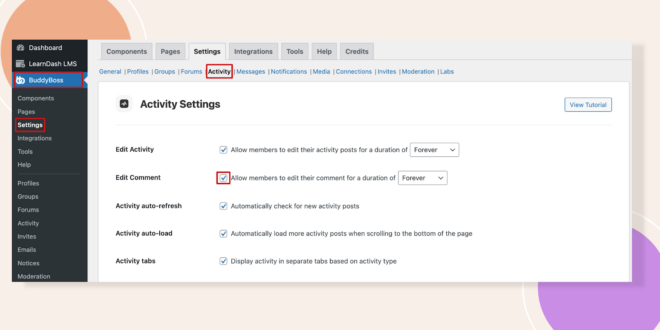
- Click the Save Settings button to apply your changes.
Test the Edit Comment Feature
- Go to your Activity Feed and post a comment on any activity.
- Click the ellipsis (3 dots) on your comment to open the drop-down menu, then select Edit.
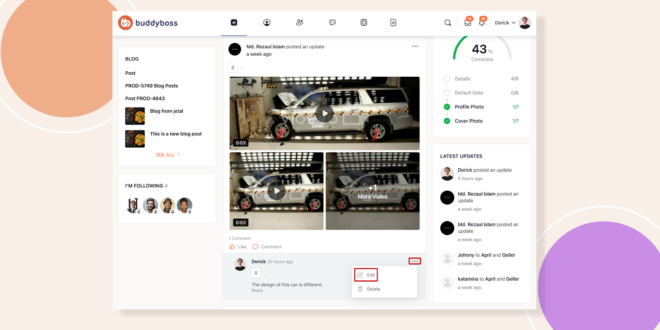
Edit Your Comment
- Modify the text as needed.
- Enhance your comment by adding images, videos, emojis, documents, or GIFs.
Verify Your Changes
- Review your Activity Feed to ensure the updated comment appears correctly with all modifications.
Troubleshooting and FAQs
Q: Why might the Edit option not be visible on my comment?
A: Ensure that the Edit Comment feature is enabled in BuddyBoss > Settings > Activity and that you are the original author of the comment.
Q: Can members edit their comments after a set period?
A: Yes, you can configure the duration for which comments remain editable. Once this period expires, the Edit option will no longer be available for that comment.


