
View the Release Notes to see the updates and changed files from every release.
Automatic Update
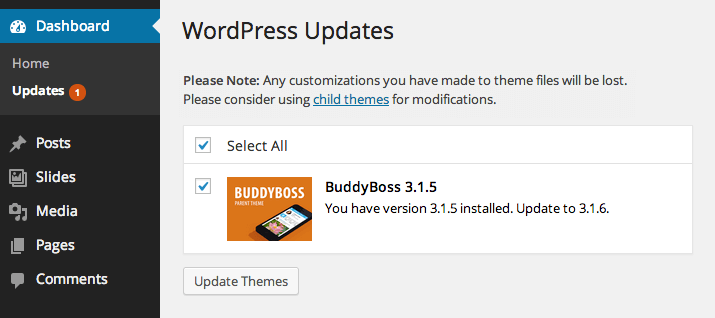
Just log into your admin and click on Dashboard > Updates and you should see the most recent version of your product available as an automatic update. For themes, if you have made edits to your main theme, please make sure to back it up! Auto-updating will completely override you main theme. We recommend adding all custom edits into your child theme to make it super easy to implement updates.
Manual Update
Downloading the theme
While logged in, click the “My Account” link under your profile icon at the top of the site, and then go to your Downloads tab, to download the current version. Using this method you will have two separate downloads – one for the parent theme and another for the child theme.
Implementing theme updates
- Download the current version of the theme.
- Back up your website files before proceeding! This plugin helps.
- View the Release Notes to see the list of all updated files.
- Copy over all updated files to your website via FTP, or upload the entire theme folder via Appearance > Themes (only if you have not edited code in your copy of the theme).
Editing Styles
Basic
For most people’s needs you won’t have to edit any code at all. Just head over to Appearance > Customize.
Advanced
For those of you who want to really customize your site with your own CSS, you should never edit the core styles in the /css/ folder of the parent theme as we often edit these files to fix issues or add features in theme updates. We strongly encourage you to avoid editing the parent theme and use a child theme instead.
If you plan on editing any CSS, we recommend adding all of your edits to /css/custom.css in your child theme so that you can implement our theme updates without losing your edits. Any styles added to this stylesheet will override styles set in the parent theme’s /css/ folder. Read more on this subject in our guide to building a BuddyBoss child theme.
If you want to disable the front-end CSS output of the admin options (theme customizer) entirely, you can add this function into your child theme:
// Remove customizer CSS output
add_action( 'after_setup_theme', 'remove_buddyboss_customizer_css') ;
function remove_buddyboss_customizer_css() {
remove_action('wp_head', 'buddyboss_customizer_css');
}
Child Themes
As mentioned above, if you plan on editing your theme at all you should strongly consider using a child theme. A child theme allows for much easier theme updating as you can safely overwrite all of the parent theme’s files. Read our guide to building a BuddyPress child theme.
I have version BuddyBoss 1.1.3, …I need to update? How do I go about doing this?
Thanks,
Bill
Bill,
You can use the download link you originally received when purchasing BuddyBoss, the link should be on your receipt. If you no longer have this email you can fill out the form on this page: https://www.buddyboss.com/contact/
This theme looks nice. I am wondering are there any custom hooks available for use in the functions.php file with the child theme structure?
I am going to need to add more fields to the Personal info section and change some of the existing ones and I am wondering how easy this will be to do.
Thanks
Jordan,
These profile fields are built into BuddyPress. They are called Xprofile fields. Do a quick Google search to find more info.
I’m liking your theme. Way to go. I’m thinking about buying it. I noticed on the update page, this page, just above, you have a link to a backup plugin. That plugin is gone from WordPress when you go there. Just wanted to mention this for you.
I’ve never heard of someone offering a theme update. This is unbelievable service. Good work. I have this bookmarked and I’m still looking it over for now. I really like it.
–Kevin
I forgot to ask. I’m running BuddyPress 1.7 Beta1 on my site right now. Can I apply BuddyBoss to that? Or do I have to go with the stable version? I’m running Beta to do my part trying out their latest product. I’d like to keep it, if that’s possible.
Thanks,
Kevin
We can not guarantee 1.7 compatibility. We are working on a complete rework for BudyPress 1.7. Stay tuned!
BuddyBoss 3.0 works with 1.7 and 1.8+. Older versions of BuddyBoss also work with 1.7 as well actually, but BuddyBoss 3.0 is recoded to work with the native BuddyPress functions (as opposed to the legacy theme code like before).
Just Great!!
I love your theme, I’m so happy I bought it!
As a plugin developer i had a nice social media idea, now i have the perfect matching theme! P.S Update was super simple!
See my site on http://www.faceyourpet.com
Glad to hear you love the theme! Thanks 🙂
Site looks great.
“upload the entire theme folder via Appearance > Themes ”
When I try to upload the individual zip files I get this error message:
“Destination folder already exists. /htdocs/wp-content/themes/buddyboss-child/”
And it fails.
What do I need to do to create a theme folder that will get uploaded and overwrite the earlier version?
Clyde this is a flaw with WordPress, we are updating the theme to prevent this in the future. Currently you must remove the old version and upload the new version, sorry for the inconvenience but hopefully we have this fixed now 🙂
Also there is no reason to update the child theme. The purpose of the child theme is to allow you to edit code in the child theme without touching the main theme. But the child theme is the same with every release, just the version number updated. You only actually need to (or should) update the main theme. After this most recent release (3.1.5) you’ll see the main theme updatable via the admin.
Hi!
Like the automatic update of the parent but for those of use who use a translation of the theme the translation gets lost with every automatic update and the theme reverts back to English.
WordPress has a language folder in /languages/ and I think the language file could be in the themes folder there. But what would be the proper naming? Right now it’s only called sv_SE.po and .mo in my case. Thanks!
Hi Magnus, you can move your language files inside the wp-content/languages/themes folder and rename those language file with their textdomain-sv_SE.po like
for buddyboss theme it will be buddyboss-sv_SE.po
for twentyfifteen it will be twentyfifteen-sv_SE.po
The latest update broke all graphics on the menu and top as well. Please fix NOW
Hi Lance , might be some plugin is creating issue, or local cache. Update is well tested and it’s working fine
hey, the boss theme is giving me a fatal error after the update… any help?
i tried inactivating then re activate..no luck
Tyrone,
The wp-updates site and service was down last week. You may try updating again. If that does not work you may need to downloaded the latest version from BuddyBoss.com My Downlaods section.
i have problem with image posts .. when i click on the image it open the diable and browser frozen .. i know its conflect with other plugin for buddyPress chat .. but i need both .. 🙁 what should i do ?
Masoud,
My first suggestion is to find another chat plugin. There are many that work with our plugins and themes including Comet Chat, Arrow Chat, and FlyZoo. Otherwise you can post to our forums and we will put this plugin on our list to become compatible with, but it could take a few months for us to get around to this since there are alternatives out there that are compatible.
Hi,
Do I have to pay an extra to update my theme after the first year? Could you explain what the cost of a theme for 1, 2, or 3 year(s)? Is it a long life free update?
Best.
YesPapa,
The license key is valid for one calendar year from the purchase date. An active license key is needed for access to plugin/theme updates, downloads and support. Your license can be renewed each year at a discounted rate (up to 50% off) of the current price.
Thank you.
i’ve purchased buddyboss theme, but my onclick installer is blank and some plugin must be purchase again ?,
*sorry for my english
Hi Umar, Please make sure your server have PHP Curl enable. If it’s enabled please create a support ticket to debug issue at your site.
in social network theme there is chatting applicattion available or not
You can use Comet Chat plugin.
I recently deleted WordPress and re-installed it on my domain. I need to re-install Buddy Boss theme that I purchased, however, I am unsure if I should download all of the files or just that ones that say (current version). I previously ordered Boss; Buddy Boss Wall and Buddy Boss Media.
Telesha, Please download current version files only and upload at your site for new installation.
We are also providing last 3 version of each plugin and theme files for the developers to compare files if they are working on highly customize sites.
So when we update a theme, we only update the main theme, NOT the child theme… is that right?
That is correct. The child theme purposely cannot be updated by us. This is because we expect you to add your custom code into the child theme.
Awesome. Thank you.