
If you plan on editing your BuddyBoss theme at all, we strongly recommend using a child theme. This will save you many headaches when you update to new versions of the theme, as you can safely overwrite all of the parent theme’s files without worrying about losing all of your edits.
Introduction to Child Themes
In WordPress, a “child theme” is a theme that inherits the functionality of another theme, called the “parent theme”. It allows you to modify, or add to, the functionality of that parent theme. In our case BuddyBoss is the parent theme, and it comes pre-packaged with a starter child theme.
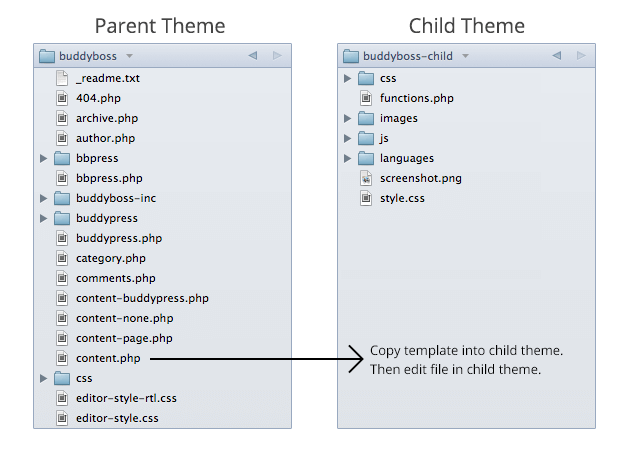
A child theme is the safest and easiest way to modify the BuddyBoss theme, whether you want to make a few tiny changes or extensive changes. Instead of modifying the theme files directly, you can modify them in the child theme. The child theme inherits all of the templates and functionality from the parent theme, but allows you to make changes to the parent theme without editing any of the parent theme’s code, because code in the child theme overwrites code in the parent theme.
For more information, read the WordPress documentation on child themes.
Getting Started
BuddyBoss 3.0 comes pre-packaged with a starter child theme.
- Upload the child theme to your
wp-content/themesfolder, along with the parent BuddyBoss theme. - Activate the child theme.
- Follow the instructions below.
BuddyBoss can be thought of as having four use case scenarios:
- WordPress
- BuddyPress
- bbPress
- BuddyBoss (wall, photos, etc.)
Theme content is separated for these four parts. Any of the parts can be turned off (excluding WordPress) and that theme content will not be used. Keep this concept in mind as you read the rest of the page.
Editing CSS
BuddyBoss 3.1 introduced admin options to change colors and fonts throughout the theme, so for most people’s needs you won’t have to edit any code at all. Just head over to Appearance > Customize. For those of you who want to really customize your site with your own CSS, below is a comprehensive guide:
Parent theme CSS structure
In the parent theme’s /css/ folder you will see separate stylesheets for the different components:
wordpress.cssis the default stylesheet and is always loaded.buddypress.csscontrols BuddyPress styles and is only loaded if the BuddyPress plugin is activated.bbpress.csscontrols bbPress styles and is only loaded if the bbPress plugin is activated.plugins.cssadds CSS support for 3rd party plugins.adminbar-mobile.csscontrols the admin panels for phones and small tablets.adminbar-desktop-fixed.csscontrols the ‘Full Width’ admin bar option for devices with large screens.adminbar-desktop-floating.csscontrols the ‘Float Right’ admin bar option for devices with large screens.
Note: There are also stylesheets in /buddyboss-inc/buddyboss-pics/css/ and /buddyboss-inc/buddyboss-slides/css/.
We recommend avoiding editing any of this CSS directly unless you absolutely have to. At any time we could update the CSS in a theme update. Override styles in your child theme instead.
In BuddyBoss 2.1.9 and below styles were called via style.css. They are now called via /buddyboss-inc/theme-functions.php to allow parallel downloading (faster) and to only load the BuddyPress and bbPress stylesheets if those plugins are activated.
Where to put CSS in your child theme
We recommend adding all of your edits into /css/custom.css in your child theme so that you can implement our theme updates without losing your edits. Any styles added to this stylesheet will overwrite styles set in the parent theme’s /css/ folder. For example, if you want to define a style that is already defined in/css/wordpress.css, simply copy the style into /css/custom.css in your child theme and make your edits there. Make sure to add it into the correct media query so that it is only used in mobile, tablet, desktop, etc.
CSS Media Queries
BuddyBoss uses a lot of media queries. This is what allows it to be mobile or “responsive”. Media queries allow CSS to load based on different screen sizes. In every stylesheet, we start with global styles that are loaded for all screen sizes. Then we narrow down to sizes below or above certain widths (to approximate which device you are using), targeting each width with specific CSS. In BuddyBoss we generally break it down into phone, tablet, and laptop & desktop. The tablet and laptop & desktop layouts are pretty similar to each other. The phone layout is noticeably different.
Media Queries are part of CSS3 and don’t work with older browsers. We’ve included a script at /js/respond.min.js/ that enables the functionality via JavaScript in these browsers.
Note: We also have some JavaScript directly targeting screen sizes when necessary, for things like the sliding panels in mobile mode.
Turning off the customizer styles
The options set in Appearance > Customize (in version 3.1+) are automatically outputted as inline styles into the HTML of your website. If you inspect the HTML you will see them in <style type=”text/css”> [styles] </style>. Even if you have not used the customizer, it will still output the default colors into the HTML, which will generally override styles set for the same CSS attributes in your child theme.
If you are making a lot of custom CSS edits you may wish to disable the customizer’s CSS output entirely. This is easy to do. Just add this function into your child theme’s functions.php file:
// Remove customizer CSS output
add_action( 'after_setup_theme', 'remove_buddyboss_customizer_css') ;
function remove_buddyboss_customizer_css() {
remove_action('wp_head', 'buddyboss_customizer_css');
}
Alternatively you can just use the !important declaration in your child theme’s CSS.
Recommended CSS Tools
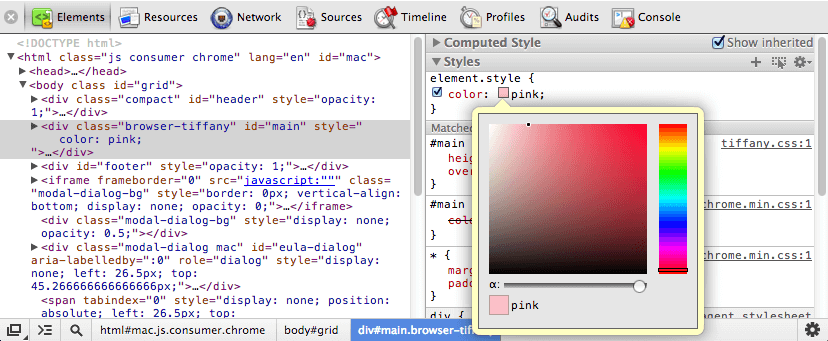
We recommend using the Chrome Inspector in your Google Chrome browser to inspect HTML and see how any element within the theme is being styled. It’s amazing…
If you prefer to edit CSS within the WordPress editor, you should install the WP Editor plugin. It will allow you to navigate through the folder structure of the theme and also gives you syntax highlighting, among other great code editing features.
Editing Template Files
For any file in the parent theme that you want to edit, copy it into the child theme and edit it there. The child theme’s copy will be used instead. If you ever delete a file in your child theme, the site will immediately revert to the copy from the parent theme.
How templates work in BuddyBoss 3.0
BuddyBoss 3.0 is not set up the same way as BuddyBoss 2.1.9 and below. The old versions were set up as BuddyPress themes using the “bp-default” theme structure, with most assets located in the /_inc/ folder and BuddyPress components intermixed with the rest of the theme. BuddyPress 1.7 introduced an important change; the ability for any WordPress theme to run BuddyPress. BuddyBoss 3.0 takes advantage of this major change. It is structured like a normal WordPress theme that is optimized for BuddyPress and bbPress, but does not need either plugin to work.
Feeding content in via templates
BuddyPress 1.7+ and bbPress 2.0+ now work in an interesting way. They feed their template content into the_content. This means each BuddyPress page uses the header, footer, and sidebar(s) from normal WordPress templates, and then feeds its own HTML into those WordPress templates into the content section only. It’s as if all BuddyPress template code is being fed into the text editor on a WordPress page. This is essentially what allows BuddyPress 1.7 to run on any WordPress theme.
The BuddyPress HTML is all located in the /buddypress/ folder in the BuddyBoss theme. You could theoretically delete this folder and the theme would still work (with some custom stuff broken) because the unedited versions of these template files all exist in the BuddyPress plugin. The /buddypress/ folder is basically acting as a child theme to the BuddyPress plugin’s included templates. bbPress is working the same way, with child templates located in the /bbpress/ folder. We have only copied over the template files that we edited. If you need to edit a template file that is not there, you will have to copy the file and its folder structure from the plugin:
- BuddyPress:
/wp-content/plugins/buddypress/bp-templates/bp-legacy/buddypress/ - bbPress:
/wp-content/plugins/bbpress/templates/default/bbpress/
Default Templates
page.phpis the default template for feeding in WordPress page content.buddypress.phpis the default template for feeding in all BuddyPress content.bbpress.phpis the default template for feeding in all bbPress content.woocommerce.phpis the default template for feeding in all WooCommerce content.
Adding BuddyPress Templates
How BuddyBoss works with the BuddyPress plugin
The BuddyPress plugin comes pre-packaged with templates that are automatically loaded for each component (Members, Groups, etc.). BuddyBoss acts much like a child theme to the BuddyPress plugin. If we copy any template file from the BuddyPress plugin into the BuddyBoss theme, the version in the BuddyBoss theme will override the corresponding file from the BuddyPress plugin.
We only added the templates that we needed to edit specifically for the BuddyBoss theme. The reason we do not include all BuddyPress template files in the theme is to make BuddyPress plugin updates easier, requiring us to patch less files if they change something that needs to be updated in the theme to maintain compatibility.
How to add the missing BuddyPress template files
If you want to edit a template file that does not yet exist in the BuddyBoss theme, you will need to copy that file from the plugin and add it into your BuddyBoss theme in the /buddypress/ directory, ideally in a child theme for best practice.
Assuming you have the BuddyPress plugin correctly installed, the core template files will be located on your server at: /wp-content/plugins/buddypress/bp-templates/bp-legacy/buddypress/
We have duplicated the /buddypress/ file structure in BuddyBoss, but only with the specific templates we edited added into the folder. Just copy the template files you need to add into your child theme, making sure to follow the folder structure exactly.
Adding bbPress Templates
How BuddyBoss works with the bbPress plugin
The bbPress plugin comes pre-packaged with templates that are automatically loaded for each layout (Forums, Topics, etc.). BuddyBoss acts much like a child theme to the bbPress plugin. If we copy any template file from the bbPress plugin into the BuddyBoss theme, the version in the BuddyBoss theme will override the corresponding file from the bbPress plugin.
We only added the templates that we needed to edit specifically for the BuddyBoss theme. The reason we do not include all bbPress template files in the theme is to make bbPress plugin updates easier, requiring us to patch less files if they change something that needs to be updated in the theme to maintain compatibility.
How to add the missing bbPress template files
If you want to edit a template file that does not yet exist in the BuddyBoss theme, you will need to copy that file from the plugin and add it into your BuddyBoss theme in the /bbpress/ directory, ideally in a child theme for best practice.
Assuming you have the bbPress plugin correctly installed, the core template files will be located on your server at: /wp-content/plugins/bbpress/templates/default/bbpress/
We have duplicated the /bbpress/ file structure in BuddyBoss, but only with the specific templates we edited added into the folder. Just copy the template files you need to add into your child theme, making sure to follow the folder structure exactly.
Editing Functions
PHP functions are different from templates and styles, in that your child theme’s functions do not overwrite the parent’s functions – they are all loaded in addition to them. functions.php is basically empty in BuddyBoss; it just initilialises other more specific function files. The general theme functions are all stored at /buddyboss-inc/theme-functions.php. Your own functions should be added into your child theme in functions.php.
Note: If you are using the child theme that came packaged with BuddyBoss 3.0 through 3.0.7, you can add your functions into /buddyboss-child-inc/child-theme.php. Or you can delete the /buddyboss-child-inc/ folder entirely and add everything directly into functions.php, the method used in the child theme packaged with version 3.1 and up. Either way, your functions will work.
I highly recommend using a child theme if you are customizing your copy of BuddyBoss. It will make theme updates much much easier.
If you have particular requests for child themes, please let us know.
It would be great if we could change the default cover photos without having to hack the parent theme ala: https://www.buddyboss.com/support-forums/topic/limiting-cover-photos/
Sorry, that should have been on the Boss. child theme page…
We are working on it Randall. Thanks for the suggestion though!
The child themes have both been updated for the upcoming BuddyBoss 2.0. Your old child themes should work just fine. These ones do not work correctly with version of BuddyBoss prior to 2.0 however.
These new ones are just simplified. BuddyBoss 2.0 is coded so that the registration css and all javascript files will be adopted in the child theme automatically, so those files no longer need to be in the child theme. (if they are there it’s okay though)
Am I the only one who lost profile photos on my group pages after this update? Also, did you intentionally drop the auto fill on the banner photos? The entire right side where the profile photos were has shifted up into the void that the profile left.
In my “Customizing” section of the child theme, at “Cover Photos” … I still have “Group Cover Photo radio button” selecting “Big” as is “Profile Cover Photo.”
Frank please visit our Support Forums for help on this issue. https://www.buddyboss.com/support-forums/
Which file Should I edit to translate the theme to Bangla.
You need to edit the language file within the BuddyPress theme. In plugins/buddypress/bp-languages.
This link should help: http://codex.buddypress.org/extending-buddypress/customizing-labels-messages-and-urls/
Could a child theme be developed for the use of 4 footer sidebars with BuddyBoss, in conjunction with the 2 child themes that are available here?
I do not foresee any issues arising from the development of any extra number of sidebars.
-TJ Chester
BuddyBoss Support Specialist
I guess my question should have been will there be a release of BuddyBoss that will have footer sidebars available? Currently neither the child nor parent themes contain footer sidebars.
Thanks
-Jesse
Jesse,
Unfortunately, since this has never been requested before it would not be a priority for us to develop. If you want I can direct you to a developer that has some WordPress/BuddyPress/BuddyBoss experience.
-TJ
BuddyBoss 3.0 has footer sidebars. Actually BuddyBoss has had them for a while now.
Buddyboss-child is the best theme .I Love it.
I want to add What’s new, form in activity page. How could i?
It should be there by default…
Hi, can I move the profile widget inside /buddyboss-inc/buddyboss-widgets to the child theme? Should it be /buddyboss-child/buddyboss-inc/buddyboss-widget too ?
Gansad,
Yes, the file should be in the same folder structure as the parent theme as you assumed.
Hi,
Is there a way to integrated Buddypress theme into Evolve+ ? More precisely, I want to keep my Evolve+ theme and integrate Buddypress templates based on Buddyboss theme.
What am I allowed to copy from Buddyboss theme (or anyother Buddypress theme) into the child theme folder of Evolve+ and what are the Evolve+ files that I need to update to make it work ?
Val,
This would require custom development. Merging two themes is no small feat. Please fill out a request here: https://www.buddyboss.com/buddypress-developers/
So, I decided to update to the latest BuddyBoss version for “presumed” security reasons, knowing full well there’d be work to do in the Child Theme. Problem is, nothing works, like banner photos and the login has disappeared. When I go to update them in the Child Theme, nothing happens or changes. So, I’ve lost confidence in this procedure. Two questions:
1. If I reload the saved version I made just before the update to the BuddyBoss Theme, will I be uploading security issues?
2. Exactly how do I upload the version I saved just before updating to the BuddyBoss Theme?
eg., the “Register Now” and the “User Name” on the opening page have disappeared.
Hello.
How to build the “Membership Pricing” page of the Boss theme?
Can you give the procedure to follow.
Thank you
It’s configured using Paid membership pro plugin, and it’s their default setting to setup member levels and display the price grid using shortcodes. You can also check details with PM pro documentation.
i payed for and installed the boss theme ($129) i really want my site to look like the demo but when iinstalled it, it just looks a mess, the dashboard is all over the place.
could you take a look and give me a clue.
Thanks
Richard,
Please create a support ticket and support agent will help to install demo data.
sorry my website is deeksy.com not deeky.com
Which file Should I edit to translate the theme to hindi
Sandeep, you can try https://wordpress.org/plugins/loco-translate/ plugin, It will help to translate strings inside Dashboard.
How do I change the color of the text in the titlebar to white? Also how do I rename the forum section “Review”
Tiffany, Please create a ticket after login, our support agent will help you on it.
It’s the best theme for wordpress
Thank you @Shweta. It is for WordPress and BuddyPress site.
Thanks for Documentation
No problem. 🙂
Simple & Best Theme. Easy to use
I loved this theme. it’s easy to use
where to download child theme plz
Kifayat, You should receive a zip file for the Child theme after your purchase. You can also find it in your Downloads when you log in to your BuddyBoss Account. Please create a ticket and our Support team can help you further.