
Introduction
When submitting an Android publishing request via the BuddyBoss plugin, you may encounter the error:
App Already Approved
Your app has already been approved by Google. To publish an update, please create and prepare a new release.
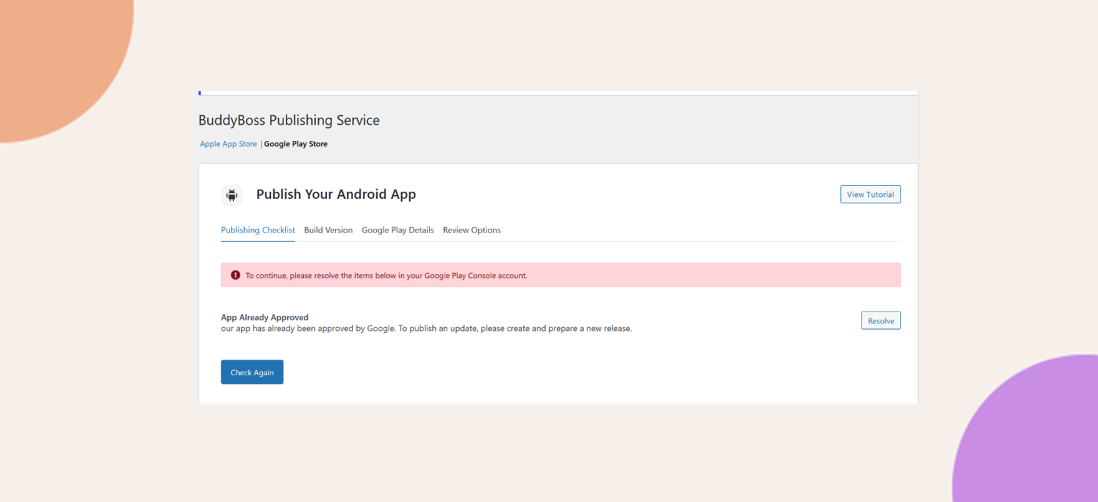
This usually happens because a production release draft exists in the Play Console but wasn’t saved as a draft, making it invisible to the publishing service.
Create a New Release Draft in Production
- Sign in to Google Play Console and select your app.
- Navigate to Test and Release > Production.
- Click Create new release in the upper-right corner.
- Upload or add your new build (APK/AAB).
- Enter a Release name and Release notes.
- Click Save as draft.
Reference Screenshot:

Retry Your Android Publishing Request
Return to your WordPress dashboard and resubmit the Android publishing request. The publishing service will now detect the new draft and proceed.
Troubleshooting and FAQs
Q: The “App Already Approved” error still appears after saving a draft—what should I check?
A: Verify that you clicked Save as draft (not Review or Release) and confirm the draft appears under the Production track.
Q: Can I bypass this by directly rolling out a production release?
A: The BuddyBoss publishing service requires a saved draft to detect the release. After detection, you can perform the final rollout manually in the Play Console.
Q: I don’t see the Production track—why?
A: Ensure you have the necessary permissions (e.g., Release Manager) and that no testing-only tracks are blocking access to Production.